
RankTagger
RankedTagger is a lightweight tier-tagging mod built for the RankedTiers community. Inspired by MCTiers, it automatically shows player rank tags next to usernames so you can quickly identify skill levels in matches, events, and practice sessions. Clean c
Screenshots

About this Mod
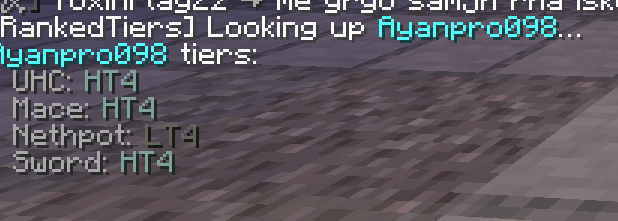
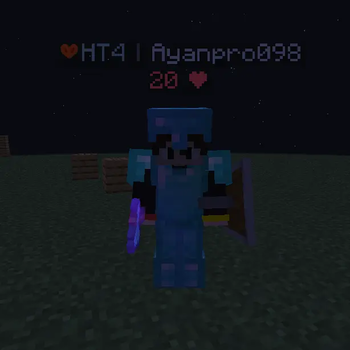
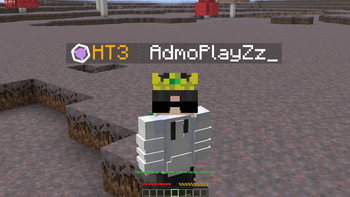
RankTagger is a lightweight, client-side Fabric mod built for the RankedTiers community. It automatically displays a player's current PvP rank as a colored tag next to their username in-game, giving you instant context on everyone around you — no menus, no commands, no interruption.
✦ What it does
When you join a server or enter a match, RankTagger silently fetches rank data in the background and overlays clean, color-coded tier tags directly on player nameplates. You'll always know at a glance whether you're up against a T1 veteran or a fresh-ranked newcomer.
✦ Features
Live rank display — Pulls up-to-date tier data from the RankedTiers API and renders it alongside player usernames in real time.
Color-coded tags — Each tier has a distinct color, making it instantly readable in fast-paced fights, scrims, and practice sessions.
Zero performance impact — Designed to be as lightweight as possible. Rank data is fetched asynchronously and cached locally so it never stutters your game.
Simple customization — Tweak tag appearance, position, and visibility through a straightforward config file.
Automatic updates — Rank data refreshes without requiring a restart or manual reload.
Community-made — Built by and for the RankedTiers community. Not officially affiliated with RankedTiers.
✦ Who it's for
RankTagger is made for competitive Minecraft PvP players who are part of the RankedTiers ecosystem. Whether you're coaching, scouting opponents, running events, or just playing ranked matches, having live tier information visible at all times gives you a meaningful edge in reading lobbies and making smart in-game decisions.
✦ Requirements
Minecraft: Java Edition 1.21.1 / 1.21.11
Mod loader: Fabric
Environment: Client-side only — no server installation needed
✦ Installation
Install Fabric Loader for your Minecraft version.
Download the latest RankTagger .jar from the Versions tab.
Place it in your .minecraft/mods folder.
Launch Minecraft and join any server — tags will appear automatically.
✦ License
RankTagger is licensed under ARR (All Rights Reserved). You may not redistribute, repackage, or modify this mod without explicit permission from the author.
Available Versions
How to Install RankTagger on Your Server
Order Server
Order a Minecraft Java server with at least 3 GB RAM (4 GB recommended).
Set fabric Loader
In the panel under "Egg", select the fabric loader and matching Minecraft version (1.21.11).
Install Mod
Open the mod browser in the dashboard and search for "RankTagger". Click "Install" – done! Alternatively, upload the .jar via SFTP to the /mods folder.
Compatibility
Mod Loaders
Minecraft Versions
1.21.11, 1.21.1
Server-side
✗ UnsupportedRecommended RAM
4 GB(min. 3 GB)Frequently Asked Questions
RankTagger server crashes on startup – what to do?
Most common cause: wrong fabric version or insufficient RAM. Check the server log (latest.log) for "OutOfMemoryError" or "Mixin" errors. With Mado Hosting: ensure at least 3 GB RAM is allocated and the loader matches the mod version (1.21.11). You can switch loaders with one click in the panel.
Is RankTagger compatible with fabric?
RankTagger officially supports fabric for Minecraft 1.21.11, 1.21.1. The Mado dashboard automatically detects incompatible loader combinations.
Server lagging with RankTagger – how to optimize performance?
Recommended RAM: 4 GB (per 8 players). Use /spark profiler to check if RankTagger consumes the most tick time. Common fixes: reduce server view-distance to 8-10, install "performant" or "starlight" as supplementary mods on Forge. With Mado Hosting, your server runs on NVMe SSDs with dedicated CPU cores for minimal latency.
Similar Mods






Rent Modded Server
Install RankTagger with just one click on your server.