
Screenshots
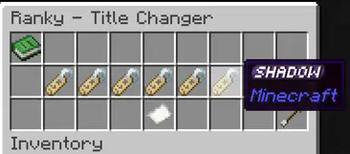

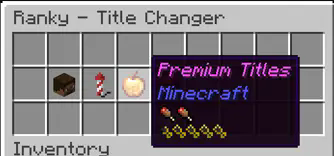
About this Mod
Ranky - Minecraft Title Management Mod
Effortlessly manage server titles with Ranky, a server-side Fabric mod introducing a GUI-based system for unlocking and managing titles via advancements!
Features:
- Chest-Based GUI: Intuitive title selection.
- Advancement Unlocks: Earn titles through achievements.
- Configurable: Customize titles via JSON.
- Pagination Support: Handle large title lists easily.
- Server-Side Security: Safe and reliable.
- Reload Config: Update titles without restarting.
- Aliases: Use
/titlesor/ranksto open the GUI.
Commands:
/titlesor/ranks: Opens the title selection GUI (all players)./ranky reload: Reloads configuration (op level 4).
Config Example:
Located in config/ranky_titles.json:
[
  {
    "name": "Noob",
    "command": "say %player% is now a Noob",
    "item": "minecraft:name_tag",
    "requirements": []
  },
  {
    "name": "Veteran",
    "command": "say %player% is now a Veteran",
    "item": "minecraft:diamond",
    "requirements": ["minecraft:story/mine_diamond"]
  }
]
Fields:
name: Title display name.command: Runs when selected (%player%= player name).item: GUI button (Minecraft item ID).requirements: List of required advancement IDs.
Common Advancements:
minecraft:story/mine_diamond: Acquire diamonds.minecraft:nether/find_fortress: Discover a Nether Fortress.minecraft:end/kill_dragon: Defeat the Ender Dragon.
Adding Titles:
- Stop the server.
- Edit
config/ranky_titles.json. - Add new entries.
- Save and restart or use
/ranky reload.
Permissions:
/titlesor/ranks: Accessible to all players./ranky reload: Operator-only.
Make titles an exciting, customizable feature with Ranky!
Here’s an example test configuration for Ranky with LuckPerms support to create a cosmetic rank:
[
    {
        "name": "Overlord",
        "setCommand": "lp user {player} parent add Overlord",
        "removeCommand": "lp user {player} parent remove Overlord",
        "item": "minecraft:name_tag",
        "requirements": [
            "dystorian-adventures:cosmeticranks/overlord"
        ]
    }
]
Available Versions
How to Install Ranky on Your Server
Order Server
Order a Minecraft Java server with at least 3 GB RAM (4 GB recommended).
Set fabric Loader
In the panel under "Egg", select the fabric loader and matching Minecraft version (1.21.1).
Install Mod
Open the mod browser in the dashboard and search for "Ranky". Click "Install" – done! Alternatively, upload the .jar via SFTP to the /mods folder.
Compatibility
Mod Loaders
Minecraft Versions
1.21.1
Server-side
✓ RequiredRecommended RAM
4 GB(min. 3 GB)Frequently Asked Questions
Ranky server crashes on startup – what to do?
Most common cause: wrong fabric version or insufficient RAM. Check the server log (latest.log) for "OutOfMemoryError" or "Mixin" errors. With Mado Hosting: ensure at least 3 GB RAM is allocated and the loader matches the mod version (1.21.1). You can switch loaders with one click in the panel.
Is Ranky compatible with fabric?
Ranky officially supports fabric for Minecraft 1.21.1. The Mado dashboard automatically detects incompatible loader combinations.
Server lagging with Ranky – how to optimize performance?
Recommended RAM: 4 GB (per 8 players). Use /spark profiler to check if Ranky consumes the most tick time. Common fixes: reduce server view-distance to 8-10, install "performant" or "starlight" as supplementary mods on Forge. With Mado Hosting, your server runs on NVMe SSDs with dedicated CPU cores for minimal latency.
Similar Mods






Rent Modded Server
Install Ranky with just one click on your server.