
Real Nether
You'll burn in the Nether without protection.
Screenshots
About this Mod
Intro
Have you ever thought that the Nether was a little too, what's the word? Cold ?
Well, never fear! The Real Nether is here!
Supplementary Material
Recipes
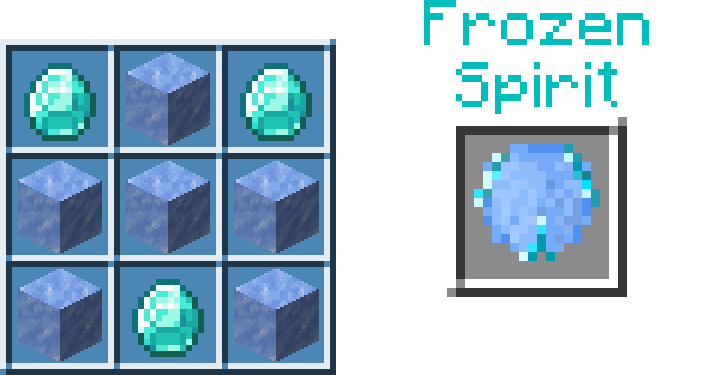
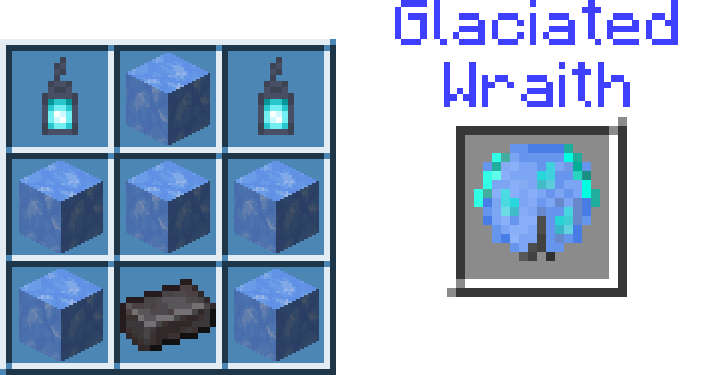
| Item | Crafting Block | Recipe |
|---|---|---|
| Ice Machine | Crafting Table | |
| Ice | Ice Machine | |
| Packed Ice | Ice Machine | Packed Ice Recipe.png (same as Vanilla Crafting Table) |
| Blue Ice | Ice Machine | Blue Ice Recipe.png (same as Vanilla Crafting Table) |
| Icy Soul | Ice Machine | |
| Frozen Spirit | Ice Machine | |
| Glaciated Wraith | Ice Machine | |
| Netherite Smithtable | Crafting Table | 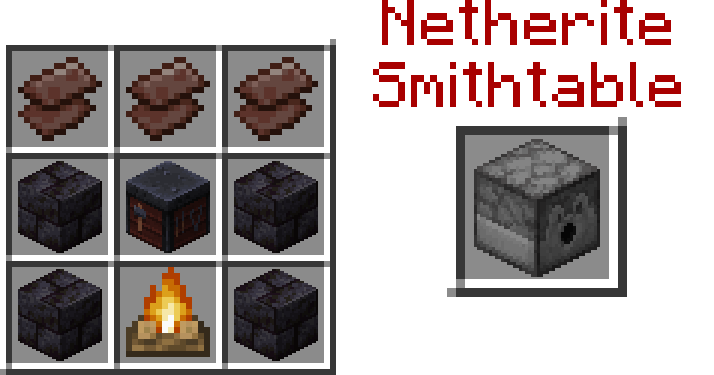 |
| Netherite Items | Netherite Smithtable | 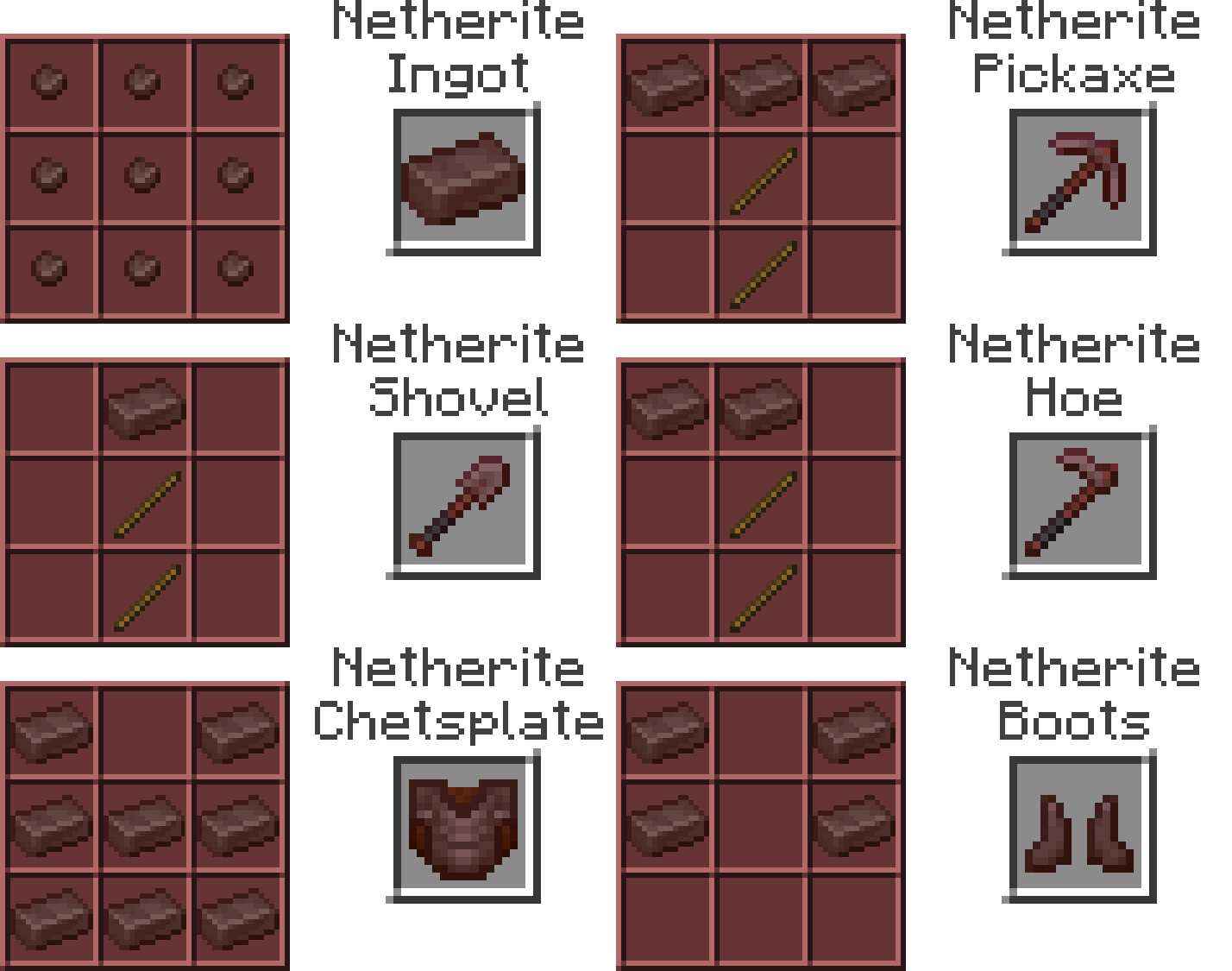 |
Walkthrough
0a) Collect Ice Shards from Ice
0b) Collect Ice, Packed Ice, and/or Blue Ice
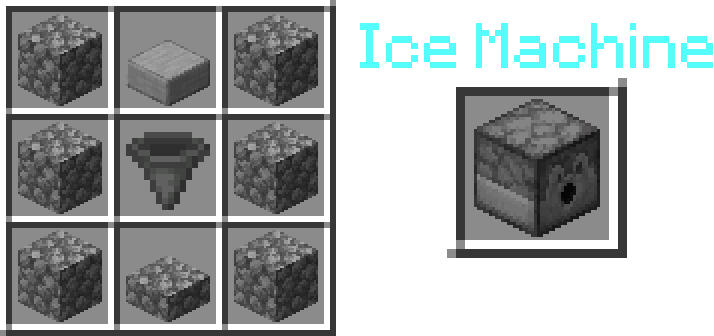
1) Use 6 Cobblestone, 1 Cobblestone Slab, 1 Smooth Stone Slab, and 1 Hopper (recipe in gallery) to craft Ice Machine
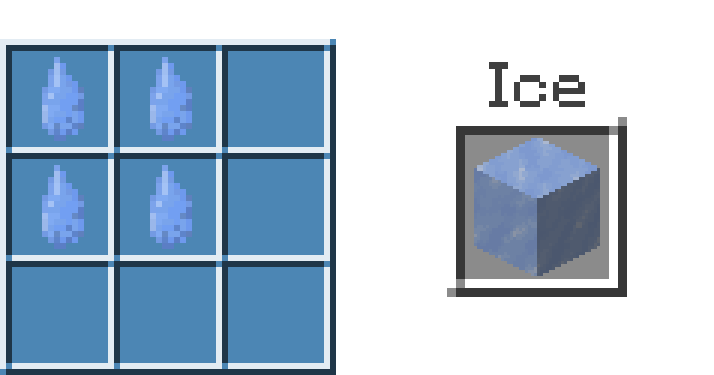
1a) Craft Ice from Ice Shards in the Ice Machine (see recipes)
2) Use the Ice Machine to craft Icy Totems (see recipes)
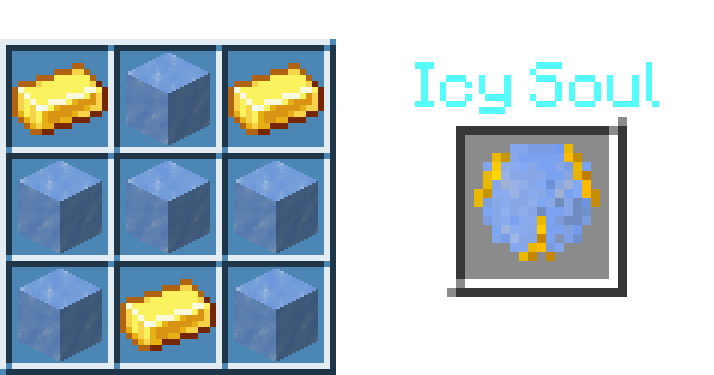
2a) Tier 1 - 6 Ice, 3 Gold Ingot
2b) Tier 2 - 6 Packed Ice, 3 Diamond
2c) Tier 3 - 6 Blue Ice, 2 Soul Lantern, 1 Netherite [Alloy] Ingot
3) Go to the Nether to acquire Black Stone & Ancient Debris
4) Use Black Stone to create Netherite Forge (Diagram from back to front)
    ▓ - air
    ░ - any
    ■ - Polished Blackstone Bricks
    ╚ ═ ╝ - Polished Blackstone Brick Stairs
    ◘ - Chiseled Polished Blackstone (placed very last)
         0              1               2              3              4
    ░░ ■ ■ ■ ░░    ■ ▓▓▓▓▓▓▓ ■     ■ ▓▓▓▓▓▓▓ ■     ■ ▓▓▓▓▓ ■     ░░ ■ ■ ■ ░░
    ░░ ■ ■ ■ ░░    ■ ▓▓▓▓▓▓▓ ■     ■ ▓▓▓▓▓▓▓ ■     ■ ■ ■ ■ ■     ░░ ╚ ═ ╝ ░░
    ░░ ■ ■ ■ ░░    ■ ▓▓▓▓▓▓▓ ■     ■ ▓▓▓▓▓▓▓ ■     ■ ■ ■ ■ ■     ░░ ■ ◘ ■ ░░
    ░░░░░░░░░░░   ░░░ ■ ■ ■ ░░░   ░░░ ■ ■ ■ ░░░   ░░ ■ ■ ■ ░░    ░░░░░░░░░░░
4a) Use Lava to power your Forge (1 Lava smelts 100 items)
5) Use your forge to smelt Ancient Debris to Scrap then Nuggets
6) Use 4 Polished Blackstone Bricks, 3 Netherite Scrap, 1 Campfire, and 1 Smithing Table to craft Netherite Smithtable (see recipes)
6a) Use Netherite Smithtable to craft non-alloy Netherite items (see recipes)
7) Equip your Netherite Armor to protect yourself in the Nether
7a) These also lessen burning: Powdered Snow, Fire Resistance, Fire Protection
Summary
This data pack assumes that the Nether is spicy hot!
Real Nether is a data pack which aims to make the Nether a little harder while also providing a new twist to the way that Netherite works, and new ways to traverse the Nether.
The vanilla Netherite has been replaced with Netherite Alloy. Use a Netherite Forge to get real Netherite.
Function
Going into the Nether without one of these will cause you to combust:
- Full Netherite Armor (not Netherite Alloy)
- Ice Totem (in off-hand)
- Icy Soul
- Frozen Spirit
- Glaciated Wraith
- Fire Resistance
- Inside Powdered Snow
¡ New Features !
-- The Netherite Forge!
(a new player-made structure)
The Netherite Forge is made from polished blackstone (which is acquired in the Nether), and is used to smelt Ancient Debris and Netherite Scrap, producing Netherite Scrap and Netherite Nuggets respectively.
-- The Ice Machine
The Ice Machine is used to make Ice (from Ice Shards), Ice Totems, and Packed/Blue ice.
-- The Netherite Smithtable
The Netherite Smithtable is used to create Netherite Items, such as: Ingots, Swords, Pickaxes, Armor, etc. . .
Have an issue or suggestion? Click here: https://forms.gle/DzwTNuuRfbimWPu36
Available Versions
How to Install Real Nether on Your Server
Order Server
Order a Minecraft Java server with at least 3 GB RAM (4 GB recommended).
Set datapack Loader
In the panel under "Egg", select the datapack loader and matching Minecraft version (1.21.1).
Install Mod
Open the mod browser in the dashboard and search for "Real Nether". Click "Install" – done! Alternatively, upload the .jar via SFTP to the /mods folder.
Compatibility
Mod Loaders
Minecraft Versions
1.21.1, 1.20.4, 1.20.1 (+1 more)
Server-side
✓ RequiredRecommended RAM
4 GB(min. 3 GB)Frequently Asked Questions
Real Nether server crashes on startup – what to do?
Most common cause: wrong datapack version or insufficient RAM. Check the server log (latest.log) for "OutOfMemoryError" or "Mixin" errors. With Mado Hosting: ensure at least 3 GB RAM is allocated and the loader matches the mod version (1.21.1). You can switch loaders with one click in the panel.
Is Real Nether compatible with datapack and fabric and forge and neoforge and quilt?
Real Nether officially supports datapack, fabric, forge, neoforge, quilt for Minecraft 1.21.1, 1.20.4, 1.20.1. Note: Forge and Fabric mods are NOT cross-compatible – pick one loader and stick with it. The Mado dashboard automatically detects incompatible loader combinations.
Server lagging with Real Nether – how to optimize performance?
Recommended RAM: 4 GB (per 8 players). Use /spark profiler to check if Real Nether consumes the most tick time. Common fixes: reduce server view-distance to 8-10, install "performant" or "starlight" as supplementary mods on Forge. With Mado Hosting, your server runs on NVMe SSDs with dedicated CPU cores for minimal latency.
Similar Mods




Rent Modded Server
Install Real Nether with just one click on your server.