
Recall Coords
Save and recall important coordinates, including death locations, to easily find your way with Recall Coords
Screenshots
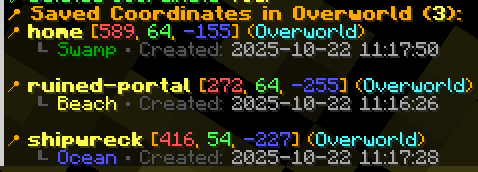
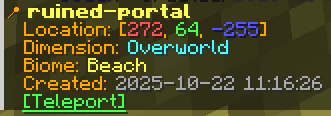

About this Mod
Recall Coords
Recall Coords is a lightweight client-side coordinate saver and waypoint utility mod that helps you quickly save, organize, and recall important locations in your Minecraft worlds and multiplayer servers.
Perfect for:
- Bases
- Nether portals
- Villages
- Structures
- Death locations
- Exploration routes
✔ Client-side only
✔ Works on most multiplayer servers
✔ Automatic death coordinate saving
✔ Lightweight and fast
✔ Multi-dimension support
✔ Simple .rc commands
Features
- Save coordinates with custom names and descriptions
- World specific storage - each server/world maintains its own coordinate list
- Multi dimensional support (Overworld, Nether, End)
- Automatic biome detection - coordinates show the biome they were saved in
- Death location tracking - automatically saves where you died
- Persistent storage - coordinates are saved locally between game sessions
- Interactive UI with clickable coordinate names and hover tooltips
- Copy coordinates - click coordinates to copy them to clipboard
Dependencies
FABRIC API REQUIRED
This mod requires Fabric API to function properly. Make sure to install Fabric API alongside this mod. Click To Download
Commands
All commands use .rc (dot rc) instead of /rc
Adding Coordinates
.rc add auto <name> [description]- Auto detect current location & biome.rc add <x> <y> <z> <name> [description]- Manually specify coordinates
Managing Coordinates
.rc delete <name>- Delete a saved coordinate.rc view <name>- View detailed information about a coordinate.rc list- List all saved coordinates (clickable names!).rc death- View your last death location in current world.rc help- Show all available commands
Interactive Features
- Click coordinate names in
.rc listto view details - Click coordinates in
.rc viewand.rc deathto copy to clipboard - Hover over elements to see helpful tooltips
Examples


Available Versions
How to Install Recall Coords on Your Server
Order Server
Order a Minecraft Java server with at least 3 GB RAM (4 GB recommended).
Set fabric Loader
In the panel under "Egg", select the fabric loader and matching Minecraft version (26.1.2).
Install Mod
Open the mod browser in the dashboard and search for "Recall Coords". Click "Install" – done! Alternatively, upload the .jar via SFTP to the /mods folder.
Compatibility
Mod Loaders
Minecraft Versions
26.1.2, 26.1.1, 26.1 (+12 more)
Server-side
✗ UnsupportedRecommended RAM
4 GB(min. 3 GB)Frequently Asked Questions
Recall Coords server crashes on startup – what to do?
Most common cause: wrong fabric version or insufficient RAM. Check the server log (latest.log) for "OutOfMemoryError" or "Mixin" errors. With Mado Hosting: ensure at least 3 GB RAM is allocated and the loader matches the mod version (26.1.2). You can switch loaders with one click in the panel.
Is Recall Coords compatible with fabric and quilt?
Recall Coords officially supports fabric, quilt for Minecraft 26.1.2, 26.1.1, 26.1. The Mado dashboard automatically detects incompatible loader combinations.
Server lagging with Recall Coords – how to optimize performance?
Recommended RAM: 4 GB (per 8 players). Use /spark profiler to check if Recall Coords consumes the most tick time. Common fixes: reduce server view-distance to 8-10, install "performant" or "starlight" as supplementary mods on Forge. With Mado Hosting, your server runs on NVMe SSDs with dedicated CPU cores for minimal latency.
Similar Mods




Rent Modded Server
Install Recall Coords with just one click on your server.