
Recall Potion
Teleport to saved locations in a simple and balanced way. Inspired by Terraria and Dofus.
Screenshots
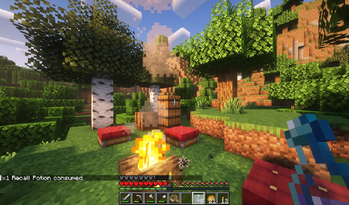
About this Mod

About
This mod is inspired by Terraria's and Dofus' Recall Potions. Specific blocks like Campfires, Beds and others now act as saving points, which you can travel back to using 3 potions added by the mod:
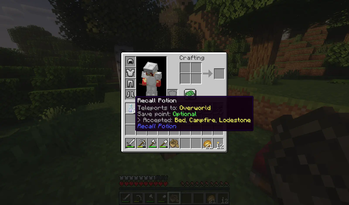
 Recall Potion: Travel back to your latest saving point in the Overworld (World Spawn by default).
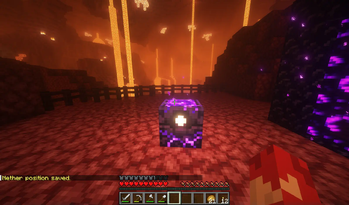
 Nether Potion: Travel to the Nether. You must have already visited the Nether and saved your location there.
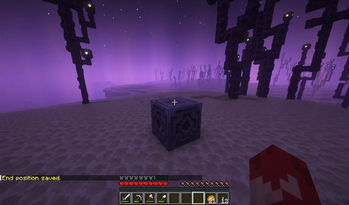
 End Potion: Travel to the End. You must have already visited the End and saved your location there.

Features
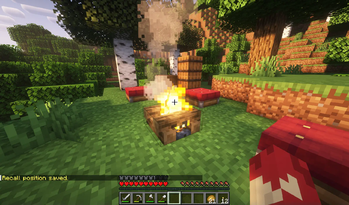
- You can save your location in each dimension by Sneak+Right-Click on any valid block (full list below).
- Use one of the 3 potions to travel back to your latest saving point in the corresponding dimension.
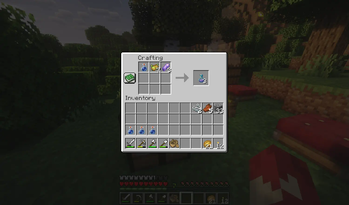
- Recall Potions can be found in any vanilla loot chest, or crafted using resources from their respective dimensions.
- Unlike vanilla potions, these stack up to 16 and don't take much inventory space. Ideal for exploring sessions!
Saving points
Saving points are dimension-specific. You can save your location for the current dimension using one of the valid blocks from the list below:
- Overworld: Bed, Campfire, Lodestone
- Nether: Soul Campfire, Respawn Anchor, Lodestone
- End: Lodestone

Want to get back to your base after some exploring? Just drink a Recall Potion and travel back home instantly!
Recipes


Tools for modpacks
More blocks can be added as valid saving points to each dimension, using block tags:
• Overworld: recall_save_point
• Nether: nether_save_point
• End: end_save_point
Structure is as follows: recall_potion:{tag}
Videos
Dependencies
This mod has no dependencies.
JEI is recommended for recipes but not required.
Installation
Add the .jar mod file into your mods folder.
Alternatively, you can browse the Modrinth launcher for the mod (if it doesn't show up, try typing the autor's name). Once found, click "Install" to add it to your modpack.
Permissions
You are free to include this mod in any modpack, public or private.
Support my work
 Download my projects on CurseForge
 Download my projects on Modrinth
Donate on Paypal
Available Versions
How to Install Recall Potion on Your Server
Order Server
Order a Minecraft Java server with at least 3 GB RAM (4 GB recommended).
Set forge Loader
In the panel under "Egg", select the forge loader and matching Minecraft version (1.21.4).
Install Mod
Open the mod browser in the dashboard and search for "Recall Potion". Click "Install" – done! Alternatively, upload the .jar via SFTP to the /mods folder.
Compatibility
Mod Loaders
Minecraft Versions
1.21.4, 1.21.1, 1.21 (+4 more)
Server-side
✓ RequiredRecommended RAM
4 GB(min. 3 GB)Frequently Asked Questions
Recall Potion server crashes on startup – what to do?
Most common cause: wrong forge version or insufficient RAM. Check the server log (latest.log) for "OutOfMemoryError" or "Mixin" errors. With Mado Hosting: ensure at least 3 GB RAM is allocated and the loader matches the mod version (1.21.4). You can switch loaders with one click in the panel.
Is Recall Potion compatible with forge and neoforge?
Recall Potion officially supports forge, neoforge for Minecraft 1.21.4, 1.21.1, 1.21. The Mado dashboard automatically detects incompatible loader combinations.
Server lagging with Recall Potion – how to optimize performance?
Recommended RAM: 4 GB (per 8 players). Use /spark profiler to check if Recall Potion consumes the most tick time. Common fixes: reduce server view-distance to 8-10, install "performant" or "starlight" as supplementary mods on Forge. With Mado Hosting, your server runs on NVMe SSDs with dedicated CPU cores for minimal latency.
Similar Mods




Rent Modded Server
Install Recall Potion with just one click on your server.