
RecapPVP
This is a new way to track progression throughout training PVP! Track your pvp stats your way!
Screenshots
About this Mod
RecapPvP
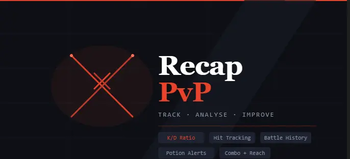
RecapPvP is a client-side Fabric mod for Minecraft 1.21 that tracks and displays a detailed breakdown of your PvP performance after every fight — so you can learn, improve, and review your gameplay with ease.
🗡️ What Does It Do?
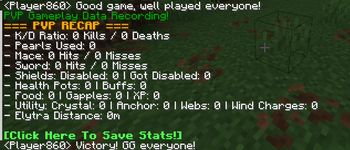
Whenever you're in a PvP fight, RecapPvP silently records everything happening in the background. When the fight ends, it prints a clean PVP Recap summary showing everything that mattered.
No more guessing how many potions you burned, whether your sword accuracy was on point, or how many pearls you wasted — RecapPvP tells you exactly.
📊 Tracked Stats
RecapPvP tracks a wide range of combat statistics, all configurable:
- Kills & Deaths — K/D ratio per session
- Sword Stats — Hits and misses
- Mace Stats — Hits and misses
- Shield Breaks — Shields you disabled vs. shields the opponent disabled on you
- Potions — Health pots and buff pots used
- Consumables — Food, golden apples, XP bottles
- Utilities — Crystals placed, anchors placed, cobwebs, wind charges
- Pearls Used
- Elytra Distance — How far you flew during the fight
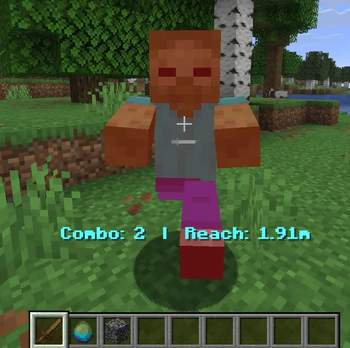
- Live Combo & Reach Display — See your current combo and reach in real time during combat
- Potion Alerts — Get warned when a potion is about to expire
💾 Battle History
Loved a session? Save it. RecapPvP includes a full Battle History system — name your battles and store them locally. View or replay any past session from the in-game History screen.
🎉 Auto-GG
RecapPvP can automatically send a GG message to chat at the end of a fight, chosen randomly from a set of friendly messages. Toggle it on or off whenever you like.
⚙️ Configuration
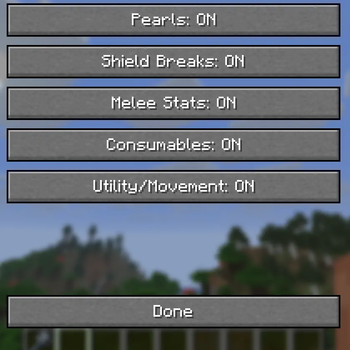
Everything is configurable through the in-game Config Screen. Enable or disable any stat category to keep your recap focused on what matters to you:
- Show/hide pearls, shield breaks, mace stats, sword stats, consumables, potions, utilities, movement, combo, reach, potion alerts, and Auto-GG
🎮 Key Bindings
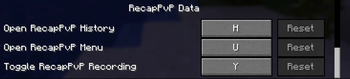
| Binding | Default | Action |
|---|---|---|
| Toggle Recording | Unbound | Start/stop tracking |
| Open Recap Menu | Unbound | View current session stats |
| Open History | Unbound | Browse saved battles |
You can also use the /recapsave command to save a battle directly from chat.
📦 Requirements
- Minecraft 1.21.1
- Fabric Loader ≥ 0.19.2
- Fabric API
Client-side only — works on any server.
Available Versions
How to Install RecapPVP on Your Server
Order Server
Order a Minecraft Java server with at least 3 GB RAM (4 GB recommended).
Set fabric Loader
In the panel under "Egg", select the fabric loader and matching Minecraft version (1.21.11).
Install Mod
Open the mod browser in the dashboard and search for "RecapPVP". Click "Install" – done! Alternatively, upload the .jar via SFTP to the /mods folder.
Compatibility
Mod Loaders
Minecraft Versions
1.21.11
Server-side
✗ UnsupportedRecommended RAM
4 GB(min. 3 GB)Frequently Asked Questions
RecapPVP server crashes on startup – what to do?
Most common cause: wrong fabric version or insufficient RAM. Check the server log (latest.log) for "OutOfMemoryError" or "Mixin" errors. With Mado Hosting: ensure at least 3 GB RAM is allocated and the loader matches the mod version (1.21.11). You can switch loaders with one click in the panel.
Is RecapPVP compatible with fabric?
RecapPVP officially supports fabric for Minecraft 1.21.11. The Mado dashboard automatically detects incompatible loader combinations.
Server lagging with RecapPVP – how to optimize performance?
Recommended RAM: 4 GB (per 8 players). Use /spark profiler to check if RecapPVP consumes the most tick time. Common fixes: reduce server view-distance to 8-10, install "performant" or "starlight" as supplementary mods on Forge. With Mado Hosting, your server runs on NVMe SSDs with dedicated CPU cores for minimal latency.
Similar Mods






Rent Modded Server
Install RecapPVP with just one click on your server.