
Recipe Modification library
Allows you to automatically apply arbitrary modifications to all recipes at runtime in a simple way.
Screenshots
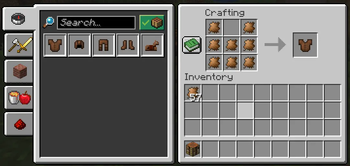

About this Mod
Recipe Modification
What is this?
This mod on its own doesn't do anything, instead, it's a tool for mod pack creators, data pack creators, other mod developers or anyone who likes tinkering.
It allows you to automatically apply arbitrary modifications to any type of recipe at runtime in a simple way, either by using JSON files in a datapack or using the Java API.
This means, instead of manually overriding multiple existing recipes, you define a set of recipe modifiers, which are applied when the game is starting. This means that modifications are applied to any recipes added by all other mods as well, without causing any incompatibilities or weird issues in case of multiple mods overriding the same recipe.
Some examples:
For example, if you wanted to make it so that all button recipes create 8 buttons instead of just 1 because you think the button recipe is a scam otherwise, you can easily do that in just a few lines of JSON!
{
  "target_recipes": "#minecraft:buttons",
  "modifiers": [
    {
      "type": "modify_result_item",
      "function": "set_count",
      "count": 8
    }
  ]
}
Other use cases would be, for example, if some mod's recipes are not properly compatible because they don't utilise tags correctly
(or there are no standardised tags for the relevant items), you can easily make them compatible
(without having to manually override every single recipe! yay!).
Say, for example, a mod named "mod_xyz" doesn't use the right tag for copper nuggets in their recipes, which makes these incompatible with copper nuggets from other mods.
Using Recipe Modification, you can fix it like this:
{
  "target_recipes": {
    "type": "namespace_equals",
    "namespace": "mod_xyz"
  },
  "modifiers": [
    {
      "type": "add_alternative",
      "ingredients": "mod_xyz:copper_nugget",
      "alternative": {
        "tag": "c:copper_nuggets"
      }
    }
  ]
}
How can I use this?
Generally, the preferred way to interact with this mod is via JSON files, however, there is also a Java API available.
Check out the document about JSON Syntax for more information on how to write these JSON files and what you can do with this mod.
There are also some (nonsensical, but working) test modifiers that you can take inspiration from.
For the Java API, just take a look at the api package, especially the methods in the main RecipeModification class.
More detailed instructions & usage information coming soon™.
If you have any questions or need help, always feel free to message me on discord or open a GitHub issue.
Available Versions
How to Install Recipe Modification library on Your Server
Order Server
Order a Minecraft Java server with at least 3 GB RAM (4 GB recommended).
Set fabric Loader
In the panel under "Egg", select the fabric loader and matching Minecraft version (1.21.11).
Install Mod
Open the mod browser in the dashboard and search for "Recipe Modification library". Click "Install" – done! Alternatively, upload the .jar via SFTP to the /mods folder.
Compatibility
Mod Loaders
Minecraft Versions
1.21.11, 1.21.1, 1.20.1
Server-side
✓ RequiredRecommended RAM
4 GB(min. 3 GB)Frequently Asked Questions
Recipe Modification library server crashes on startup – what to do?
Most common cause: wrong fabric version or insufficient RAM. Check the server log (latest.log) for "OutOfMemoryError" or "Mixin" errors. With Mado Hosting: ensure at least 3 GB RAM is allocated and the loader matches the mod version (1.21.11). You can switch loaders with one click in the panel.
Is Recipe Modification library compatible with fabric and forge and neoforge and quilt?
Recipe Modification library officially supports fabric, forge, neoforge, quilt for Minecraft 1.21.11, 1.21.1, 1.20.1. Note: Forge and Fabric mods are NOT cross-compatible – pick one loader and stick with it. The Mado dashboard automatically detects incompatible loader combinations.
Server lagging with Recipe Modification library – how to optimize performance?
Recommended RAM: 4 GB (per 8 players). Use /spark profiler to check if Recipe Modification library consumes the most tick time. Common fixes: reduce server view-distance to 8-10, install "performant" or "starlight" as supplementary mods on Forge. With Mado Hosting, your server runs on NVMe SSDs with dedicated CPU cores for minimal latency.
Similar Mods



Rent Modded Server
Install Recipe Modification library with just one click on your server.