
CraftLock
A minigame type of mod that locks every crafting recipe after it has been made once
Screenshots
About this Mod
CraftLock
One craft. One chance.
A Fabric mod that turns every recipe into a single-use opportunity. Once you make it, you can never make it again — for the entire lifetime of the world.



-blue?style=for-the-badge)
Overview
CraftLock is a hardcore-challenge mod built for content creators and self-imposed-challenge enjoyers. The premise is simple and brutal:
Every recipe in the game can only be crafted once. After that, it's gone forever.
The first time you craft oak planks, sticks, a furnace, a diamond pickaxe, an Eye of Ender — that recipe locks. The next time you put the same ingredients in a crafting table, the result slot stays empty. The mod plays a denial sound, shows you the actionbar message "Already crafted Oak Planks once", and the run continues with one fewer tool in your kit.
It covers crafting tables, the 2x2 inventory grid, furnaces, blast furnaces, smokers, campfires, smithing tables, stonecutters, and the brewing stand. Two recipes are exempt by default — Blaze Powder and Eye of Ender — because without them, you can't finish the game.
Features
Locking
- Universal coverage — crafting table, inventory 2x2, furnace family, smithing, stonecutter, brewing stand
- Recipe-level granularity —
oak_planksfrom logs locks separately fromoak_planksfrom stripped logs - Persistent across restarts — the lock list is stored in the world save and survives sessions
- Exempt list — recipes you choose stay infinite (default:
blaze_powder,ender_eye)
UX polish for streaming
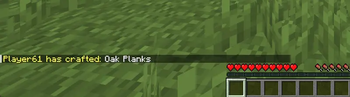
- Yellow chat broadcast on every first-time craft: Chompii has crafted: Iron Ingot
- Bell ping plays for all players when a new recipe is locked
- Actionbar warning + villager-no sound when a blocked craft is attempted
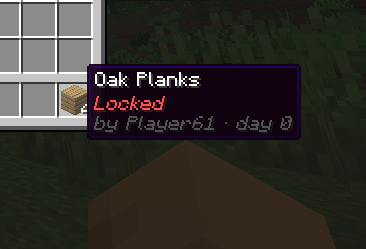
- Tooltip badge — locked items display a red italic Locked line with attribution: by Chompii · day 7
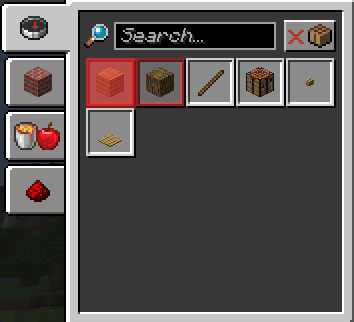
- Recipe-book overlay — locked recipes are highlighted with a red tint inside the recipe book
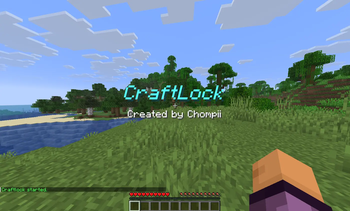
- Animated title played on
/craftlock start(light-blue italic CraftLock with subtitle, plus a calm amethyst chime)
Tooling
- A full command suite for moderators / streamers (see below)
- JSON config at
config/craftlock.jsonfor sound tuning, exempt list, and brand text - Translation support via
assets/craftlock/lang/en_us.json - SLF4J logger under the
craftlocknamespace
Installation
Requirements
| Component | Version |
|---|---|
| Minecraft | 1.21.11 |
| Fabric Loader | >= 0.19.2 |
| Fabric API | 0.141.4+1.21.11 |
| Java | 21 |
Steps
- Install Fabric Loader for Minecraft
1.21.11. - Drop Fabric API into your
mods/folder. - Drop the latest
craftlock-1.0.jar(from the Releases page) alongside it. - Launch the game. The mod will run as soon as you load a world — locking does not start until you invoke
/craftlock start.
Commands
All commands require permission level gamemaster (level 2 in vanilla terms — automatically granted to the singleplayer host).
| Command | Description |
|---|---|
/craftlock start |
Begin enforcing locks. Shows the CraftLock title to all players. |
/craftlock stop |
Pause enforcement without clearing the lock list. Resume with start. |
/craftlock status |
Print run state, locked-recipe count, and exempt-recipe count. |
/craftlock list |
List every locked recipe by ID. |
/craftlock reset |
Wipe the entire lock list. Does not affect the started flag. |
/craftlock lock <recipe> |
Manually lock a recipe (useful for setting up challenges). |
/craftlock unlock <recipe> |
Manually unlock a single recipe. |
Example
> /craftlock start
[CraftLock started.]
[Title: CraftLock]
[Subtitle: Created by Chompii]

> /craftlock list
Locked recipes (3):
  - minecraft:oak_planks
  - minecraft:stick
  - minecraft:crafting_table

> /craftlock unlock minecraft:stick
Unlocked minecraft:stick
Configuration
On first launch the mod writes config/craftlock.json with the defaults below. Edit the file and restart the world to apply changes.
{
  "titleText": "CraftLock",
  "subtitleText": "Created by Chompii",
  "exemptRecipes": [
    "minecraft:blaze_powder",
    "minecraft:ender_eye"
  ],
  "craftPingVolume": 0.6,
  "craftPingPitch": 1.5,
  "startSoundVolume": 1.0,
  "startSoundPitch": 1.0,
  "blockedSoundVolume": 1.0,
  "blockedSoundPitch": 1.0
}
| Field | Type | Notes |
|---|---|---|
titleText |
string | Text shown when /craftlock start fires. |
subtitleText |
string | Subtitle paired with the title. |
exemptRecipes |
string[] | Recipe IDs that can be crafted any number of times. |
craftPingVolume / craftPingPitch |
float | Bell sound played on every first-time craft. |
startSoundVolume / startSoundPitch |
float | Amethyst chime played on /craftlock start. |
blockedSoundVolume / blockedSoundPitch |
float | Villager "no" played when a craft is blocked. |
How it works
CraftLock is built around a per-world SavedData instance that stores:
- A set of locked recipe IDs
- A metadata map:
{recipe_id -> {crafter, world_day}} - A
startedflag
Mixins attach to the appropriate vanilla menus and block entities:
| Class | Hook | Purpose |
|---|---|---|
CraftingMenu |
slotChangedCraftingGrid (TAIL) |
Clear the result slot + send a ClientboundContainerSetSlotPacket if the matched recipe is locked. Also caches the recipe so ResultSlot.onTake can still see it after vanilla's shift-click drain. |
ResultSlot |
onTake (HEAD) |
Record the lock + broadcast. |
AbstractFurnaceBlockEntity |
canBurn (HEAD) + setRecipeUsed (HEAD) |
Block smelting if locked; record on completion. |
CampfireBlockEntity |
getCookableRecipe (RETURN) + placeFood (RETURN) |
Block placement if locked; record on placement. |
SmithingMenu |
createResult (TAIL) + onTake (HEAD) |
Clear result if locked; record on take. |
StonecutterMenu |
setupResultSlot (TAIL) + onTake (HEAD) |
Same pattern. |
PotionBrewing |
mix (RETURN) |
Return the unmixed input if the output would be a locked potion variant; lock on successful brew. |
RecipeButton |
renderWidget (TAIL) — client only |
Paint a red overlay on locked recipes inside the recipe book. |
State syncs to all connected clients via a craftlock:lock_list custom payload whenever the lock list changes, so tooltips and the recipe-book overlay update live.
For challenge runners
A typical run flow:
- Create a fresh world. The lock list persists per-save, so don't reuse old ones.
- Run
/craftlock startto begin enforcement. Until you do, the mod runs in observe-only mode. - Plan your path. Eye of Ender and Blaze Powder are exempt, so the End is reachable. Everything else — every single recipe — locks on first craft.
- Use
/craftlock resetbetween filming takes if you need to redo a segment. - Use
/craftlock listto audit what you've spent.
Tip for editors: the yellow chat broadcasts (
Chompii has crafted: ...) are designed to be readable in compressed YouTube footage and pair well with the bell ping for "milestone moment" cuts.
Building from source
git clone <repository-url>
cd CraftLock
./gradlew build
The compiled jar lands in build/libs/.
For development you can use:
./gradlew runClient   # launch a dev client with the mod loaded
./gradlew runServer   # launch a dedicated dev server
./gradlew genSources  # decompile Minecraft for IDE navigation
Credits
Made by Chompii.
Built on the Fabric modding toolchain. Powered by SpongePowered Mixin and MixinExtras.
License
Released under the CraftLock License — see LICENSE for the full text.
In short:
- You may use, modify, distribute, fork, repackage, and embed the mod.
- You must credit Chompii visibly in any use of the mod (video descriptions, modpack credits, derivative mod readmes, etc.).
- You may not claim to be the original author of CraftLock.
- The software is provided "as is" with no warranty.
If you're publishing a video, a fair-use credit looks like:
"Featuring CraftLock by Chompii — github.com/Chompii/CraftLock"
Available Versions
How to Install CraftLock on Your Server
Order Server
Order a Minecraft Java server with at least 3 GB RAM (4 GB recommended).
Set fabric Loader
In the panel under "Egg", select the fabric loader and matching Minecraft version (1.21.11).
Install Mod
Open the mod browser in the dashboard and search for "CraftLock". Click "Install" – done! Alternatively, upload the .jar via SFTP to the /mods folder.
Compatibility
Mod Loaders
Minecraft Versions
1.21.11
Server-side
✓ RequiredRecommended RAM
4 GB(min. 3 GB)Frequently Asked Questions
CraftLock server crashes on startup – what to do?
Most common cause: wrong fabric version or insufficient RAM. Check the server log (latest.log) for "OutOfMemoryError" or "Mixin" errors. With Mado Hosting: ensure at least 3 GB RAM is allocated and the loader matches the mod version (1.21.11). You can switch loaders with one click in the panel.
Is CraftLock compatible with fabric?
CraftLock officially supports fabric for Minecraft 1.21.11. The Mado dashboard automatically detects incompatible loader combinations.
Server lagging with CraftLock – how to optimize performance?
Recommended RAM: 4 GB (per 8 players). Use /spark profiler to check if CraftLock consumes the most tick time. Common fixes: reduce server view-distance to 8-10, install "performant" or "starlight" as supplementary mods on Forge. With Mado Hosting, your server runs on NVMe SSDs with dedicated CPU cores for minimal latency.
Similar Mods





Rent Modded Server
Install CraftLock with just one click on your server.