
record-able
A highly configurable and helpful OBS style mod that lets you record your game session like you would on any recording software and much more
Screenshots
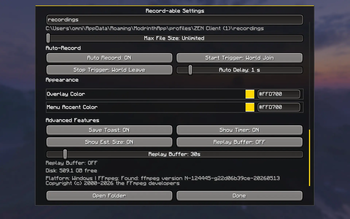

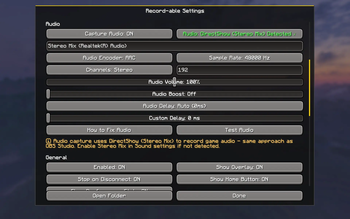
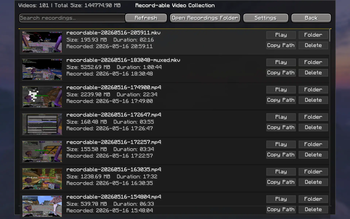
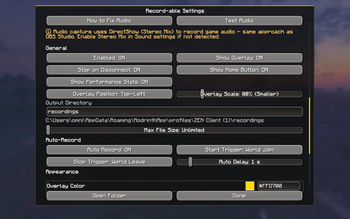
About this Mod
Record-able
A lightweight screen recording mod for Fabric that lets you capture, clip, and relive your gameplay. Supports Minecraft 1.20.0 through 26.1.2+ across three build variants.
what does it do?
Record-able captures video and audio directly from your Minecraft session. No external software needed, no performance tanks. Uses on-demand FFmpeg downloads instead of bundling binaries.
Key features!
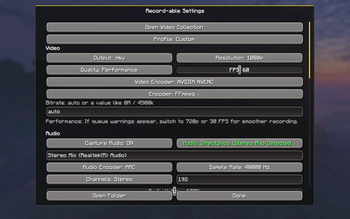
Hardware acceleration support (NVENC, AMF, QuickSync)
Software encoding with automatic
ultrafastpreset for smooth queue performancePerformance Preset slider to dial in the speed-vs-quality tradeoff
Two container formats (for now) (MP4, MKV)
Customizable video quality and bitrate settings
Audio capture from game with microsecond-precision A/V sync
Microphone & Push-to-Talk (PTT) capture with a draggable mic overlay indicator
Separate audio tracks (game vs. mic) and audio chapter markers
Max file size limits with auto-stop
Customizable recording overlay (5 positions, scalable from 50% to 200%)
Built-in watermark editor
Redesigned settings UI with scrollable sections and storage management
Built-in video collection browser
Auto-Clip System
Record-able can automatically save clips when something noteworthy happens:
- Player death - captures your final moments (and whatever got you)
- Dimension change - portal transitions, End entries, etc.
- Achievements - clips the moment you unlock an advancement
- Kills - detects melee attacks, projectiles (arrows, tridents), and specialized/modded weapons via a damage-scan fallback
- Kill Montages - a rolling buffer stitches together a pre-roll, the kill event, and a post-roll into one clip
Clips are organized in a dedicated "Clips" collection UI with subfolder organization, a draggable scrollbar, and a Protect/Unlock feature to keep your best moments safe.
How does FFmpeg work?
First launch will prompt you to download FFmpeg. The mod handles this automatically from trusted mirrors (gyan.dev, johnvansickle.com, evermeet.cx) with SHA-256/MD5 integrity verification. One-time setup, then you're good to go.
System requirements (because ofc🤷)
Fabric Loader
Legacy (Minecraft 1.20.0 - 1.20.4): Java 17
Sandwich (Minecraft 1.20.5 - 1.21.11): Java 21
Modern (Minecraft 26.1 - 26.1.2+): Java 25
FFmpeg (downloaded on first use when prompted)
Controls🎮
Start/stop recording with a keybind (configurable)
Push-to-Talk keybind for mic capture (configurable)
Access settings, video collection, and clips from mod menu
Overlay shows recording status and duration in real-time
Technical details for the power-users!
Uses OpenAL loopback for audio capture with microsecond-precision timestamp tracking to prevent A/V drift. Video encoder runs async to avoid frame drops. Mic input is captured on a separate track with its own gain control. Supports custom FFmpeg parameters if you want full control.
Compatibility
Record-able now includes a compatibility bridge for coexistence with Replay Mod and Flashback. Auto-recording is suppressed during replay playback, and a replayYieldAudioDevice config flag manages OpenAL loopback device conflicts so the mods can share the audio pipeline.
That said, running multiple recording mods side by side can still cause visual or audio quirks, so your mileage may vary. (Shout-out to each respective mod's authors)
Also: high quality, high FPS, high resolution, and long recording times
Eat up a lot of Memory, CPU, and RAM (so better be careful!)
Disclaimer⚠️:
For complete clarity, this project was and is AI assisted.
Available Versions
How to Install record-able on Your Server
Order Server
Order a Minecraft Java server with at least 3 GB RAM (4 GB recommended).
Set fabric Loader
In the panel under "Egg", select the fabric loader and matching Minecraft version (26.2).
Install Mod
Open the mod browser in the dashboard and search for "record-able". Click "Install" – done! Alternatively, upload the .jar via SFTP to the /mods folder.
Compatibility
Mod Loaders
Minecraft Versions
26.2, 26.1.2, 26.1.1 (+18 more)
Server-side
✗ UnsupportedRecommended RAM
4 GB(min. 3 GB)Frequently Asked Questions
record-able server crashes on startup – what to do?
Most common cause: wrong fabric version or insufficient RAM. Check the server log (latest.log) for "OutOfMemoryError" or "Mixin" errors. With Mado Hosting: ensure at least 3 GB RAM is allocated and the loader matches the mod version (26.2). You can switch loaders with one click in the panel.
Is record-able compatible with fabric?
record-able officially supports fabric for Minecraft 26.2, 26.1.2, 26.1.1. The Mado dashboard automatically detects incompatible loader combinations.
Server lagging with record-able – how to optimize performance?
Recommended RAM: 4 GB (per 8 players). Use /spark profiler to check if record-able consumes the most tick time. Common fixes: reduce server view-distance to 8-10, install "performant" or "starlight" as supplementary mods on Forge. With Mado Hosting, your server runs on NVMe SSDs with dedicated CPU cores for minimal latency.
Similar Mods





Rent Modded Server
Install record-able with just one click on your server.