
Recovery+
A smarter recovery compass with waypoints
Screenshots
About this Mod
Recovery+
Welcome to Recovery+!
With only four redstone you can transform your boring, death dimension only, vanilla Recovery Compass into an exciting portal tracking, dimension guiding, Smart Recovery Compass.

This new and improved Recovery Compass also works in the dimensions you traversed before dying - retracing the steps you took to get to your point of death.
This makes it ideal for exploration: for example when you explore a ruined Nether Portal, explore end islands, or when you just don't know how exactly you got to where you died.
Whenever you change dimension using Nether Portals or End Portals or you use an End Gateway it's recorded and a new waypoint is added to a backlog.
Then when you die the new recovery compass points you to the first portal you crossed. If you reach a waypoint the recovery compass then focuses on to the next step of your journey to get your stuff back.
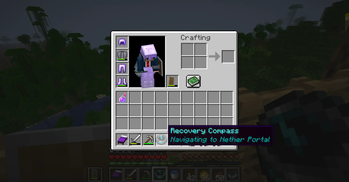
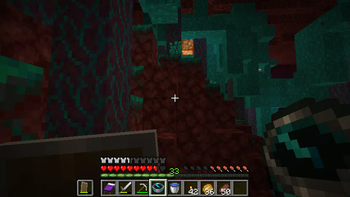
Some Gameplay Images

The Item Description live-updates with the current target

Navigating through the Nether
Roadmap
After Modfest new features like support for portals from other mods, a compass that only points north for when you don't have access to a local map, and eventually also a compass that can track entities (useful e.g. for finding lost horses) are going to be added.
License
This mod is licensed under the European Union Public License 1.2.
Available Versions
How to Install Recovery+ on Your Server
Order Server
Order a Minecraft Java server with at least 3 GB RAM (4 GB recommended).
Set fabric Loader
In the panel under "Egg", select the fabric loader and matching Minecraft version (1.20.1).
Install Mod
Open the mod browser in the dashboard and search for "Recovery+". Click "Install" – done! Alternatively, upload the .jar via SFTP to the /mods folder.
Compatibility
Mod Loaders
Minecraft Versions
1.20.1, 1.20, 1.19.4 (+3 more)
Server-side
✓ RequiredRecommended RAM
4 GB(min. 3 GB)Frequently Asked Questions
Recovery+ server crashes on startup – what to do?
Most common cause: wrong fabric version or insufficient RAM. Check the server log (latest.log) for "OutOfMemoryError" or "Mixin" errors. With Mado Hosting: ensure at least 3 GB RAM is allocated and the loader matches the mod version (1.20.1). You can switch loaders with one click in the panel.
Is Recovery+ compatible with fabric and quilt?
Recovery+ officially supports fabric, quilt for Minecraft 1.20.1, 1.20, 1.19.4. The Mado dashboard automatically detects incompatible loader combinations.
Server lagging with Recovery+ – how to optimize performance?
Recommended RAM: 4 GB (per 8 players). Use /spark profiler to check if Recovery+ consumes the most tick time. Common fixes: reduce server view-distance to 8-10, install "performant" or "starlight" as supplementary mods on Forge. With Mado Hosting, your server runs on NVMe SSDs with dedicated CPU cores for minimal latency.
Similar Mods




Rent Modded Server
Install Recovery+ with just one click on your server.