
Re:Death
Re:Death — A Death You'll Feel 💀 A fresh take on Minecraft death. Not the end — a turning point.
Screenshots
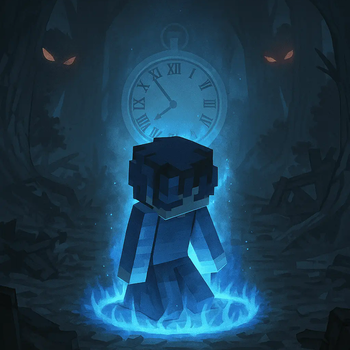
About this Mod

Re:Death — A Death You'll Feel
💀 A fresh take on Minecraft death. Not the end — a turning point.
Re:Death is a minimalist but impactful mod inspired by Re:Zero and roguelike philosophy. It introduces a death rollback system — bringing you back to a previous checkpoint with your inventory, experience, and location intact. But every death comes at a cost.
Forget "game over". Every death is part of the story now.
🔥 Features
🔄 Rollback after death
Your inventory, XP, and position are fully restored after dying.💀 Stackable death curse
Each death permanently reduces your maximum health until cured.🧬 Anti-abuse system
Deaths aren’t free. The more you die, the weaker you become.💎 Diamond Apple
The only way to remove the curse and reclaim your lost strength.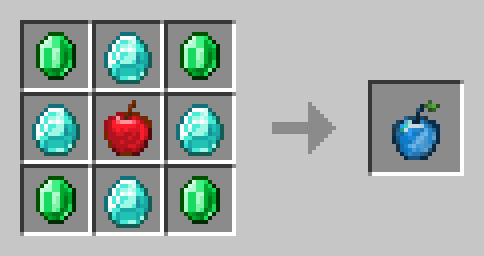
🌐 Multiplayer support
Each player has individual checkpoints and curse tracking. Works flawlessly on servers.🧩 Perfect for modpacks and story-driven worlds
Great for Re:Zero-inspired gameplay, roguelikes, Dark Souls-like survival, or emotional storytelling.

⚙️ Compatibility
- Supports:Fabric
- Version: Minecraft 1.21.5
- Server-ready — no configuration needed
📥 Installation
- Install the correct mod loader (Fabric)
- Drop the mod
.jarinto yourmodsfolder - Done. Re:Death will activate automatically on death.
🧠 Inspired by
- Re:Zero — Starting Life in Another World
- Dark Souls and its philosophy of punishing death
- Roguelikes and permadeath with consequences
📜 License
CC BY-NC

Available Versions
How to Install Re:Death on Your Server
Order Server
Order a Minecraft Java server with at least 3 GB RAM (4 GB recommended).
Set fabric Loader
In the panel under "Egg", select the fabric loader and matching Minecraft version (1.21.5).
Install Mod
Open the mod browser in the dashboard and search for "Re:Death". Click "Install" – done! Alternatively, upload the .jar via SFTP to the /mods folder.
Compatibility
Mod Loaders
Minecraft Versions
1.21.5
Server-side
✓ RequiredRecommended RAM
4 GB(min. 3 GB)Frequently Asked Questions
Re:Death server crashes on startup – what to do?
Most common cause: wrong fabric version or insufficient RAM. Check the server log (latest.log) for "OutOfMemoryError" or "Mixin" errors. With Mado Hosting: ensure at least 3 GB RAM is allocated and the loader matches the mod version (1.21.5). You can switch loaders with one click in the panel.
Is Re:Death compatible with fabric?
Re:Death officially supports fabric for Minecraft 1.21.5. The Mado dashboard automatically detects incompatible loader combinations.
Server lagging with Re:Death – how to optimize performance?
Recommended RAM: 4 GB (per 8 players). Use /spark profiler to check if Re:Death consumes the most tick time. Common fixes: reduce server view-distance to 8-10, install "performant" or "starlight" as supplementary mods on Forge. With Mado Hosting, your server runs on NVMe SSDs with dedicated CPU cores for minimal latency.
Similar Mods




Rent Modded Server
Install Re:Death with just one click on your server.
Details
- License
- Creative Commons Attribution Non Commercial 4.0 International
- Server-side
- Required