
Redeem XP
Redeem and store xp with a simple command!
About this Mod
This server-side mod adds a simple command to redeem and store xp in a bottle for later use!
Run /redeem <amount> xp | levels
For e.g. /redeemxp 100 xp stores 100 xp points, whereas /redeemxp 10 levels stores the xp for 10 levels in a Bottle o' Enchanting.
If you run the command while holding a bottle that is not full, that bottle will be filled first and the amount would be capped by the space in that bottle. Running the command again would give you a new bottle.
To redeem the maximum amount possible run /redeemxp max. (Would depend on player's current xp or the maximum space of a bottle)
Keep in mind, if u redeem 10 levels while being at 30, u will get an xp amount that is different from when u redeem 10 levels while being at 20, for example.
To get the xp back again, simply right click to slowly drain the bottle just like normal.
The xp which is given out per click and the maximum amount a bottle can hold are configurable: xp_rate : 10 and max_xp : 1395.
If u sneak while right-clicking u can get all the xp at once.
The stored xp can be monitored by the durability bar or the description.
Run /redeemxp quickmend to toggle quick mend feature. When its enabled, open inventory and hover over an item with mending and press offhand key to mend that item using the players xp.
Amount in percentage of each mend can be configured. For balance, a penalty multiplier can also be configured to increase the use of xp. For example "quickmend_penalty": 2 means double the xp will be used.
On death, the player drops a bottle containing a fraction of their xp. This can be configured under xp_percentage_on_death : 50.
Run /redeemxp info totalxp to get your total xp points.
Run /redeemxp info xplevels <levels> to get the xp points required to reach that level.
Run /redeemxp toggle-repair to toggle between whether xp orbs repair items with mending or increase the player's xp. (This feature can be disabled in the config)
For the config file to appear load and run the mod once, then u can change the values in /config/redeemxp.json5
If you are on singleplayer you can use Mod Menu to configure the values.
TL;DR
/redeemxp <amount> xp | levels
/redeemxp max
/redeemxp info totalxp
/redeemxp info xplevels <levels>
/redeemxp quickmend
/redeemxp toggle-repair
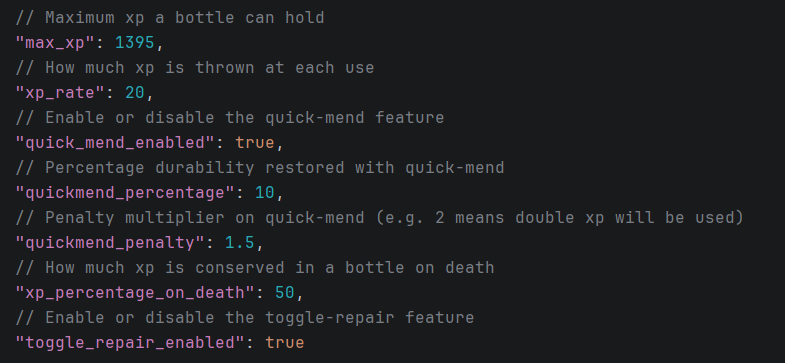
"max_xp" : 1395
"xp_rate" : 10
"quick_mend_enabled": true
"quickmend_percentage": 10
"quickmend_penalty": 1.5
"xp_percentage_on_death" : 50
"toggle_repair_enabled": true
Config example:
Available Versions
How to Install Redeem XP on Your Server
Order Server
Order a Minecraft Java server with at least 3 GB RAM (4 GB recommended).
Set fabric Loader
In the panel under "Egg", select the fabric loader and matching Minecraft version (1.21.11).
Install Mod
Open the mod browser in the dashboard and search for "Redeem XP". Click "Install" – done! Alternatively, upload the .jar via SFTP to the /mods folder.
Compatibility
Mod Loaders
Minecraft Versions
1.21.11
Server-side
✓ RequiredRecommended RAM
4 GB(min. 3 GB)Frequently Asked Questions
Redeem XP server crashes on startup – what to do?
Most common cause: wrong fabric version or insufficient RAM. Check the server log (latest.log) for "OutOfMemoryError" or "Mixin" errors. With Mado Hosting: ensure at least 3 GB RAM is allocated and the loader matches the mod version (1.21.11). You can switch loaders with one click in the panel.
Is Redeem XP compatible with fabric?
Redeem XP officially supports fabric for Minecraft 1.21.11. The Mado dashboard automatically detects incompatible loader combinations.
Server lagging with Redeem XP – how to optimize performance?
Recommended RAM: 4 GB (per 8 players). Use /spark profiler to check if Redeem XP consumes the most tick time. Common fixes: reduce server view-distance to 8-10, install "performant" or "starlight" as supplementary mods on Forge. With Mado Hosting, your server runs on NVMe SSDs with dedicated CPU cores for minimal latency.
Similar Mods




![[TaCZ] Timeless and Classics Zero](https://cdn.modrinth.com/data/SzzJttH8/fd27766d2bb8390d284696b1dbd358f87e081439_96.webp)

Rent Modded Server
Install Redeem XP with just one click on your server.