
Red's JetPacks
Red’s JetPacks is a lightweight Minecraft mod that introduces three types of jetpacks, each with unique features.
Screenshots

About this Mod
Red’s JetPacks Mod
Partnered with RocketNode Server hosting :
Great game server hosting, seamlessly integrated with an intuitive control panel, competitive pricing, and lightning-fast customer support. Try it 25% off with the code "ANOMALY"! http://www.rocketnode.com/anomaly
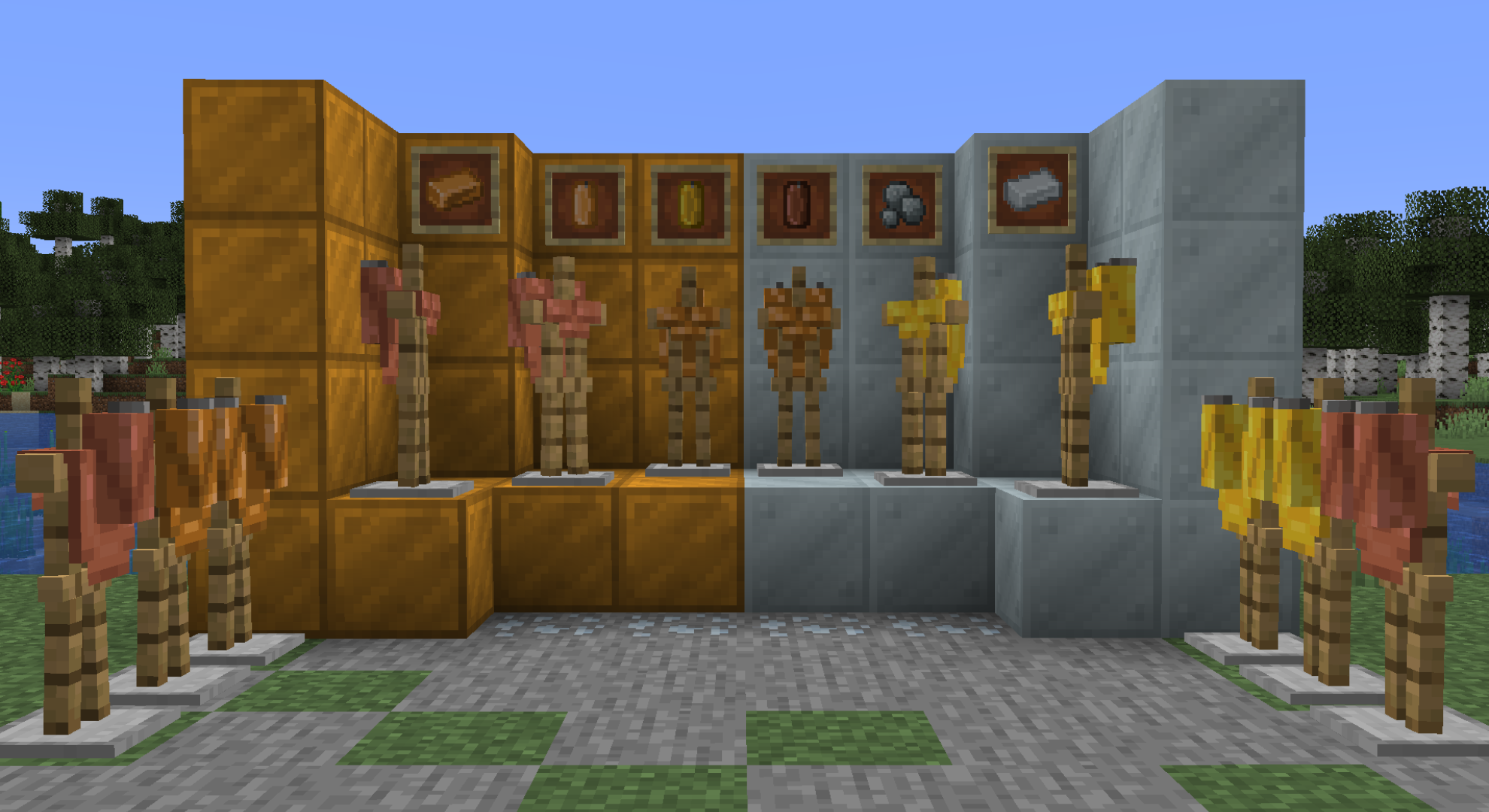
Red’s JetPacks is a lightweight Minecraft mod that introduces three types of jetpacks, each with unique features. Additionally, the mod adds two new types of ores and building blocks. Here’s what you’ll find in this exciting mod:
Building Blocks:
- Bronze Block: A sturdy construction material with a rustic appearance.
- Silver Block: A sleek building block.
New Ores:
- Bronze Ore: bronze can be crafted using gold, silver, coal and copper.
- Silver Ore (or Raw Silver): A valuable resource mined and used for crafting bronze.
Jetpacks:
- Copper Jetpack:
- Propelling Power: Medium
- Tank Capacity: Medium
- Resistance: Medium
- Golden Jetpack:
- Propelling Power: High
- Tank Capacity: Low (but it’s speedy!)
- Resistance: Low
- Bronze Jetpack:
- Propelling Power: Low
- Tank Capacity: High (great for long flights)
- Resistance: High
Tank Items:
- Bronze Tank: Used to refill the bronze jetpack.
- Golden Tank: Refills the golden jetpack.
- Copper Tank: Keeps the copper jetpack fueled.
Remember that Red’s JetPacks was created using MCreator, so feel free to explore and provide any suggestions for improvement. Enjoy soaring through the skies with your new jetpacks! 🚀✨
Available Versions
How to Install Red's JetPacks on Your Server
Order Server
Order a Minecraft Java server with at least 3 GB RAM (4 GB recommended).
Set forge Loader
In the panel under "Egg", select the forge loader and matching Minecraft version (1.20.1).
Install Mod
Open the mod browser in the dashboard and search for "Red's JetPacks". Click "Install" – done! Alternatively, upload the .jar via SFTP to the /mods folder.
Compatibility
Mod Loaders
Minecraft Versions
1.20.1
Server-side
✓ RequiredRecommended RAM
4 GB(min. 3 GB)Frequently Asked Questions
Red's JetPacks server crashes on startup – what to do?
Most common cause: wrong forge version or insufficient RAM. Check the server log (latest.log) for "OutOfMemoryError" or "Mixin" errors. With Mado Hosting: ensure at least 3 GB RAM is allocated and the loader matches the mod version (1.20.1). You can switch loaders with one click in the panel.
Is Red's JetPacks compatible with forge?
Red's JetPacks officially supports forge for Minecraft 1.20.1. The Mado dashboard automatically detects incompatible loader combinations.
Server lagging with Red's JetPacks – how to optimize performance?
Recommended RAM: 4 GB (per 8 players). Use /spark profiler to check if Red's JetPacks consumes the most tick time. Common fixes: reduce server view-distance to 8-10, install "performant" or "starlight" as supplementary mods on Forge. With Mado Hosting, your server runs on NVMe SSDs with dedicated CPU cores for minimal latency.
Similar Mods




Rent Modded Server
Install Red's JetPacks with just one click on your server.