
Redsteel Armory
Ever wanted red weapons? well. i hope so. add awesome weapons with unique textures to minecraft! (was built to use better combat)
Screenshots
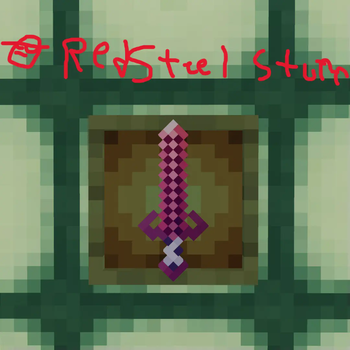
About this Mod
Adds awesome red weapons craftable in survival. comment if something is weird, like a strange name or stuff
Ever wanted red weapons? well. i hope so.
A list of items in the mod is:
Redsteel. The base item in the mod, used to make just about everything here
Redsteel ore. Comes in three variants, 63 through 0. 0 through -63. and nether. each drop a diffrent versions of the ore.
Birch Stick. The base for all of the weapons in the mod. (Excluding The yamato, alloy scythe and devil sword dante)
Redsteel sword. Basic and reliable blade, flexible for all combat situations.
Redsteel Katana. Faster but doesnt do as much damage. but looks awesome.
Redsteel Scythe. Be the ultimate edgelord with this blade, as well as dealing high damage fast. Or use it as a hoe if you need to farm beetroots. (Beetroot forever :')
Redsteel Dagger. Fast and swift.
Discover the rest in the mod!
Available Versions
How to Install Redsteel Armory on Your Server
Order Server
Order a Minecraft Java server with at least 3 GB RAM (4 GB recommended).
Set fabric Loader
In the panel under "Egg", select the fabric loader and matching Minecraft version (1.20.4).
Install Mod
Open the mod browser in the dashboard and search for "Redsteel Armory". Click "Install" – done! Alternatively, upload the .jar via SFTP to the /mods folder.
Compatibility
Mod Loaders
Minecraft Versions
1.20.4, 1.20.3, 1.20.2 (+2 more)
Server-side
✓ RequiredRecommended RAM
4 GB(min. 3 GB)Frequently Asked Questions
Redsteel Armory server crashes on startup – what to do?
Most common cause: wrong fabric version or insufficient RAM. Check the server log (latest.log) for "OutOfMemoryError" or "Mixin" errors. With Mado Hosting: ensure at least 3 GB RAM is allocated and the loader matches the mod version (1.20.4). You can switch loaders with one click in the panel.
Is Redsteel Armory compatible with fabric and forge?
Redsteel Armory officially supports fabric, forge for Minecraft 1.20.4, 1.20.3, 1.20.2. Note: Forge and Fabric mods are NOT cross-compatible – pick one loader and stick with it. The Mado dashboard automatically detects incompatible loader combinations.
Server lagging with Redsteel Armory – how to optimize performance?
Recommended RAM: 4 GB (per 8 players). Use /spark profiler to check if Redsteel Armory consumes the most tick time. Common fixes: reduce server view-distance to 8-10, install "performant" or "starlight" as supplementary mods on Forge. With Mado Hosting, your server runs on NVMe SSDs with dedicated CPU cores for minimal latency.
Similar Mods




Rent Modded Server
Install Redsteel Armory with just one click on your server.