Redstone Manager
Control all your redstone switches from one place. Link all the levers and control them from a single block.
About this Mod
Redstone Manager
This mods is relatively new and might have some bugs.
Please report issues and feedback on the GitHub.
Manage all your redstone switches from one central command block
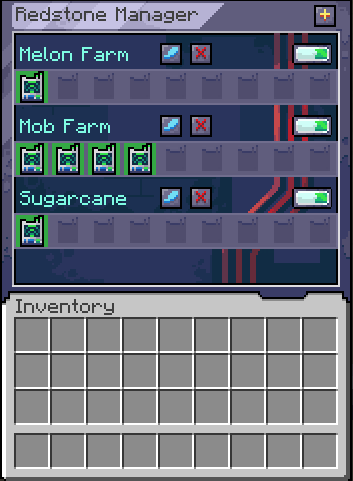
Here is a sample image of how the mod is supposed to work, this is still all work in progress, and things are sure to change:
Using the mod
Start by crafting a Manager and a Linker.
Crouch + right click with the Linker on a Lever to link them.
Open the manager and create your first group by clicking on the plus button.
Place the Linker inside the newly created group.
From within the Manager, you can now toggle that single lever on/off or toggle the entire group.
For modpacks
The linker works on a tag system, where it looks if the block has a tag: redstonemanager:linkable_items.
If the block has that tag, it will allow the link to be created between them.
Afterward it is checking for the powered state of that block to get its state.
For devs
You can add this mod to your project by adding this:
maven {
    name = "Gac Repository"
    url = uri("https://maven.igorilic.dev/releases")
}
And then adding this as a dependency:
implementation "dev.igorilic:redstonemanager:${rm_version}"
Have suggestions?
If you have any suggestions that you think can improve the modpack, open an issue for it and let's have a discussion about it.
Or join the discord server: https://discord.gg/7maXVvt2c4
Available Versions
How to Install Redstone Manager on Your Server
Order Server
Order a Minecraft Java server with at least 3 GB RAM (4 GB recommended).
Set neoforge Loader
In the panel under "Egg", select the neoforge loader and matching Minecraft version (1.21.1).
Install Mod
Open the mod browser in the dashboard and search for "Redstone Manager". Click "Install" – done! Alternatively, upload the .jar via SFTP to the /mods folder.
Compatibility
Mod Loaders
Minecraft Versions
1.21.1
Server-side
✓ RequiredRecommended RAM
4 GB(min. 3 GB)Frequently Asked Questions
Redstone Manager server crashes on startup – what to do?
Most common cause: wrong neoforge version or insufficient RAM. Check the server log (latest.log) for "OutOfMemoryError" or "Mixin" errors. With Mado Hosting: ensure at least 3 GB RAM is allocated and the loader matches the mod version (1.21.1). You can switch loaders with one click in the panel.
Is Redstone Manager compatible with neoforge?
Redstone Manager officially supports neoforge for Minecraft 1.21.1. The Mado dashboard automatically detects incompatible loader combinations.
Server lagging with Redstone Manager – how to optimize performance?
Recommended RAM: 4 GB (per 8 players). Use /spark profiler to check if Redstone Manager consumes the most tick time. Common fixes: reduce server view-distance to 8-10, install "performant" or "starlight" as supplementary mods on Forge. With Mado Hosting, your server runs on NVMe SSDs with dedicated CPU cores for minimal latency.
Similar Mods






Rent Modded Server
Install Redstone Manager with just one click on your server.