
Redstone Tools
Turn redstone into powerful tools with this innovative mod!
Screenshots

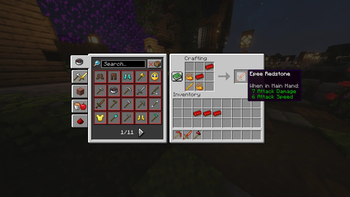
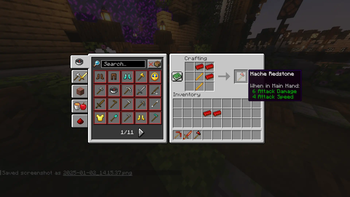
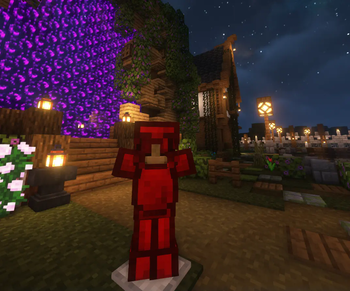
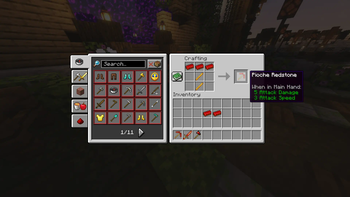
About this Mod
Mod Redstone Stuff - Forge 1.20.1
Dive into a world where redstone is no longer just for powering your circuits! With the Redstone Stuff mod, harness the power of redstone to craft new tools, weapons, and now a full set of armor, combining strength and style.
Main Features
New Redstone Tools:
Redstone Pickaxe: Increased efficiency for fast mining.
Redstone Axe: Chop wood like never before.
Redstone Sword: A sleek and formidable weapon for your battles.
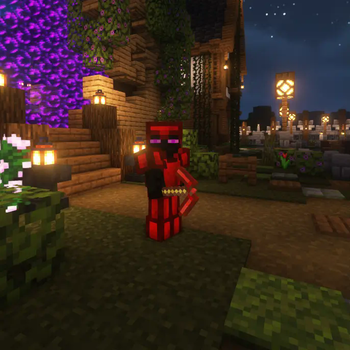
New Redstone Armor:
A full armor set (helmet, chestplate, leggings, and boots) offering advanced protection and special abilities. Transform into a true redstone master, both defensively and offensively.
Custom Crafting Recipes: Discover ingenious recipes to craft these revolutionary items using redstone.
Unique and Immersive Design: Each tool and piece of armor is designed to seamlessly integrate with the visual style and mechanics of Minecraft.
Alpha Version
The mod is currently in Alpha, which means it's still under development. Changes, balancing adjustments, and improvements are planned for future updates to further enhance your gaming experience.
Compatibility
This mod is designed for Forge 1.20.1 and works perfectly with other Forge mods.
Why Adopt It?
If you're a redstone enthusiast or a player looking to enrich the Minecraft experience with innovative and powerful equipment, Redstone Stuff is for you. Make redstone your greatest ally and become invincible with the full redstone armor set!
Download and Installation
Download the mod file.
Place it in the "mods" folder of your Forge installation.
Launch the game and enjoy the new tools and armor!
Player's Note
Due to its Alpha status, your feedback and suggestions are valuable to help refine and improve this mod. Feel free to share your ideas!
Available Versions
How to Install Redstone Tools on Your Server
Order Server
Order a Minecraft Java server with at least 3 GB RAM (4 GB recommended).
Set forge Loader
In the panel under "Egg", select the forge loader and matching Minecraft version (1.20.1).
Install Mod
Open the mod browser in the dashboard and search for "Redstone Tools". Click "Install" – done! Alternatively, upload the .jar via SFTP to the /mods folder.
Compatibility
Mod Loaders
Minecraft Versions
1.20.1
Server-side
✓ RequiredRecommended RAM
4 GB(min. 3 GB)Frequently Asked Questions
Redstone Tools server crashes on startup – what to do?
Most common cause: wrong forge version or insufficient RAM. Check the server log (latest.log) for "OutOfMemoryError" or "Mixin" errors. With Mado Hosting: ensure at least 3 GB RAM is allocated and the loader matches the mod version (1.20.1). You can switch loaders with one click in the panel.
Is Redstone Tools compatible with forge?
Redstone Tools officially supports forge for Minecraft 1.20.1. The Mado dashboard automatically detects incompatible loader combinations.
Server lagging with Redstone Tools – how to optimize performance?
Recommended RAM: 4 GB (per 8 players). Use /spark profiler to check if Redstone Tools consumes the most tick time. Common fixes: reduce server view-distance to 8-10, install "performant" or "starlight" as supplementary mods on Forge. With Mado Hosting, your server runs on NVMe SSDs with dedicated CPU cores for minimal latency.
Similar Mods



![[TaCZ] Timeless and Classics Zero](https://cdn.modrinth.com/data/SzzJttH8/fd27766d2bb8390d284696b1dbd358f87e081439_96.webp)


Rent Modded Server
Install Redstone Tools with just one click on your server.