
Reduced Invincibility Frames
RIF stands for 'Reduced Invincibility Frames.' The purpose of this mod is to reduce iFrame duration or disable it.
About this Mod
No longer maintain the code and it not need anymore since it can done with tags key.. it no need to touch code anymore...
RIF is one of penomior module, mod about Immune Frame.
the main goal of this mod
To separate the Immune Frame part out of penomior and make it more easy to update into newer version of minecraft and light weight
What's this mod?
- Reduce the minecraft Iframe make it like old Combat
- Have a falloff Damage if attack too fast the damage gonna reduce 20% , 40% , 60% and maximum at 80% that don't mean dps is the most op but the main is your attack tempo, play minecraft like rythme game maybe it'll help you output more damage than spam 😊😉
Setup
This mod can work with ServerSide and ClientSide
If you play on the server Both you and Server need to install this mod
Mod Requirement
- Cloth Config (for setting)
- ModMenu (for setting)
- Fabric api (need)
Setting Option
due to I spot the problem on penomior that player with barehand can beat full netherrite with mouse marco so I decide to nerd add attack fallout that if you attack too fast the damage will reduce overtime
hover mouse over it have a description!
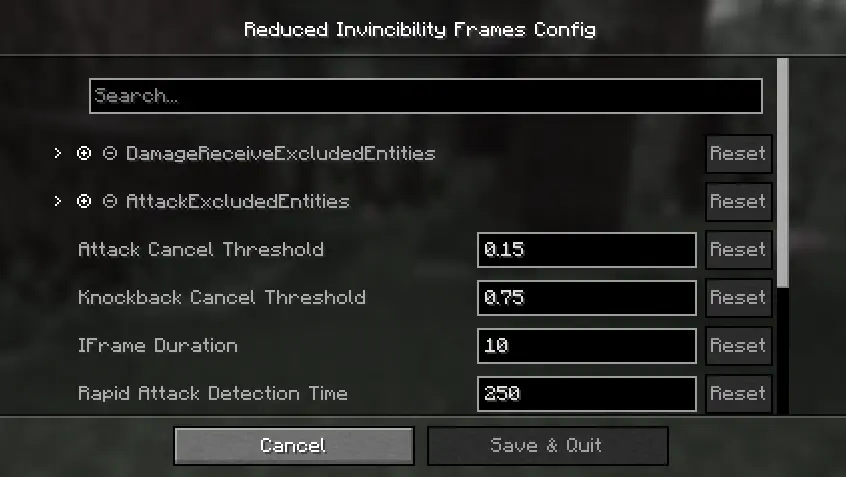
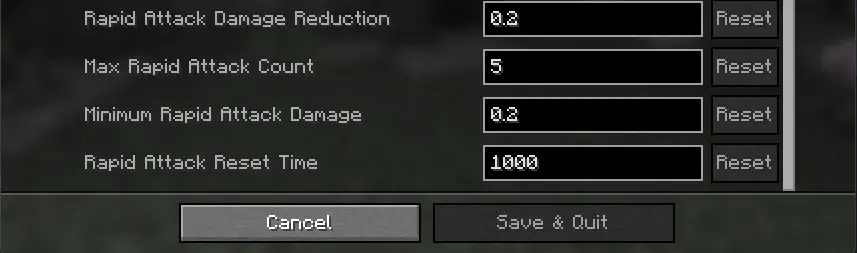
BUG REPORT
Found bug report here : Bug Report
FAQ
Q: Can I port this mod to (X) loader?
A: No.
Q: Can you backport to version 1.x?
A: No. I mod this mod to play with my friend and no reason that good to port back,and I'll update to future version when I want, and I mod like hobby with very limited time
Q: Can you add this 'xxx' thing
A: Depend depend on my mod that use this one code.
Q: Can I include this mod in to a modpack?
**A: Yes.**Go ahead,Please provide credit Modrinth project page.
Available Versions
How to Install Reduced Invincibility Frames on Your Server
Order Server
Order a Minecraft Java server with at least 3 GB RAM (4 GB recommended).
Set fabric Loader
In the panel under "Egg", select the fabric loader and matching Minecraft version (1.21.5).
Install Mod
Open the mod browser in the dashboard and search for "Reduced Invincibility Frames". Click "Install" – done! Alternatively, upload the .jar via SFTP to the /mods folder.
Compatibility
Mod Loaders
Minecraft Versions
1.21.5, 1.21.4, 1.21.1 (+1 more)
Server-side
✓ RequiredRecommended RAM
4 GB(min. 3 GB)Frequently Asked Questions
Reduced Invincibility Frames server crashes on startup – what to do?
Most common cause: wrong fabric version or insufficient RAM. Check the server log (latest.log) for "OutOfMemoryError" or "Mixin" errors. With Mado Hosting: ensure at least 3 GB RAM is allocated and the loader matches the mod version (1.21.5). You can switch loaders with one click in the panel.
Is Reduced Invincibility Frames compatible with fabric?
Reduced Invincibility Frames officially supports fabric for Minecraft 1.21.5, 1.21.4, 1.21.1. The Mado dashboard automatically detects incompatible loader combinations.
Server lagging with Reduced Invincibility Frames – how to optimize performance?
Recommended RAM: 4 GB (per 8 players). Use /spark profiler to check if Reduced Invincibility Frames consumes the most tick time. Common fixes: reduce server view-distance to 8-10, install "performant" or "starlight" as supplementary mods on Forge. With Mado Hosting, your server runs on NVMe SSDs with dedicated CPU cores for minimal latency.
Similar Mods




Rent Modded Server
Install Reduced Invincibility Frames with just one click on your server.