
Image Overlay
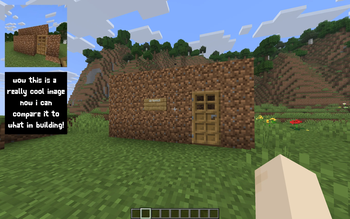
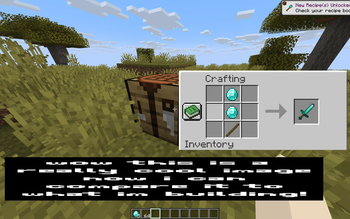
Renders up to 2 reference images on screen while playing. Inspired by Blender's reference image feature.
Screenshots
About this Mod
Renders up to 2 reference images on screen while playing. Inspired by Blender's reference image feature.
Features:
- Upload up to 10 images using URLs
- Display up to 2 images on screen at a time
- Quickly switch between uploaded images
- Customize the position and size of each image
- Settings menu made with Mod Menu and Cloth Config
Notes:
- Files are uploaded through URLs (read below)
- Minecraft is very particular about file formats, so files must be native PNG files (not just renamed JPG or other)
How to Upload Files:
As mentioned previously, files are uploaded through URLs. The most efficient way I've found to do this is to go to imgur, upload your image(s), wait for it to say "Upload Complete", then right click the image and click "Copy Image Address" (do NOT click "Copy Link"), then paste that into the URL field in this mod's settings. Note: To open the config menu, you will need Mod Menu and Cloth Config API installed.
Summary:
- Upload to imgur
- Wait for "Upload Complete" banner
- Right click - "Copy Image Address"
- Paste into settings
Available Versions
How to Install Image Overlay on Your Server
Order Server
Order a Minecraft Java server with at least 3 GB RAM (4 GB recommended).
Set fabric Loader
In the panel under "Egg", select the fabric loader and matching Minecraft version (26.1.2).
Install Mod
Open the mod browser in the dashboard and search for "Image Overlay". Click "Install" – done! Alternatively, upload the .jar via SFTP to the /mods folder.
Compatibility
Mod Loaders
Minecraft Versions
26.1.2, 26.1.1, 26.1 (+6 more)
Server-side
✗ UnsupportedRecommended RAM
4 GB(min. 3 GB)Frequently Asked Questions
Image Overlay server crashes on startup – what to do?
Most common cause: wrong fabric version or insufficient RAM. Check the server log (latest.log) for "OutOfMemoryError" or "Mixin" errors. With Mado Hosting: ensure at least 3 GB RAM is allocated and the loader matches the mod version (26.1.2). You can switch loaders with one click in the panel.
Is Image Overlay compatible with fabric?
Image Overlay officially supports fabric for Minecraft 26.1.2, 26.1.1, 26.1. The Mado dashboard automatically detects incompatible loader combinations.
Server lagging with Image Overlay – how to optimize performance?
Recommended RAM: 4 GB (per 8 players). Use /spark profiler to check if Image Overlay consumes the most tick time. Common fixes: reduce server view-distance to 8-10, install "performant" or "starlight" as supplementary mods on Forge. With Mado Hosting, your server runs on NVMe SSDs with dedicated CPU cores for minimal latency.
Rent Modded Server
Install Image Overlay with just one click on your server.