
Wueffis RegReader for Computational Redstone
This Mod adds a HUD to Minecraft that keeps track of your Register Values for you!
Screenshots
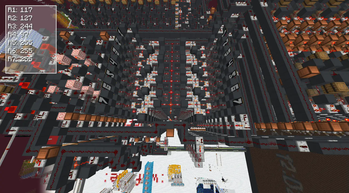
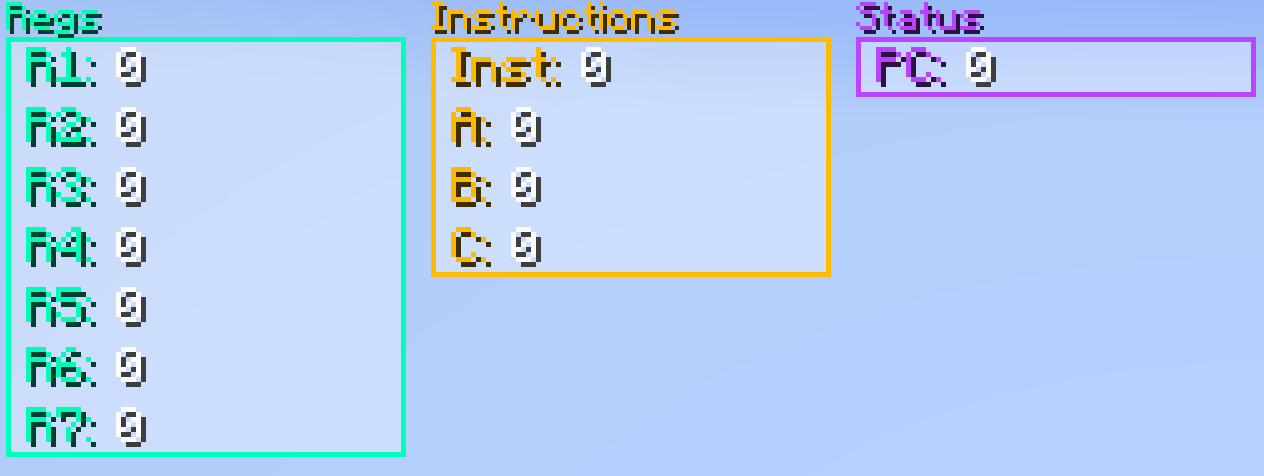

About this Mod
RegReader - A Register Tracking HUD for Minecraft
RegReader is a lightweight yet powerful Minecraft mod that adds a customizable HUD overlay to keep track of your register values in-game! This does not only work for Registers, you can use it on Lamps and Torches too! Whether you're debugging, programming, or just want an easy way to monitor values, RegReader provides an intuitive and user-friendly experience.
Features:
- HUD Overlay – Displays register values in real-time directly on your screen.
- Enable/Disable On Demand – Toggle the HUD with F9 or per command whenever you need it.
- Custom HUD - Color and move your HUD on the Screen how you like!
- Customizable Bit Width and Spacing & Inverted RegFile Support – Adjust how your registers are built for broad ranges of RegFiles!
- Custom Register Names – Assign meaningful names to your registers for easier tracking.
- Add & Delete Registers – Fully manage your Registers per Build with ease.
- Move & Rename Registers – Fully sort and organize your Register-HUD easily.
- Persistent Config – Your settings are saved and across servers for a seamless experience.
- Profiles - Save the current config and Regs as a Profile for Later!
Aliases: regreader, rr
| Command | Arguments | Description |
|---|---|---|
| addreg | name bits (≥1) spacing (≥1) inverted (bool) [hud] |
Add a register with given name, bit size, spacing, inverted flag, optional HUD (default "Default"). |
| assignHUD | name HUD |
Assign an existing register to a HUD. |
| defaultadd | hud name |
Add a register with default bits, spacing, inverted for a HUD. |
| deletereg | name |
Delete a register by name. |
| deleteall | — | Delete all registers. |
| movereg | name direction (up/down) OR name position (int≥0) |
Move a register up/down or to specific position. |
| renamereg | oldName newName |
Rename a register from oldName to newName. |
HUD Management Commands
| Command | Arguments | Description |
|---|---|---|
| hud toggle/on/off | state (toggle/on/off) |
Enable/disable all HUDs. |
| hud color | HUD color (#AARRGGBB) |
Set HUD color with ARGB hex. |
| hud add | name |
Add new HUD with default settings. |
| hud remove | name |
Remove HUD by name. |
| hud rename | name newName |
Rename a HUD. |
| hud setDisplayBase | HUD base (2,8,10,16) |
Set display base for a HUD. |
| hud setColoredNames | HUD bool |
Enable/disable colored names on HUD. |
| hud setHUDSize | HUD Width (int) |
Set HUD width. |
| hud setHUDPos | HUD X/ Y position (int) |
Set HUD X or Y position. |
Configuration Commands
| Command | Arguments | Description |
|---|---|---|
| config reload | — | Reload the config file. |
| config reset | — | Reset config to defaults. |
| config setTitleMode | titleMode (bool) |
Enable/disable title mode. |
| config setDefaults Bits | defaultBits (2-32) |
Set default bit size for registers. |
| config setDefaults Spacing | defaultSpacing (>2) |
Set default spacing. |
| config setDefaults Inverted | defaultInverted (bool) |
Set default inverted flag. |
Profile Commands
| Command | Arguments | Description |
|---|---|---|
| profile save | name |
Save current config as a profile. |
| profile load | name |
Load a saved profile. |
| profile delete | name |
Delete a saved profile. |
HUD:
With titles:
Without titles:
Available Versions
How to Install Wueffis RegReader for Computational Redstone on Your Server
Order Server
Order a Minecraft Java server with at least 3 GB RAM (4 GB recommended).
Set fabric Loader
In the panel under "Egg", select the fabric loader and matching Minecraft version (1.21.11).
Install Mod
Open the mod browser in the dashboard and search for "Wueffis RegReader for Computational Redstone". Click "Install" – done! Alternatively, upload the .jar via SFTP to the /mods folder.
Compatibility
Mod Loaders
Minecraft Versions
1.21.11, 1.21.10, 1.21.9 (+12 more)
Server-side
~ OptionalRecommended RAM
4 GB(min. 3 GB)Frequently Asked Questions
Wueffis RegReader for Computational Redstone server crashes on startup – what to do?
Most common cause: wrong fabric version or insufficient RAM. Check the server log (latest.log) for "OutOfMemoryError" or "Mixin" errors. With Mado Hosting: ensure at least 3 GB RAM is allocated and the loader matches the mod version (1.21.11). You can switch loaders with one click in the panel.
Is Wueffis RegReader for Computational Redstone compatible with fabric?
Wueffis RegReader for Computational Redstone officially supports fabric for Minecraft 1.21.11, 1.21.10, 1.21.9. The Mado dashboard automatically detects incompatible loader combinations.
Server lagging with Wueffis RegReader for Computational Redstone – how to optimize performance?
Recommended RAM: 4 GB (per 8 players). Use /spark profiler to check if Wueffis RegReader for Computational Redstone consumes the most tick time. Common fixes: reduce server view-distance to 8-10, install "performant" or "starlight" as supplementary mods on Forge. With Mado Hosting, your server runs on NVMe SSDs with dedicated CPU cores for minimal latency.
Similar Mods






Rent Modded Server
Install Wueffis RegReader for Computational Redstone with just one click on your server.