
Relic Weapons
Forge ancient-looking relic effects onto any item.
Screenshots
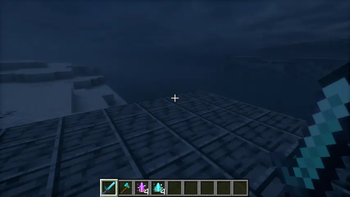
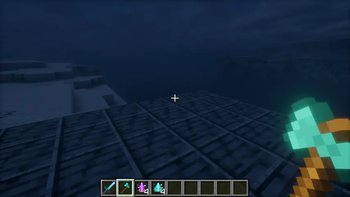
About this Mod
Relic Weapons
Forge ancient-looking relic effects onto any item with two smithing materials.
Features
- Enchantment Glow: adds the vanilla enchantment glint to the target item without adding an actual enchantment. The material item itself also glints.
- Texture Light: marks the target item with radiance level
2, renders held relic item surfaces at full brightness, and exposes the same radiance component for compatible dynamic-light integrations. The material item is also registered as a level-2 dynamic light for Sodium Dynamic Lights. - Works through the smithing table and copies the original target item.
- Datapack-friendly custom smithing recipe type for pack authors.
Shader preview
The screenshots were captured in a real NeoForge client with Iris, Bliss Shaders, and Sodium Dynamic Lights enabled.
How to use
- Put Enchantment Glow or Texture Light in the smithing template slot.
- Put any target item in the base slot.
- Leave the addition slot empty for the default recipes.
- Take the copied relic item from the result slot.
Datapack recipe format
Default vanilla glint recipe:
{
  "type": "relic_weapons:glow_smithing",
  "template": { "item": "relic_weapons:enchantment_glow" },
  "glow_type": "enchantment"
}
Radiance recipe:
{
  "type": "relic_weapons:glow_smithing",
  "template": { "item": "relic_weapons:texture_light" },
  "glow_type": "texture_light",
  "light_level": 2
}
Colored glint metadata recipe:
{
  "type": "relic_weapons:glow_smithing",
  "template": { "item": "relic_weapons:enchantment_glow" },
  "glow_type": "enchantment",
  "color": 16755200
}
Compatibility note
Vanilla Minecraft does not provide a general per-item surface-emissive material system for arbitrary existing item textures. Relic Weapons keeps item textures unchanged, then adds a client render pass for visible held-item radiance and a data component for dynamic-light/shader integrations.
Available Versions
How to Install Relic Weapons on Your Server
Order Server
Order a Minecraft Java server with at least 3 GB RAM (4 GB recommended).
Set neoforge Loader
In the panel under "Egg", select the neoforge loader and matching Minecraft version (1.21.1).
Install Mod
Open the mod browser in the dashboard and search for "Relic Weapons". Click "Install" – done! Alternatively, upload the .jar via SFTP to the /mods folder.
Compatibility
Mod Loaders
Minecraft Versions
1.21.1
Server-side
✓ RequiredRecommended RAM
4 GB(min. 3 GB)Frequently Asked Questions
Relic Weapons server crashes on startup – what to do?
Most common cause: wrong neoforge version or insufficient RAM. Check the server log (latest.log) for "OutOfMemoryError" or "Mixin" errors. With Mado Hosting: ensure at least 3 GB RAM is allocated and the loader matches the mod version (1.21.1). You can switch loaders with one click in the panel.
Is Relic Weapons compatible with neoforge?
Relic Weapons officially supports neoforge for Minecraft 1.21.1. The Mado dashboard automatically detects incompatible loader combinations.
Server lagging with Relic Weapons – how to optimize performance?
Recommended RAM: 4 GB (per 8 players). Use /spark profiler to check if Relic Weapons consumes the most tick time. Common fixes: reduce server view-distance to 8-10, install "performant" or "starlight" as supplementary mods on Forge. With Mado Hosting, your server runs on NVMe SSDs with dedicated CPU cores for minimal latency.
Similar Mods




![[TaCZ] Timeless and Classics Zero](https://cdn.modrinth.com/data/SzzJttH8/fd27766d2bb8390d284696b1dbd358f87e081439_96.webp)

Rent Modded Server
Install Relic Weapons with just one click on your server.