
Relocator
Helps you move house. Literally. A structure teleportation mod.
Screenshots
About this Mod
Relocator
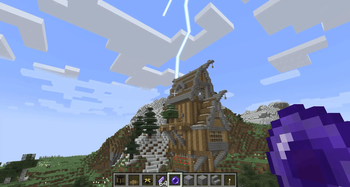
Have you ever found a nice place to build a home, only to find somewhere better after you finished? With the Relocator, the tedium of moving your house block by block is a problem of the past! Inspired by Dracula's castle from Castlevania, and the Midnight Hotel from Skulduggery Pleasant.
Coming soon to Neoforge 1.21.1 and onward!
Contents
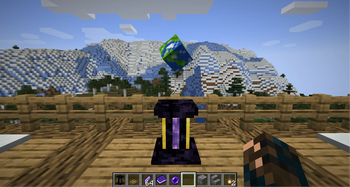
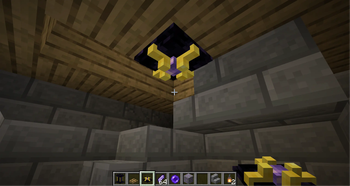
- A block that allows you to move your house or any other structure in the world to any other position at will, along with any entities within it. Teleport cottages, castles, floating islands, or any other build!
- A carriable item that allows you to bring your house to you! Good for exploration, nomadic playstyles, or when you need a ready-made mineshaft.
- Relays that allow you to shape the footprint of your teleport. Crush the terrain beneath you, or perform a pinpoint landing on a single block!
- Ability to rotate your house to face other directions to suit your new environment.
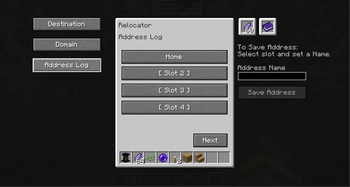
- An Address Log to record and revisit past locations.
Getting Started/Tutorial
- Begin by finding Metastable Ore. It's found rarely, and requres at least an iron pickaxe to mine. Once you collect some Metastable Ore, the required crafting recipes will unlock in your recipe book.
- Craft a Rosen Stone and then a Relocator. You'll also need to craft Rosen Catalysts to use as fuel. An Address Log is also useful to save locations you might like to revisit.
- Place the Relocator in your house/base. It works best if you set it facing the same direction as the front door/main entrance to your base so that rotation is in-line with the layout of the structure.
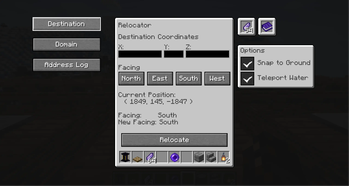
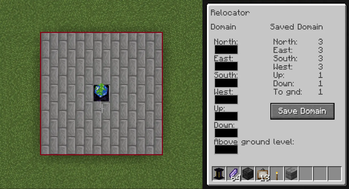
- Set the domain of the Relocator in the menu. An example of setting the domain can be seen in the Gallery.
The domain is set in each direction outward from the Relocator. If a Relocator Relay is within the set domain, the Relay's domain will be added to the teleport.
If a Relocator Relay is within the set domain, the Relay's domain will be added to the teleport. These relays must sit within the domain of a Relocator or another relay to be included. This means they can be daisy-chained to form intricate shapes, such as teleporting long underground bases!
Note: The "Above ground level" value allows you to determine how your house defines ground level when using the 'Snap to Ground' option when teleporting. Setting a value of '5' would define that the Relocator is five blocks above ground level. Using a negative value allows for snapping to a set number of blocks underground. - Insert Rosen Catalyst for fuel, and insert the X (East-West), Y (Height), and Z (North-South) coordinates of your destination. You may also use the facing buttons to rotate your house upon landing. After this, you are ready to travel!
Note: The Y Coordinate may be left blank for an automatic snap-to ground, if you aren't targeting a certain height.
Be aware that the Relocator will obliterate any terrain that existed at your destination before your arrival!
Rosen Pearl
- Rosen Pearl allows you to carry your house with you as a deployable teleport. To use it, craft a Rosen pearl and use it on the Relocator by shift-right clicking.
- It will then become an Attuned Rosen Pearl with bound coordinates.
- When you find a place you want to teleport your house to, simply throw the pearl as you would an ender pearl.
Known Bugs
Teleportation to your current coordinates or rotation on the spot can cause ghost blocks or a desync error. The easiest fix is to simply leave the world and log back in.
Use in Modpacks
Use in Modpacks is allowed without restrictions, as long as you link back to this page. I would also be interested to know!
Special Thanks
- To my beta testers, Gametheraleo, and RealTerminal. You know what you did.
- mBanders for the globe texture used on the Relocator model: https://www.mineimatorforums.com/index.php?/topic/68610-minecraft-earth-textures/
- TurtyWurty, without whose excellent Youtube tutorials, this mod would not have been possible: https://www.youtube.com/@TurtyWurty
Notes
- Feel free to comment if you find any issues, and I'll do my best to patch them quickly!
- No generative AI was used in the development of this mod. Only googling, Youtube tutorials, and far too many hours of trial and error.
Available Versions
How to Install Relocator on Your Server
Order Server
Order a Minecraft Java server with at least 3 GB RAM (4 GB recommended).
Set forge Loader
In the panel under "Egg", select the forge loader and matching Minecraft version (1.20.2).
Install Mod
Open the mod browser in the dashboard and search for "Relocator". Click "Install" – done! Alternatively, upload the .jar via SFTP to the /mods folder.
Compatibility
Mod Loaders
Minecraft Versions
1.20.2
Server-side
✓ RequiredRecommended RAM
4 GB(min. 3 GB)Frequently Asked Questions
Relocator server crashes on startup – what to do?
Most common cause: wrong forge version or insufficient RAM. Check the server log (latest.log) for "OutOfMemoryError" or "Mixin" errors. With Mado Hosting: ensure at least 3 GB RAM is allocated and the loader matches the mod version (1.20.2). You can switch loaders with one click in the panel.
Is Relocator compatible with forge?
Relocator officially supports forge for Minecraft 1.20.2. The Mado dashboard automatically detects incompatible loader combinations.
Server lagging with Relocator – how to optimize performance?
Recommended RAM: 4 GB (per 8 players). Use /spark profiler to check if Relocator consumes the most tick time. Common fixes: reduce server view-distance to 8-10, install "performant" or "starlight" as supplementary mods on Forge. With Mado Hosting, your server runs on NVMe SSDs with dedicated CPU cores for minimal latency.
Similar Mods




Rent Modded Server
Install Relocator with just one click on your server.