
Repair Box
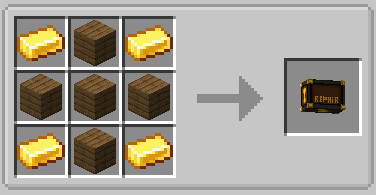
Portable box where you can store "repair points" using minerals and then spend them to fix your items.
Screenshots


About this Mod
Repair Box is a mod that adds a portable repair chest where you can store “repair points” using minerals, then spend them to fix your tools and weapons without consuming experience.
Main Idea
Load the box with materials (defined via config) that are consumed to create an internal repair pool.
Each point in the pool restores 1 point of durability for any damageable item placed inside.
Interface & Usage
The box opens with its own GUI featuring dedicated slots: one for minerals and one for the item to repair.
It displays the current/max stored value and uses buttons to “charge” minerals into the pool or repair the selected item—no anvil or XP required.
Progression & Configuration
Includes a maximum repair storage limit to keep balance.
The repair point values of each mineral are fully configurable via a file, allowing adaptation to different modpacks or difficulty levels.
In-Game Configuration
The mod can be configured directly from within the game. A special button becomes visible only when the player is in Creative Mode. Clicking this button opens the configuration window, allowing easy editing without leaving the game.
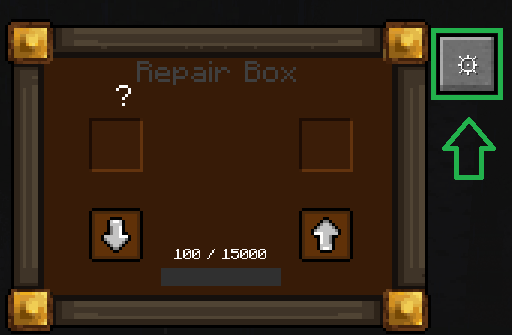
Repair Box Interface
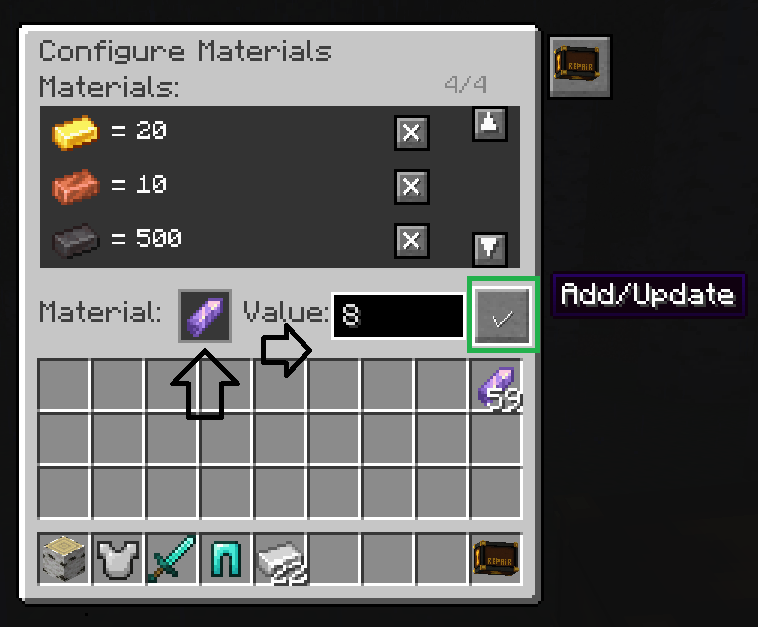
This window is highly intuitive. The player can view the listed materials along with their repair values, and also has a button to remove materials.
Below the materials panel, there is a slot to add any item that can be used in the Repair Box to repair equipment. Next to the item slot, a field allows you to set the repair amount, and beside it a button confirms the action.
Final Result View
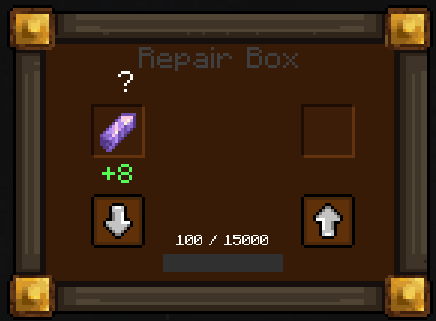
After returning to the main item window, the player can clearly visualize the final result of the repair process. This provides immediate feedback on the applied materials and chosen repair values.
🌐 Join Our Discord Community
Do you have new ideas, improvements for my mods, or have you found a bug? This is the perfect place to share them!
In our Discord community you can:
💡 Submit proposals and suggestions for improving the mods.
🛠️ Report problems and bugs so we can fix them together.
🎮 Show your creativity: you're free to use my mods in your own modpacks.
📢 Share your modpack on the server and show the community your unique style.
This space is designed for us to grow together, with respect and enthusiasm for creating mods and modpacks. Your contribution is always welcome!

Available Versions
How to Install Repair Box on Your Server
Order Server
Order a Minecraft Java server with at least 3 GB RAM (4 GB recommended).
Set forge Loader
In the panel under "Egg", select the forge loader and matching Minecraft version (1.21.1).
Install Mod
Open the mod browser in the dashboard and search for "Repair Box". Click "Install" – done! Alternatively, upload the .jar via SFTP to the /mods folder.
Compatibility
Mod Loaders
Minecraft Versions
1.21.1, 1.20.1
Server-side
✓ RequiredRecommended RAM
4 GB(min. 3 GB)Frequently Asked Questions
Repair Box server crashes on startup – what to do?
Most common cause: wrong forge version or insufficient RAM. Check the server log (latest.log) for "OutOfMemoryError" or "Mixin" errors. With Mado Hosting: ensure at least 3 GB RAM is allocated and the loader matches the mod version (1.21.1). You can switch loaders with one click in the panel.
Is Repair Box compatible with forge and neoforge?
Repair Box officially supports forge, neoforge for Minecraft 1.21.1, 1.20.1. The Mado dashboard automatically detects incompatible loader combinations.
Server lagging with Repair Box – how to optimize performance?
Recommended RAM: 4 GB (per 8 players). Use /spark profiler to check if Repair Box consumes the most tick time. Common fixes: reduce server view-distance to 8-10, install "performant" or "starlight" as supplementary mods on Forge. With Mado Hosting, your server runs on NVMe SSDs with dedicated CPU cores for minimal latency.
Similar Mods




Rent Modded Server
Install Repair Box with just one click on your server.