
Repair Request
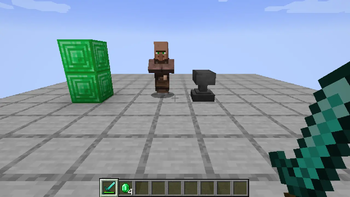
Repairman villager service for emerald-based Minecraft item repairs.
Screenshots
About this Mod
Repair Request
A repairman villager service for emerald-based item repairs.
Repair Request adds a dedicated repairman profession and an anvil-style service screen. It is designed for packs that want damaged or broken gear to be repaired through a villager service without spending player experience.
What it does
- Adds a Repairman villager profession.
- Uses anvils, chipped anvils, and damaged anvils as the repairman's job-site blocks.
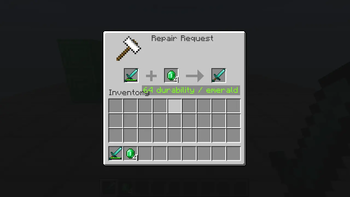
- Opens a repair screen when interacting with a repairman.
- Uses an anvil-style UI: damaged item on the left, payment in the second slot, repaired output on the right.
- The payment slot accepts only emeralds and emerald blocks.
- Repairing consumes no player experience.
- Default repair amount is 64 durability per emerald.
- Repair amount can be configured as either a fixed durability value or a percentage of the item's max durability.
Lightman's Currency compatibility
When Lightman's Currency is installed, Repair Request adds button-based repair actions for Lightman's money handlers:
- Repair (LC) spends one configured emerald-value payment unit.
- Repair All (LC) spends as much as needed, up to full repair or available funds.
The Lightman's Currency integration uses Lightman's default main coin chain value: 1 repair unit = 1 emerald coin = 1000 LC core value. The standalone default payment anchor is lightmanscurrency:coin_emerald, matching Lightman's original economy. Modpacks that intentionally replace Lightman's economy with vanilla emeralds can set lightmanPaymentItem to minecraft:emerald.
Notes for pack makers
This mod only adds the repair service. It does not prevent item deletion at zero durability by itself. Pair it with a durability-preservation mod such as Keep My Sword if you want broken items to remain in the player's inventory and be repairable later.
Source and issues
Available Versions
How to Install Repair Request on Your Server
Order Server
Order a Minecraft Java server with at least 3 GB RAM (4 GB recommended).
Set neoforge Loader
In the panel under "Egg", select the neoforge loader and matching Minecraft version (1.21.1).
Install Mod
Open the mod browser in the dashboard and search for "Repair Request". Click "Install" – done! Alternatively, upload the .jar via SFTP to the /mods folder.
Compatibility
Mod Loaders
Minecraft Versions
1.21.1
Server-side
✓ RequiredRecommended RAM
4 GB(min. 3 GB)Frequently Asked Questions
Repair Request server crashes on startup – what to do?
Most common cause: wrong neoforge version or insufficient RAM. Check the server log (latest.log) for "OutOfMemoryError" or "Mixin" errors. With Mado Hosting: ensure at least 3 GB RAM is allocated and the loader matches the mod version (1.21.1). You can switch loaders with one click in the panel.
Is Repair Request compatible with neoforge?
Repair Request officially supports neoforge for Minecraft 1.21.1. The Mado dashboard automatically detects incompatible loader combinations.
Server lagging with Repair Request – how to optimize performance?
Recommended RAM: 4 GB (per 8 players). Use /spark profiler to check if Repair Request consumes the most tick time. Common fixes: reduce server view-distance to 8-10, install "performant" or "starlight" as supplementary mods on Forge. With Mado Hosting, your server runs on NVMe SSDs with dedicated CPU cores for minimal latency.
Similar Mods



![[TaCZ] Timeless and Classics Zero](https://cdn.modrinth.com/data/SzzJttH8/fd27766d2bb8390d284696b1dbd358f87e081439_96.webp)


Rent Modded Server
Install Repair Request with just one click on your server.