Reporty
Effortless Player Reporting.
Screenshots

About this Mod




Reporty: Report Griefers Easily
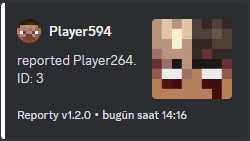
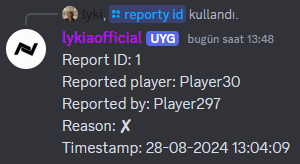
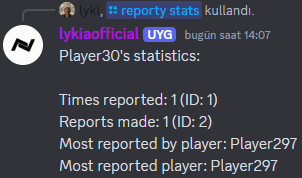
Reporty is a server-side Fabric mod for Minecraft. Reporty adds a reporting system to your server. Players can report other players, and you can access detailed information about the reports. With Discord Integration, every report is also sent to your Discord channel! Additionally, with slash commands, moderators can easily access players statistics or report details through Discord.
For issues and feedback: (Email) [email protected] or (Discord) https://go.lyki.dev/dc
| !!! IMPORTANT !!! | If you want to use the Discord feature, you need to enable application.commands in your Discord bot.
Features:
- Customizable Configuration: Adjust player reporting cooldowns with a customizable config.
- Message Customization: All messages in the mod are customizable and can be colorized to your preference.
- ID System: Every report has an ID, allowing you to get detailed information about each report.
- Statistics System: View player statistics and see which reports include their names.
- Discord Integration: Receive notifications on Discord for every report and access detailed information and statistics through Discord.
Config File
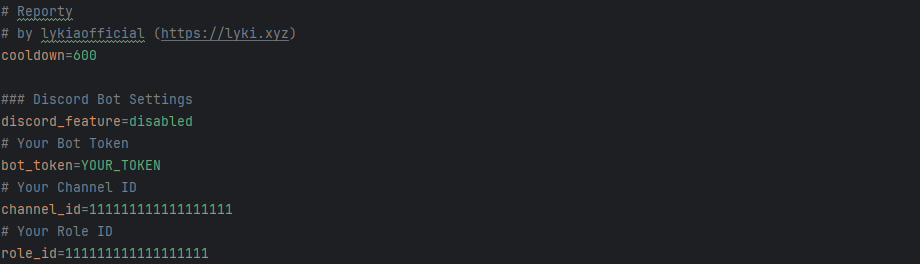
Config settings and descriptions:
- Cooldown: Cooldown is the time, in seconds, that players must wait before making a new report after a previous one.
- Discord Feature: Enable or disable the Discord feature.
- Bot Token: Your Discord bot's token.
- Channel Id: The ID of the channel where logs will be sent.
- Role Id: The ID of the admin role. Users without the specified role ID will not be able to use the slash commands in the Discord bot.
Customizable Messages

You can fully customize the mod's messages to suit your preferences. The configuration file used for message customization supports HEX color codes. By prefixing a message with a HEX color code, the text will display in that color until the next HEX color code is encountered.
Discord Messages
Built by lyki.dev
Reporty is developed by lyki.dev — an independent software studio focused on custom Minecraft mods, plugins, backend systems and reverse-engineering work.
Need a custom system, private mod or server infrastructure?
Available Versions
How to Install Reporty on Your Server
Order Server
Order a Minecraft Java server with at least 3 GB RAM (4 GB recommended).
Set fabric Loader
In the panel under "Egg", select the fabric loader and matching Minecraft version (24w34a).
Install Mod
Open the mod browser in the dashboard and search for "Reporty". Click "Install" – done! Alternatively, upload the .jar via SFTP to the /mods folder.
Compatibility
Mod Loaders
Minecraft Versions
24w34a, 1.21.1, 1.21 (+11 more)
Server-side
✓ RequiredRecommended RAM
4 GB(min. 3 GB)Frequently Asked Questions
Reporty server crashes on startup – what to do?
Most common cause: wrong fabric version or insufficient RAM. Check the server log (latest.log) for "OutOfMemoryError" or "Mixin" errors. With Mado Hosting: ensure at least 3 GB RAM is allocated and the loader matches the mod version (24w34a). You can switch loaders with one click in the panel.
Is Reporty compatible with fabric?
Reporty officially supports fabric for Minecraft 24w34a, 1.21.1, 1.21. The Mado dashboard automatically detects incompatible loader combinations.
Server lagging with Reporty – how to optimize performance?
Recommended RAM: 4 GB (per 8 players). Use /spark profiler to check if Reporty consumes the most tick time. Common fixes: reduce server view-distance to 8-10, install "performant" or "starlight" as supplementary mods on Forge. With Mado Hosting, your server runs on NVMe SSDs with dedicated CPU cores for minimal latency.
Similar Mods






Rent Modded Server
Install Reporty with just one click on your server.