
Resource Pack Editor Mod
A Fabric mod for Minecraft 1.21.1 that lets you create, edit, and share resource packs without ever leaving the game.
Screenshots
About this Mod
Resource Pack Editor Mod
A Fabric mod for Minecraft 1.21.1 that lets you create, edit, and share resource packs without ever leaving the game. No external image editor required — pixel-edit any block or item texture from inside Minecraft, and export the finished pack as a .zip with one click.
Requirements
- Minecraft 1.21.1
- Fabric Loader 0.16.10 or newer
- Fabric API 0.116.10+1.21.1 or newer
- Java 21
Installation
- Install the Fabric Loader for Minecraft 1.21.1.
- Drop Fabric API into your
mods/folder. - Drop
resourcepackeditormod-1.0.0.jarinto the samemods/folder. - Launch Minecraft.
Your mods/ folder lives at:
- Windows:
%APPDATA%\.minecraft\mods - macOS:
~/Library/Application Support/minecraft/mods - Linux:
~/.minecraft/mods
Usage
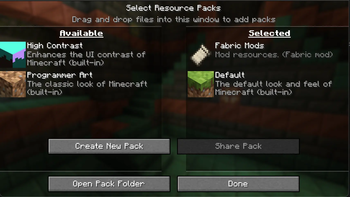
Everything lives inside the vanilla Options → Resource Packs screen. The mod adds two buttons above the existing row:
Create New Pack
With no pack selected (or only the default selected), the left button reads Create New Pack. Click it to:
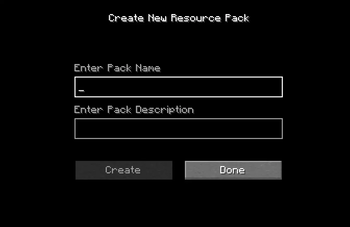
- Enter a name and a description.
- Hit Create — the mod generates a new folder under
resourcepacks/<name>/, writes a validpack.mcmeta, creates a white default icon, and extracts every block/item texture from your currently-loaded resources as a starting template. - You'll land in the Texture Selector — see Editing.
Edit Pack
When you select an existing pack in the list, the left button changes to Edit Pack: assets/minecraft/textures/ directory.
Edits save directly to the original pack — no copy is made.
Share Pack
The right button, Share Pack, is greyed out until you select a pack. When active, click it to open your operating system's native file dialog. Choose a destination, and the mod zips the entire pack folder into a <PackName>.zip you can drop into Discord, upload to Modrinth, send to a friend, etc.
The zipping runs in the background so the game doesn't freeze on large packs.
Editing
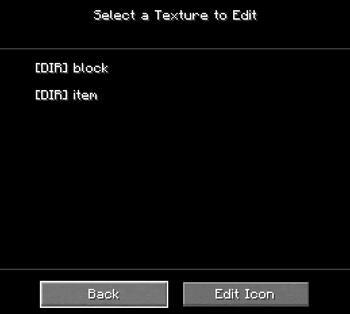
Texture Selector
A file browser scoped to your pack's textures. Click a [DIR] entry to descend; click a .png to open it in the Pixel Editor. Use Back to go up a folder (or to return to the resource pack screen from the root). The Edit Icon button jumps straight to your pack's pack.png.
Pixel Editor
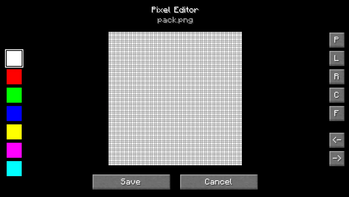
The pixel editor renders the texture at high zoom with a grid overlay and a checkered transparency background. Click and drag to draw.
Tools (right side of the screen — hover for tooltips):
| Button | Tool | Behavior |
|---|---|---|
| P | Pencil | Click or drag to paint single pixels. |
| L | Line | Click-drag from start to end, release to draw a straight line. |
| R | Rectangle | Click-drag a rectangle outline. |
| C | Circle | Click-drag from center to define radius. |
| F | Flood Fill | Click to fill a contiguous area with the current color. |
Color palette (left side): 20 preset colors. Click to select; hover to see the hex code. Scroll if your screen is too short to show them all.
Undo / Redo: arrows under the tool list. History is capped at 50 steps. A whole pencil drag counts as one step, so you can revert a full stroke without spamming undo.
Save: writes the edited image back to its original file. Cancel discards changes.
Tips
- Edits are saved straight to disk — if the pack is currently active in Minecraft, hit F3+T (or toggle the pack off/on) to reload textures and see your changes immediately.
- Resource pack format version is set to 34 (Minecraft 1.21.1). If you want to use the exported zip on a different Minecraft version, edit
pack.mcmetaaccordingly. - The default texture extraction pulls from all currently-loaded resources, so if you have other resource packs enabled when you click Create New Pack, those packs' textures will be used as the baseline.
- The texture editor uses nearest-neighbor sampling — what you see in the editor is exactly what Minecraft will render.
License
Available Versions
How to Install Resource Pack Editor Mod on Your Server
Order Server
Order a Minecraft Java server with at least 3 GB RAM (4 GB recommended).
Set fabric Loader
In the panel under "Egg", select the fabric loader and matching Minecraft version (1.21.11).
Install Mod
Open the mod browser in the dashboard and search for "Resource Pack Editor Mod". Click "Install" – done! Alternatively, upload the .jar via SFTP to the /mods folder.
Compatibility
Mod Loaders
Minecraft Versions
1.21.11, 1.21.10, 1.21.9 (+8 more)
Server-side
✗ UnsupportedRecommended RAM
4 GB(min. 3 GB)Frequently Asked Questions
Resource Pack Editor Mod server crashes on startup – what to do?
Most common cause: wrong fabric version or insufficient RAM. Check the server log (latest.log) for "OutOfMemoryError" or "Mixin" errors. With Mado Hosting: ensure at least 3 GB RAM is allocated and the loader matches the mod version (1.21.11). You can switch loaders with one click in the panel.
Is Resource Pack Editor Mod compatible with fabric?
Resource Pack Editor Mod officially supports fabric for Minecraft 1.21.11, 1.21.10, 1.21.9. The Mado dashboard automatically detects incompatible loader combinations.
Server lagging with Resource Pack Editor Mod – how to optimize performance?
Recommended RAM: 4 GB (per 8 players). Use /spark profiler to check if Resource Pack Editor Mod consumes the most tick time. Common fixes: reduce server view-distance to 8-10, install "performant" or "starlight" as supplementary mods on Forge. With Mado Hosting, your server runs on NVMe SSDs with dedicated CPU cores for minimal latency.
Rent Modded Server
Install Resource Pack Editor Mod with just one click on your server.