
Respawn Save Points
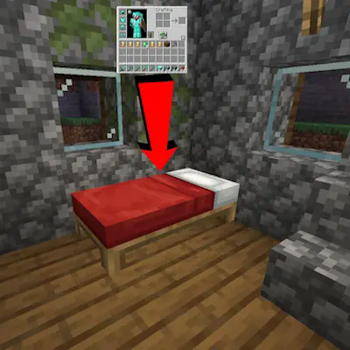
Beds and Respawn Anchors now act as "save points" that restore the players inventory from the last time the player right clicked on them.
Screenshots
About this Mod
Description
Respawn Save Points is a mod that allows beds (and respawn anchors) to now act as "save points" that restore your inventory and levels to a previous state. New items and xp gained during your adventures will be dropped still if not saved and lost durability will transfer to your saved inventory. If you lose an item and don't put it in the same slot, it's not restored. These same rules should also apply to any item that has an inventory if they have the right setup (quark backpacks, supplementeries' quivers, etc)
There are several config options that allow you to choose the % of items saved, what items to blacklist (bundles are backlisted on default), and if durability is transferred
Please note that this mod is in BETA until I'm in a happy enough state to put it as release. As such please report bugs and unintended dupe glitches to the github when possible.
La descripción
Respawn Save Points es un mod que hace que las camas (y nexos de reaparición) actúen como un "punto de guardado" que revierte su inventario y niveles de experiencia a un estado anterior. Todos los nuevos objetos y niveles de experiencia que hayas obtenido en tu aventura se perderán si no los guarda y la durabilidad perdida de sus objetos se transferirán en su inventario guardado. Si pierde un objeto y no lo pone en el mismo lugar, no se restaura. Estas mismas reglas aplican a cajas de shulker, las mochilas de Quark, las de Sophisticated Backpacks y las de Backpacked.
Estos muchos opciones en el config, que se puede elegir el % de objetos guardan, objetos no permiten, y si durabilidad se transfiere al morir
Demonstration video/el vídeo de demostración
Available Versions
How to Install Respawn Save Points on Your Server
Order Server
Order a Minecraft Java server with at least 3 GB RAM (4 GB recommended).
Set forge Loader
In the panel under "Egg", select the forge loader and matching Minecraft version (1.21.1).
Install Mod
Open the mod browser in the dashboard and search for "Respawn Save Points". Click "Install" – done! Alternatively, upload the .jar via SFTP to the /mods folder.
Compatibility
Mod Loaders
Minecraft Versions
1.21.1, 1.21, 1.20.1
Server-side
✓ RequiredRecommended RAM
4 GB(min. 3 GB)Frequently Asked Questions
Respawn Save Points server crashes on startup – what to do?
Most common cause: wrong forge version or insufficient RAM. Check the server log (latest.log) for "OutOfMemoryError" or "Mixin" errors. With Mado Hosting: ensure at least 3 GB RAM is allocated and the loader matches the mod version (1.21.1). You can switch loaders with one click in the panel.
Is Respawn Save Points compatible with forge and neoforge?
Respawn Save Points officially supports forge, neoforge for Minecraft 1.21.1, 1.21, 1.20.1. The Mado dashboard automatically detects incompatible loader combinations.
Server lagging with Respawn Save Points – how to optimize performance?
Recommended RAM: 4 GB (per 8 players). Use /spark profiler to check if Respawn Save Points consumes the most tick time. Common fixes: reduce server view-distance to 8-10, install "performant" or "starlight" as supplementary mods on Forge. With Mado Hosting, your server runs on NVMe SSDs with dedicated CPU cores for minimal latency.
Similar Mods




Rent Modded Server
Install Respawn Save Points with just one click on your server.