
Respec Skill
Server-side skill reset and prestige for Pufferfish Skills. Reset skill points, ascend skill trees, configurable.
Screenshots

About this Mod
Respec Skill Mod
Reset and reallocate your skills used in Pufferfish's Skills easily!
Server-side mod. Players type /respec to open a clickable menu of every Puffish skill category on the server; each costs a configurable item. Categories are auto-discovered, so no setup is needed to support new skill trees.

Commands
| Command | Permission | Description |
|---|---|---|
/respec |
All players | Opens the chat menu listing every Puffish category with a clickable [Reset] button. |
/respec <namespace:category> |
All players | Respecs the given category directly. Used by the menu's [Reset] button. |
/respec prestige |
All players | Lists configured prestige paths. Ineligible paths show greyed out. |
/respec prestige <from_category> |
All players | Ascends from the given category into its configured target. |
/respec reload |
Level 3 (op) | Reloads config/respec-skill.properties from disk. |
How It Works
1. Run /respec
Players see a chat menu listing every Puffish skill category loaded on the server, with the cost shown next to a clickable [Reset] button.
2. Click [Reset] (or run /respec <namespace:category>)
The mod checks:
- Player has enough total skill points in that category (
min_level_to_respec) - Player is past the cooldown (if configured)
- Player has enough of the cost item in their inventory
If all pass, the item is consumed, the category is erased, and a fraction of the previous XP is returned (xp_reduction_factor).
Configuration
Edit config/respec-skill.properties. Reload in-game with /respec reload (requires permission level 3).
# Minimum total skill points a player must have in a category before they can respec it.
min_level_to_respec = 20

# Fraction of category XP returned after respec (0.0 = lose all, 1.0 = lose none).
xp_reduction_factor = 0.2

# Cooldown in seconds between respecs (0 = no cooldown). Per player, in-memory only; resets on server restart.
cooldown_seconds = 0

# Default cost applied to every category that doesn't have an override below.
# Format:  <item_id>, <count>
default_cost = minecraft:emerald, 16

# Optional: per-category cost overrides. Categories without an override use default_cost.
# cost.puffish_skills:combat = minecraft:diamond, 4
# cost.puffish_skills:mining = minecraft:emerald, 32
You do not need to list each category. Every Puffish category loaded on the server is auto-discovered and appears in /respec automatically.
Prestige (optional)
A one-way irreversible ascension from one skill category into another. Configure paths in the same file:
# Format:  prestige.<n> = <from_category>, <to_category>, <min_points_in_from>, <xp_carryover_factor>, <cost_item>, <cost_count>
prestige.1 = puffish_skills:combat, puffish_skills:advanced_combat, 50, 0.4, minecraft:netherite_ingot, 1
prestige.2 = puffish_skills:mining, puffish_skills:master_mining,   75, 0.6, minecraft:netherite_ingot, 2
On a successful prestige, the source category is erased, the target category gains currentXp × xp_carryover_factor, and the cost is consumed. If any prestige paths are configured, /respec shows a clickable link to the prestige menu at the bottom of its output. See the Commands section above for the command syntax.
For Servers/Modpacks
Pure server-side; clients do not need the mod. Feel free to include in modpacks. Credit appreciated but not required.
1.x Legacy
The 1.x versions used a different mechanic: a craftable Respec Scroll right-clicked onto a Skill Altar (a lodestone placed on a configured base block). 2.0 removed all of that in favor of the /respec command described above.
If you are on 1.x and need that documentation, see below. Upgrading to 2.x will require regenerating the config (respec-skill.toml → respec-skill.properties).
1.x docs
Features
- Skill Respec System: Reset individual skill categories and get back XP to reallocate.
- Prestige System: Transition from one skill tree to another at high levels.
- Configurable: Set minimum levels and XP retention rates.
How it worked
Craft a Respec Scroll with this recipe:

Build a Skill Altar by placing a configured skill block with a lodestone on top. Example setup for the Default Skill Tree:
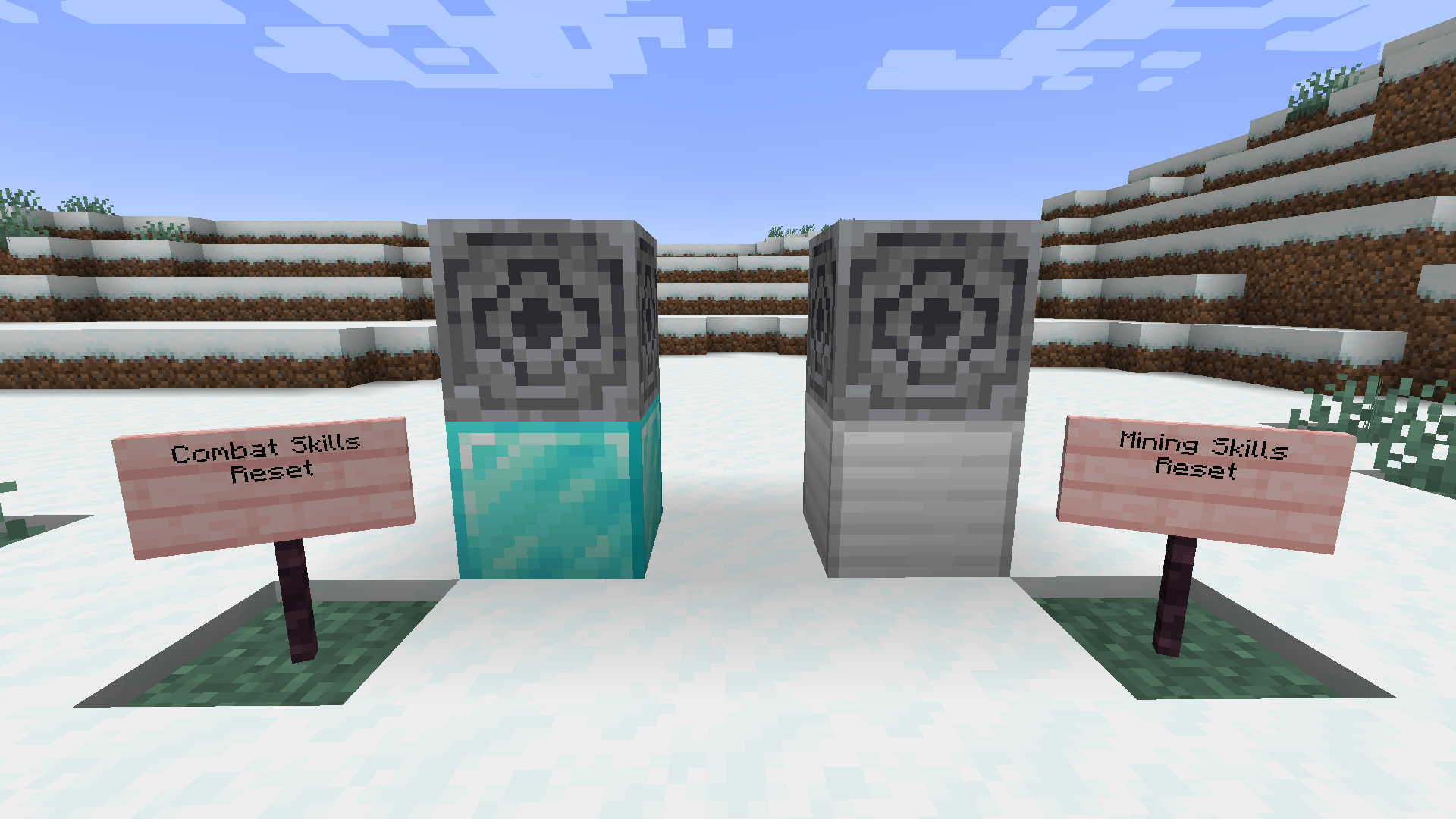
Right-click the lodestone with the scroll to reset that category's points.
Prestige: at high levels, transition into advanced trees via configured
from → tomappings.
1.x config (TOML)
# Respec Skill Mod Configuration
config_version = 2

min_level_to_respec = 20
xp_reduction_factor = 0.2

[skill_altar_map]
"minecraft:diamond_block" = "combat"
"minecraft:iron_block" = "mining"

[prestige_mappings]
# "combat" = "advanced_combat,true,50,0.4"
# "mining" = "master_mining,true,75,0.6"
Client-side note (1.x only): to see the Respec Scroll in the creative inventory or in REI, the mod also had to be installed client-side. 2.x is fully server-side.
Available Versions
How to Install Respec Skill on Your Server
Order Server
Order a Minecraft Java server with at least 3 GB RAM (4 GB recommended).
Set fabric Loader
In the panel under "Egg", select the fabric loader and matching Minecraft version (26.1.2).
Install Mod
Open the mod browser in the dashboard and search for "Respec Skill". Click "Install" – done! Alternatively, upload the .jar via SFTP to the /mods folder.
Compatibility
Mod Loaders
Minecraft Versions
26.1.2, 26.1.1, 26.1 (+6 more)
Server-side
✓ RequiredRecommended RAM
4 GB(min. 3 GB)Frequently Asked Questions
Respec Skill server crashes on startup – what to do?
Most common cause: wrong fabric version or insufficient RAM. Check the server log (latest.log) for "OutOfMemoryError" or "Mixin" errors. With Mado Hosting: ensure at least 3 GB RAM is allocated and the loader matches the mod version (26.1.2). You can switch loaders with one click in the panel.
Is Respec Skill compatible with fabric?
Respec Skill officially supports fabric for Minecraft 26.1.2, 26.1.1, 26.1. The Mado dashboard automatically detects incompatible loader combinations.
Server lagging with Respec Skill – how to optimize performance?
Recommended RAM: 4 GB (per 8 players). Use /spark profiler to check if Respec Skill consumes the most tick time. Common fixes: reduce server view-distance to 8-10, install "performant" or "starlight" as supplementary mods on Forge. With Mado Hosting, your server runs on NVMe SSDs with dedicated CPU cores for minimal latency.
Similar Mods




Rent Modded Server
Install Respec Skill with just one click on your server.