
RestMode
Reduces PC load while you’re AFK, with a customizable sleep screen
Screenshots

About this Mod
Minecraft can keep eating your PC even when you're not actually playing.
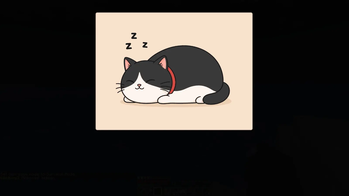
RestMode fixes that by putting Minecraft into a quiet rest state while you're AFK or away. It reduces the game's load, fades the sound, dims the screen, and shows a customizable sleep overlay. When you return, everything is restored automatically.
RestMode can significantly reduce Minecraft's resource usage while the game is AFK or minimized, especially GPU load and system temperatures.
Actual results depend on your hardware, modpack, settings, shaders, render distance, background apps and other performance mods.
Features:
- Automatically detects when you're AFK or away from the game
- Reduces PC load while Minecraft is idle
- Lowers FPS during rest mode
- Can reduce particles and simulation distance
- Smoothly fades the game sound
- Dims the screen while resting
- Supports a custom sleep screen image
- Restores your original settings when you come back
- Works fully client-side, no server install required
Custom Sleep Screen
You can replace the default sleep screen with your own PNG image.
Put your custom image here:
".minecraft/config/restmode/sleep_overlay.png"
The image must be named sleep_overlay.png
Configuration
RestMode can be configured in-game from:
Mods -> RestMode -> Config
You can adjust AFK timers, rest behavior, overlay position, overlay size, image opacity, screen darkness, and more.
Available Versions
How to Install RestMode on Your Server
Order Server
Order a Minecraft Java server with at least 3 GB RAM (4 GB recommended).
Set forge Loader
In the panel under "Egg", select the forge loader and matching Minecraft version (1.20.6).
Install Mod
Open the mod browser in the dashboard and search for "RestMode". Click "Install" – done! Alternatively, upload the .jar via SFTP to the /mods folder.
Compatibility
Mod Loaders
Minecraft Versions
1.20.6, 1.20.5, 1.20.4 (+3 more)
Server-side
✗ UnsupportedRecommended RAM
4 GB(min. 3 GB)Frequently Asked Questions
RestMode server crashes on startup – what to do?
Most common cause: wrong forge version or insufficient RAM. Check the server log (latest.log) for "OutOfMemoryError" or "Mixin" errors. With Mado Hosting: ensure at least 3 GB RAM is allocated and the loader matches the mod version (1.20.6). You can switch loaders with one click in the panel.
Is RestMode compatible with forge?
RestMode officially supports forge for Minecraft 1.20.6, 1.20.5, 1.20.4. The Mado dashboard automatically detects incompatible loader combinations.
Server lagging with RestMode – how to optimize performance?
Recommended RAM: 4 GB (per 8 players). Use /spark profiler to check if RestMode consumes the most tick time. Common fixes: reduce server view-distance to 8-10, install "performant" or "starlight" as supplementary mods on Forge. With Mado Hosting, your server runs on NVMe SSDs with dedicated CPU cores for minimal latency.
Rent Modded Server
Install RestMode with just one click on your server.