
Restore Inventory
Restore Inventory from minutes: 1 - ago (change able) 5 - ago (change able) when you last saved
Screenshots


About this Mod
Englisch:
RestoreInv - Your inventory, safely stored.
RestoreInv is a handy Minecraft mod that allows you to restore your inventory after death or unexpected loss - simple, reliable and fully customizable. Designed with a focus on functionality, server compatibility and ease of use. If you use the command while you have something in your inventory, this inventory will be replaced with the saved one.
🔁 Never lose valuable items again. Whether due to a server crash, lava or PvP - with RestoreInv you are prepared.
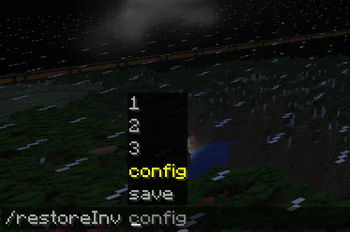
💬 Simple command: Open the chat and enter /restoreinv config and customize restore rules to your needs and restore your inventory with these commands /restoreInv 1/2/3. (1 is backed up every minute with default settings and 2 every 5 minutes. 3 is only saved if you enter /restoreInv save).

⚙️ Customizable & Intuitive: A clear GUI allows you to set after how many minutes slot 1&2 should be saved.
📦 Features:
Supports Minecraft 1.21+
GUI for configuration
Compatible with Fabric
Secure restore of inventories after death
🚀 Installation: Open Minecraft 1.21.1 Mod Ornder & drag in file Or simply via Modrinth
🛠️ Technical requirements:
Java 21 or newer
Minecraft 1.21 or newer
Compatible with other mods, e.g. Fabric API
German:
RestoreInv – Dein Inventar, sicher gespeichert.
RestoreInv ist eine praktische Minecraft-Mod, die es dir erlaubt, dein Inventar nach dem Tod oder bei unerwartetem Verlust wiederherzustellen – einfach, zuverlässig und vollständig anpassbar. Entwickelt mit Fokus auf Funktionalität, Server-Kompatibilität und Benutzerfreundlichkeit. Wenn man den Command nutzt während man etwas im Inventar hat, dann wird dieses Inventar mit dem gesicherten ersetzt.
🔁 Verliere nie wieder wertvolle Items. Ob durch einen Serverabsturz, Lava oder PvP – mit RestoreInv bist du vorbereitet.
💬 Einfacher Befehl:
Öffne den Chat und gib /restoreinv config ein und passe Wiederherstellungsregeln an deine Bedürfnisse an und stelle dein Inventar mit diesen Commands wiederher /restoreInv 1/2/3.
(1 wird mit standart Einstellungen jede Minute gesichert und 2 alle 5 Minuten. 3 wird nur gesichert wenn du /restoreInv save eingibst.)
⚙️ Anpassbar & Intuitiv:
Ein übersichtliches GUI erlaubt dir einzustellen nach wie vielen Minuten Slot 1&2 gesichert werden sollen.
📦 Features:
Unterstützt Minecraft 1.21+
GUI zur Konfiguration
Kompatibel mit Fabric
Sicheres Wiederherstellen von Inventaren nach dem Tod
🚀 Installation:
Minecraft 1.21.1
Mod Ornder öffnen & Datei rein ziehen
Oder einfach über Modrinth
🛠️ Technische Voraussetzungen:
Java 21 oder neuer
Minecraft 1.21 oder neuer
Kompatibel mit anderen Mods, z.B. Fabric API
Available Versions
How to Install Restore Inventory on Your Server
Order Server
Order a Minecraft Java server with at least 3 GB RAM (4 GB recommended).
Set fabric Loader
In the panel under "Egg", select the fabric loader and matching Minecraft version (1.21.11).
Install Mod
Open the mod browser in the dashboard and search for "Restore Inventory". Click "Install" – done! Alternatively, upload the .jar via SFTP to the /mods folder.
Compatibility
Mod Loaders
Minecraft Versions
1.21.11, 1.21.10, 1.21.9 (+5 more)
Server-side
✓ RequiredRecommended RAM
4 GB(min. 3 GB)Frequently Asked Questions
Restore Inventory server crashes on startup – what to do?
Most common cause: wrong fabric version or insufficient RAM. Check the server log (latest.log) for "OutOfMemoryError" or "Mixin" errors. With Mado Hosting: ensure at least 3 GB RAM is allocated and the loader matches the mod version (1.21.11). You can switch loaders with one click in the panel.
Is Restore Inventory compatible with fabric?
Restore Inventory officially supports fabric for Minecraft 1.21.11, 1.21.10, 1.21.9. The Mado dashboard automatically detects incompatible loader combinations.
Server lagging with Restore Inventory – how to optimize performance?
Recommended RAM: 4 GB (per 8 players). Use /spark profiler to check if Restore Inventory consumes the most tick time. Common fixes: reduce server view-distance to 8-10, install "performant" or "starlight" as supplementary mods on Forge. With Mado Hosting, your server runs on NVMe SSDs with dedicated CPU cores for minimal latency.
Similar Mods




![[TaCZ] Timeless and Classics Zero](https://cdn.modrinth.com/data/SzzJttH8/fd27766d2bb8390d284696b1dbd358f87e081439_96.webp)

Rent Modded Server
Install Restore Inventory with just one click on your server.