
Rezolve
This is a Minecraft mod which simplifies automation and provides tools to help you manage complex modded Minecraft bases.
Screenshots
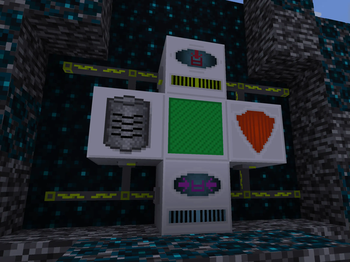
About this Mod
Thunderbolt
Rezolve's primary feature is a universal cable called Thunderbolt. A single cable can provide items, fluid, energy,
remote access and more to any side of machines you use it with.
Remote Shell
The Remote Shell lets you access the user interface of any machine remotely. This includes vanilla machines,
Rezolve machines, and machines from other mods. Simply connect the Remote Shell to a Thunderbolt network which is
itself connected to a machine you wish to access remotely, and make sure to provide a source of FE energy to the
Remote Shell. Note that accessing a remote machine will require an opening RF fee as well as a continuous drain on FE
as long as you have the remote machine open. Also, any items you transfer in and out of the machine (including due to
automation inputs/outputs) will drain FE within the Remote Shell and may cause disconnects. You are shown the current
FE available within the Remote Shell while you have a remote machine's UI open.
By default the Remote Shell only shows the type of machine and its dimension/position within the machines list.
You can however name each machine if you have a Database Server connected to the Thunderbolt network.
Database Server
Remote Shell to store the custom names you assign to machines on an Ethernet Cable network.
Security Server
You can also use Thunderbolt to restrict access to any machine, vanilla, Rezolve, or one from another mod. Simply
connect a machine to an Ethernet network and then connect a Security Server block to that Thunderbolt network. Security
Servers do not require FE to work at this time. You can set default rules for machines and players, as well as provide
a user level for specific players by typing their Minecraft usernames. This mechanism works by controlling user
interface access to the machine on both the client and the server. Note that accessing the contents of a machine may
still be possible by an unauthorized user by placing piping/automation blocks nearby the controlled machine. This will
be handled in an upcoming version of Rezolve.
Bundling
Rezolve provides a mechanism for grouping sets of items together so that they can be transported together without being
mixed with other unrelated items.
Bundler
You can use this machine to bundle a set of items into a single item. This can be used for automation/flow control
purposes or for inventory storage purposes. The bundler requires RF energy, and the bigger the bundle being made, the
more RF is required. To create a bundle, you must supply the bundler with a Bundle Pattern (see Bundle Pattern Builder
below).
After you have made a bundle, you can then reduce the bundle to its constituent items via the Unbundler (see below).
Bundles can be nested, allowing for arbitrarily deep storage. However, this exponentially increases the RF cost. The
cost to bundle an item is the same as the cost to unbundle an item.
The formula for the RF cost of bundling/unbundling is as follows:
(ItemCount * 100) * 2^(MaxBundleDepth)
Where ItemCount is the total number of items involved in the bundle (including all nested items, and including 1
point per Bundle item), and MaxBundleDepth is the deepest level of Bundle involved in the bundle you are creating.
This makes very deep bundles very expensive.
Bundle Pattern Builder
Use this machine to create patterns which can be slotted into Bundlers. The Bundle Pattern Builder offers a 9x9 ghost
inventory for specifying the component items of a bundle. You must then insert a Blank Bundle Pattern, and then you can
extract a Bundle Pattern encoded with the items you specified. You can also color-code the bundle pattern which may
help with mod compatibility and sorting/organization- to do so, insert a dye into the dye slot. The resulting bundle
will be colored based on the dye.
The Bundle Pattern Builder requires RF to work, but it is a small static fee of 100 RF. This fee does not change
regardless of how complex a bundle is. The item tooltip for a bundle pattern indicates what items are included,
including any nested bundles.
Unbundler
You can reconstitute the component items of a bundle using an Unbundler. Unbundlers require RF just like Bundlers, and
the cost is the same as creating the bundle.
Balance
This mod is considered alpha quality. Please note that this mod can be considered unbalanced, and all recipes
and energy costs are expected to change in upcoming releases. We are particularly looking for feedback on the
difficulty (or lack thereof) of using the mod relative to other mods, because this is intended to be used in a
tech-heavy modpack, so it should ideally fit in with the balance of other common tech mods. Please let us know your
thoughts on how this mod interacts with other mods and how it affects your playthrough.
Issues
Please post Github issues for any bugs or crashes you encounter. If we find bugs/crashes on the CurseForge page, we'll try to create Github issues to correspond to them, but really Github is the correct place to file these reports.
Feedback
You can post feedback on the CurseForge page, we'll try to read all of the comments posted there. Feedback can also be
posted as a Github issue for now. We may mark your issue as feedback and close it but understand that your voice has
been heard, and we'll consider your input for future releases. Anyone can see these feedback items by filtering github
issues and including closed issues as well.
Getting the mod
Note: This mod is still experimental and is, at best, beta-quality. The developers are not responsible for damage
to your world files, and the mod lacks a lot of the gameplay balance work that you would expect from a polished mod.
You have been warned.
That being said, official play-ready builds for this mod can be found on CurseForge:
https://minecraft.curseforge.com/projects/rezolve
Developers
We recommend using IntelliJ IDEA for working on this mod. Necessary support for Eclipse has not been (and will not be)
added to the project.
- Open the project and allow Gradle to sync
- Run the
genIntellijRunsGradle task - Run the
runClientrun configuration
If you wish to test alongside other mods, you can copy the mods from the mods folder into run/mods.
Maven
All versions of this mod are available in a Maven repository hosted on PackageCloud:
https://packagecloud.io/rezonant/rezolve
You can depend on this repository in your own mod's build.gradle to include it in your development environment.
Credits
This mod was started by rezonant, along with designs from maxillaria. We are looking for more contributors, so please
come talk to us in Discord if you want to help!
License
This mod, including all its code and graphics, are licensed under the 2-clause BSD license. Feel free to use code you
find in this repository for your mod for any purpose, just be sure to attribute us in some reasonable fashion and if
you can, let us know how you used the code!
Modpacks
You do not need our permission to include this mod in a pack. You are free to use it in any way you wish without
any stipulations. That being said, we'd love to hear about how you've used the mod so far. Hearing that you are
enjoying this mod keeps us motivated to improve it!
Available Versions
How to Install Rezolve on Your Server
Order Server
Order a Minecraft Java server with at least 3 GB RAM (4 GB recommended).
Set forge Loader
In the panel under "Egg", select the forge loader and matching Minecraft version (1.19.2).
Install Mod
Open the mod browser in the dashboard and search for "Rezolve". Click "Install" – done! Alternatively, upload the .jar via SFTP to the /mods folder.
Compatibility
Mod Loaders
Minecraft Versions
1.19.2
Server-side
✓ RequiredRecommended RAM
4 GB(min. 3 GB)Frequently Asked Questions
Rezolve server crashes on startup – what to do?
Most common cause: wrong forge version or insufficient RAM. Check the server log (latest.log) for "OutOfMemoryError" or "Mixin" errors. With Mado Hosting: ensure at least 3 GB RAM is allocated and the loader matches the mod version (1.19.2). You can switch loaders with one click in the panel.
Is Rezolve compatible with forge?
Rezolve officially supports forge for Minecraft 1.19.2. The Mado dashboard automatically detects incompatible loader combinations.
Server lagging with Rezolve – how to optimize performance?
Recommended RAM: 4 GB (per 8 players). Use /spark profiler to check if Rezolve consumes the most tick time. Common fixes: reduce server view-distance to 8-10, install "performant" or "starlight" as supplementary mods on Forge. With Mado Hosting, your server runs on NVMe SSDs with dedicated CPU cores for minimal latency.
Similar Mods





Rent Modded Server
Install Rezolve with just one click on your server.