
RiderWatchCraft
An addon for KamenRiderWeaponCraft that adds an external Core/Watch system, allowing you to install/uninstall Rider cores and unleash unique abilities!
Screenshots
About this Mod
Extended Description
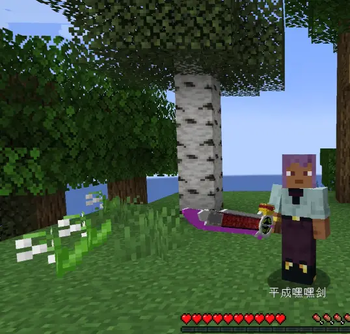
Rider Watch Craft is an addon for KamenRiderWeaponCraft (by xiaoshi2022) that adds an external Core system to the Heisei Sword.
What does this mod do?
This mod allows you to collect special Rider Cores and attach them to your Heisei Sword. Once attached, the sword gains new abilities based on the equipped core.
How it works
Obtain a Core – Craft or acquire a Rider Core item (e.g., Kuuga Mighty Core)
Install the Core – Hold the core in your off-hand and press the designated key (default: R)
Use the Ability – Right-click while holding the Heisei Sword to unleash the core's unique skill
Remove the Core – Press the same key (default: R) with an empty off-hand to detach it
Current Cores
Core Ability Damage Energy Cost
Kuuga Mighty Core Rider Kick – Launches a fireball entity that explodes on impact 45 20
ZZZ Dream Core Dream Power – Creates a cloud of soul particles around the player 48 25
Controls
Action Default Key
Install / Detach Core R (customizable in Controls menu)
Activate Core Skill Right-click (while holding Heisei Sword)
Compatibility
Requires: KamenRiderWeaponCraft, GeckoLib
Minecraft Version: 1.21.1
Mod Loader: NeoForge
Conflict: None known – original mod features remain fully functional
Why this addon?
KamenRiderWeaponCraft includes a Core system for internal Rider forms, but this addon extends it by allowing external cores that can be attached and removed at any time, similar to how Ridewatches work in the Kamen Rider series.
Technical Notes
This mod uses:
Mixin to override HeiseiswordModel rendering for custom models
Custom network packets for client-server communication
GeckoLib for item animations
NeoForge's key binding system for customizable controls
Source Code
This mod is open source under the MIT License. You are free to use, modify, and distribute it as long as you include the original license.
This description accurately reflects the mod's functionality and does not make any false or misleading claims. The mod does not contain any malicious code, backdoors, or unauthorized data collection.
Available Versions
How to Install RiderWatchCraft on Your Server
Order Server
Order a Minecraft Java server with at least 3 GB RAM (4 GB recommended).
Set neoforge Loader
In the panel under "Egg", select the neoforge loader and matching Minecraft version (1.21.1).
Install Mod
Open the mod browser in the dashboard and search for "RiderWatchCraft". Click "Install" – done! Alternatively, upload the .jar via SFTP to the /mods folder.
Compatibility
Mod Loaders
Minecraft Versions
1.21.1
Server-side
✓ RequiredRecommended RAM
4 GB(min. 3 GB)Frequently Asked Questions
RiderWatchCraft server crashes on startup – what to do?
Most common cause: wrong neoforge version or insufficient RAM. Check the server log (latest.log) for "OutOfMemoryError" or "Mixin" errors. With Mado Hosting: ensure at least 3 GB RAM is allocated and the loader matches the mod version (1.21.1). You can switch loaders with one click in the panel.
Is RiderWatchCraft compatible with neoforge?
RiderWatchCraft officially supports neoforge for Minecraft 1.21.1. The Mado dashboard automatically detects incompatible loader combinations.
Server lagging with RiderWatchCraft – how to optimize performance?
Recommended RAM: 4 GB (per 8 players). Use /spark profiler to check if RiderWatchCraft consumes the most tick time. Common fixes: reduce server view-distance to 8-10, install "performant" or "starlight" as supplementary mods on Forge. With Mado Hosting, your server runs on NVMe SSDs with dedicated CPU cores for minimal latency.
Similar Mods




![[TaCZ] Timeless and Classics Zero](https://cdn.modrinth.com/data/SzzJttH8/fd27766d2bb8390d284696b1dbd358f87e081439_96.webp)

Rent Modded Server
Install RiderWatchCraft with just one click on your server.