Riftname
Style names on servers - Player-set nicknames, prefixes, colors, gradients and more
Screenshots

About this Mod

Riftname
WARNING! Upgrading the mod to 0.9.0 and later can cause you to lose your nicknames and tags!
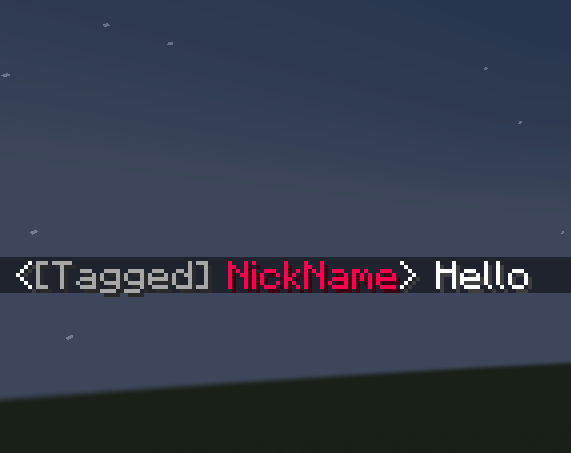
A mod for styling your name on multiplayer servers. Supports prefixes, nicknames, name colors, gradients in names and prefixes and custom text components that are sanitized to prevent players adding click events.
Works in chat, join/leave/death messages, nameplates, and the Playerlist/Tablist
Gradients use the RGBirdflop &#rrggbb format.
A partial rewrite of Rift Realms Utility for 1.21.1 and onward
Features
Older versions of the mod use different commands.
They are not documented here and you're recommended to upgrade to version 0.9.0 or later.
Name style - /namestyle
- Colors are set with
/namestyle color- They are specified with hexadecimal color codes: eg.
#ffffff - Certain colors can also be referred to by names
- They are specified with hexadecimal color codes: eg.
- Formattings are added with
/namestyle formatting- They are used to add bold, italic, obfuscated or other effects
- They can also set certain colors
- Name styles are cleared with
/namestyle clear
Tags / Prefixes - /playertag
- A tag can be removed with
/playertag clear /playertag togglestyleoverridetoggles the style override value- When set to
falsethe tag is forced to use its own style, whentrueit can use the name style
- When set to
- Tags can be set in three ways
/playertag set simple <Tag>: Sets a string value, which by default uses the main name style/playertag set text<Text Component>: Uses a version dependent text component/playertag set gradient <Gradient Text>: Uses text with color and style codes embedded, supporting easy gradients
Nick Names - /nick
Nick Names use the same subcommands and formats as Tags - eg. /nick set gradient <Gradient Text>, /nick togglestyleoverride
Available Versions
How to Install Riftname on Your Server
Order Server
Order a Minecraft Java server with at least 3 GB RAM (4 GB recommended).
Set fabric Loader
In the panel under "Egg", select the fabric loader and matching Minecraft version (1.21.11).
Install Mod
Open the mod browser in the dashboard and search for "Riftname". Click "Install" – done! Alternatively, upload the .jar via SFTP to the /mods folder.
Compatibility
Mod Loaders
Minecraft Versions
1.21.11, 1.21.8, 1.21.1
Server-side
✓ RequiredRecommended RAM
4 GB(min. 3 GB)Frequently Asked Questions
Riftname server crashes on startup – what to do?
Most common cause: wrong fabric version or insufficient RAM. Check the server log (latest.log) for "OutOfMemoryError" or "Mixin" errors. With Mado Hosting: ensure at least 3 GB RAM is allocated and the loader matches the mod version (1.21.11). You can switch loaders with one click in the panel.
Is Riftname compatible with fabric and quilt?
Riftname officially supports fabric, quilt for Minecraft 1.21.11, 1.21.8, 1.21.1. The Mado dashboard automatically detects incompatible loader combinations.
Server lagging with Riftname – how to optimize performance?
Recommended RAM: 4 GB (per 8 players). Use /spark profiler to check if Riftname consumes the most tick time. Common fixes: reduce server view-distance to 8-10, install "performant" or "starlight" as supplementary mods on Forge. With Mado Hosting, your server runs on NVMe SSDs with dedicated CPU cores for minimal latency.
Similar Mods






Rent Modded Server
Install Riftname with just one click on your server.