
Right Click Item Picking
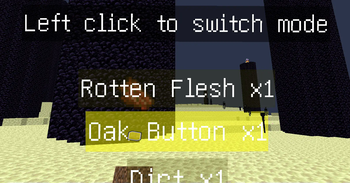
(both MENU and CLICKING ITEM!) pick items by right clicking whenever you want!
Screenshots
About this Mod
Right Click Item Picking
pick items by right clicking whenever you want
Config
Use scoreboard players set <config> rcip.config <value>
| Config | Description | Value |
|---|---|---|
defMode |
The defalt mode of new players | Right Click Menu:0 Right Click Items:1 Vanilla:2 No Picking:3 |
playerTip |
Conditions to show the tip to the players | Never:0 NewPlayers:1 JoinGame:2 |
tipLoc |
The place to Message tip showing | Chat:0 Title:1 Subtitle:2 Custom(#rcip:show_tip,return fail to wait for next time):3 |
updTick |
The number of ticks to wait for updating once | >0 |
Usage
Modes
Right Click MenuMode
- Players with this mode can use scroll wheel to choose and right click to pick up the item
- Use
/trigger Right-Click-Item-Picking--Switch-picking-modeto enable right click picking temporarily
Right Click ItemsMode
- Players with this mode can right click the item you can reach to pick it up
VanillaMode
- Vanilla,but the pick up delay won't change when you cannot reach them
No PickingMode
- No picking!
Swiching
- In
Right Clickmode,left clickto switch near at least 1 item - Use
/trigger Right-Click-Item-Picking--Switch-picking-mode
In Survival
- Adventuring: Use
Right Click Menumode - Combating: Use
Vanilla(for the loots) orRight Click Items(just for espace) Mode ( OrRight Click Menuif you jump when damaging ) - Mining: Use
Right Click ItemsMode
Uninstallation
- Use:
/function uninstall:right_click_item_picking
Warning
- Be careful to use it in your server because the datapack may causes game ticks to be lost when someone attacks the server.
Available Versions
How to Install Right Click Item Picking on Your Server
Order Server
Order a Minecraft Java server with at least 3 GB RAM (4 GB recommended).
Set datapack Loader
In the panel under "Egg", select the datapack loader and matching Minecraft version (1.21.4).
Install Mod
Open the mod browser in the dashboard and search for "Right Click Item Picking". Click "Install" – done! Alternatively, upload the .jar via SFTP to the /mods folder.
Compatibility
Mod Loaders
Minecraft Versions
1.21.4, 1.21.3, 1.21.2 (+4 more)
Server-side
✓ RequiredRecommended RAM
4 GB(min. 3 GB)Frequently Asked Questions
Right Click Item Picking server crashes on startup – what to do?
Most common cause: wrong datapack version or insufficient RAM. Check the server log (latest.log) for "OutOfMemoryError" or "Mixin" errors. With Mado Hosting: ensure at least 3 GB RAM is allocated and the loader matches the mod version (1.21.4). You can switch loaders with one click in the panel.
Is Right Click Item Picking compatible with datapack and fabric and forge and neoforge and quilt?
Right Click Item Picking officially supports datapack, fabric, forge, neoforge, quilt for Minecraft 1.21.4, 1.21.3, 1.21.2. Note: Forge and Fabric mods are NOT cross-compatible – pick one loader and stick with it. The Mado dashboard automatically detects incompatible loader combinations.
Server lagging with Right Click Item Picking – how to optimize performance?
Recommended RAM: 4 GB (per 8 players). Use /spark profiler to check if Right Click Item Picking consumes the most tick time. Common fixes: reduce server view-distance to 8-10, install "performant" or "starlight" as supplementary mods on Forge. With Mado Hosting, your server runs on NVMe SSDs with dedicated CPU cores for minimal latency.
Similar Mods






Rent Modded Server
Install Right Click Item Picking with just one click on your server.