
Ripples of the Past: Recording
This addon mod add some original Stand for Ripples of the Past, a mod for Minecraft based on JoJo's Bizarre Adventure.
Screenshots


About this Mod
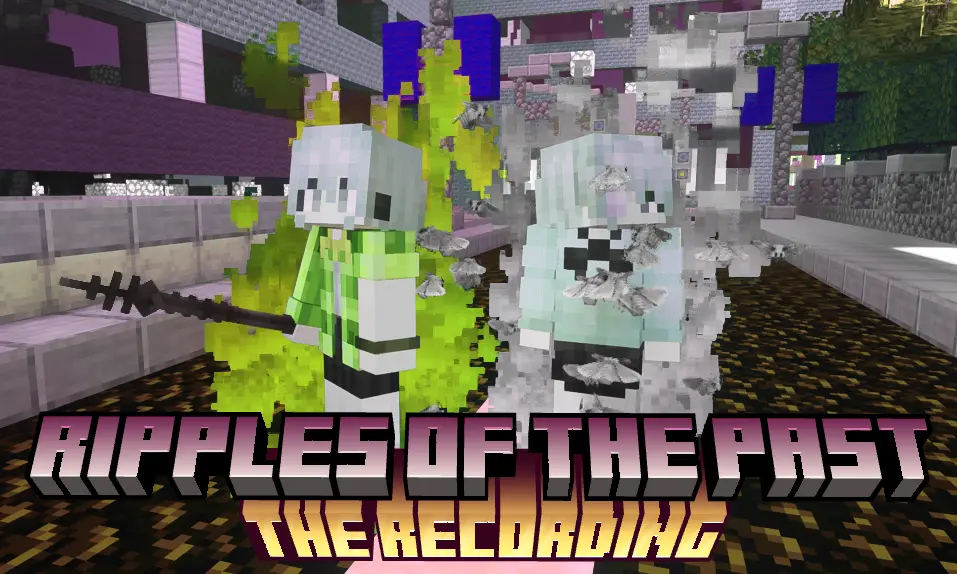
RotP but Stand you never seen !
This addon mod add some original Stand for Ripples of the Past, a mod for Minecraft based on JoJo's Bizarre Adventure.
1.16.5
Ashes to Ashes
 Ashes to Ashes
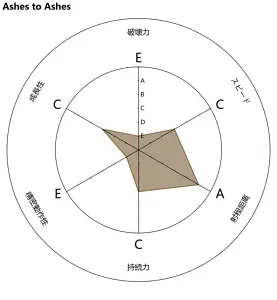
Ashes to Ashes is a Colony Stand manifested as hundreds of fragile moths coalesced from lime-grey dust. These moths siphon kinetic energy from any moving object they touch, storing the stolen momentum within their "fossilized" wings. While individual units lack precision, they can trigger a Strata Release—shattering their physical forms to revert back into dust, while simultaneously unleashing all accumulated energy as a devastating kinetic blast.
Attacks
 Moth Gnaw:Commands the dust-formed moths to chew on attached entities. Damage scales with the number of moths latched onto the target.
 Swarm attack:Directs the swarm to surge toward a target and automatically envelope it. Can also be used to retrieve items.
- (shift variation:
Moth Jet:Launches a concentrated stream of moths at high velocity, adhering to any entity in their path.)
 Adhesion: Affixes moths onto an entity or block to constantly siphon its kinetic energy. For entities, this will Reduces movement speed and attack power. for block, this will make them uninteractive and unbreakable.
- (shift variation:
Kinetic Adhesion: Attaches fully-charged "Amber" moths that are ready for immediate detonation.)
 Kinetic Piercing: Consumes stored energy to launch a single moth as a high-speed projectile, shattering blocks and dealing heavy piercing damage.
 Bullet with Butterfly Wings:Unleashes the entire swarm in a high-speed barrage, overwhelming the target with massive kinetic impact.
Abilities
 Swarm Shield: Orbits the fossilized moths around the user to create a kinetic-absorption field.
- (shift variation:
Swarm Guardian: Projects the shield onto an ally to protect them.)
 Moth Recall: Reacll the furthest moth back to the user.
- (shift variation:
Swarm Recall: Recalls all active moths simultaneously.)
 Kinetic Detonation: Trigger an immediate explosion of all moths carrying kinetic energy.
- (shift variation:
Exfoliating Detonation: Explodes the moths into a thick dust cloud, slowing entities and rapidly depleting their Oxygen Gauge.)
 Kinetic Sensing: Uses the moths' sensitivity to motion to highlight all moving entities in the vicinity.
 Stasis Barrier: Deploys a wall of moths that creates an impassable kinetic wall.
- (shift variation:
Remove Barrier: Remove the barrier you're looking at. You can also remove them by "Swarm recall")
Thela Hun Ginjeet
 Thela hun Ginjeet
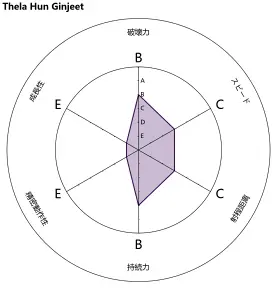
Thela Hun Ginjeet is an Artificial Non-Humanoid Stand appearing as a rusted, 2-meter-long black metal railing spear. Once lodged within a target, it infests the vascular system with internal barbs that consume all healing effects to fuel their growth. This converts any attempted recovery into additional damage and further paralysis. The effect persists until the victim inflicts equivalent damage on another entity, causing the thorns to wither and the Stand to return to the user.
Attacks
 Swift Thrust:Use metal railing to perform a thrusting attack.
 Sweep:Use metal railing to perform a Sweep attack.
- Thron Burst: Explode the Spear in victim. Cause fatal damage and launch amount of spear.
Abilities
 Block: Block but use Spear.
 Recall: Recall your spear. When recalling. Recalling can also trigger the effect of stabbing into enemies.
 Tether Pull: Grab the entity which been stabbed in.
 Railing Dash: Pulls the user toward the spear's location, enabling high-speed mobility and vertical jumps.
Passive
- Behavior: Thela Hun Ginjeet functions as a specialized weapon with Trident-like behavior, supporting both melee and thrown projectile attacks. Its Attack Damage scales dynamically with the Stand's Destructive Power stat.
- Vascular Infestation: When thrown, the spear impales and remains lodged within the target entity. Once anchored, the Stand initiates a parasitic growth: it consumes all incoming healing effects (such as Potions, Golden Apples, or regeneration) to fuel its internal expansion. This converts all intended recovery into additional damage and increased paralysis, ensuring the curse remains absolute until the spear is recalled or the debt is paid.
Available Versions
How to Install Ripples of the Past: Recording on Your Server
Order Server
Order a Minecraft Java server with at least 3 GB RAM (4 GB recommended).
Set forge Loader
In the panel under "Egg", select the forge loader and matching Minecraft version (1.16.5).
Install Mod
Open the mod browser in the dashboard and search for "Ripples of the Past: Recording". Click "Install" – done! Alternatively, upload the .jar via SFTP to the /mods folder.
Compatibility
Mod Loaders
Minecraft Versions
1.16.5
Server-side
✓ RequiredRecommended RAM
4 GB(min. 3 GB)Frequently Asked Questions
Ripples of the Past: Recording server crashes on startup – what to do?
Most common cause: wrong forge version or insufficient RAM. Check the server log (latest.log) for "OutOfMemoryError" or "Mixin" errors. With Mado Hosting: ensure at least 3 GB RAM is allocated and the loader matches the mod version (1.16.5). You can switch loaders with one click in the panel.
Is Ripples of the Past: Recording compatible with forge?
Ripples of the Past: Recording officially supports forge for Minecraft 1.16.5. The Mado dashboard automatically detects incompatible loader combinations.
Server lagging with Ripples of the Past: Recording – how to optimize performance?
Recommended RAM: 4 GB (per 8 players). Use /spark profiler to check if Ripples of the Past: Recording consumes the most tick time. Common fixes: reduce server view-distance to 8-10, install "performant" or "starlight" as supplementary mods on Forge. With Mado Hosting, your server runs on NVMe SSDs with dedicated CPU cores for minimal latency.
Similar Mods




Rent Modded Server
Install Ripples of the Past: Recording with just one click on your server.