
Rising Toxicity
A toxic fog rises over 20 days, forcing you to live in the sky and explore below it using gas masks.
Screenshots
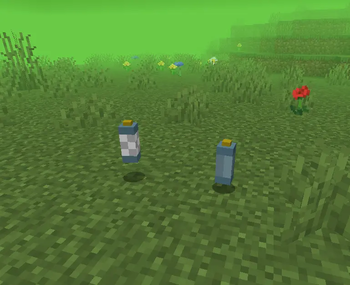


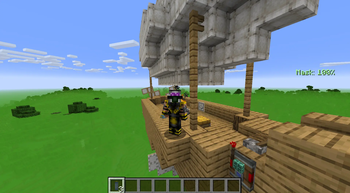
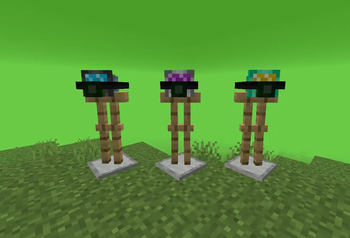

About this Mod
Rising Toxicity
Rising Toxicity introduces a toxic fog that rises over a set period of in-game days, forcing players to take to the skys to survive. This mod was designed to take advantage of Create Aeronautics (Not Required) by encouraging flying bases.
🎥 Video
⚙️ Mechanics:
Toxic fog rises over time to a set height (default 20 days)
Exposure builds in toxic air without a mask → damage at 100%
Masks prevent exposure but consume air
Masks fog up over time, reducing visibility and forcing you to surface
Air tanks refill mask capacity
Passive mobs take damage; hostile mobs are immune (Villagers, Wandering Traders, and some others are also immune)
Non-immune mobs can't spawn in the toxic fog.
Fully multiplayer compatible
Configurable heights, timing, and progression via commands
⚒️ Items:
- Gas Mask (Tier 1) – 1 tank capacity, 10 minutes of air, fully fogged at 10 minutes
- Reinforced Mask (Tier 2) – 3 tank capacity, 30 minutes of air, fully fogged at 30 minutes
- Advanced Mask (Tier 3) – 5 tank capacity, 50 minutes of air, fully fogged at 50 minutes
- Air Tanks – Used to refill mask air supply, right-click in clean air with an empty tank to refill tank
🧾 Commands
- /toxicity getstage – Shows current toxic fog details
- /toxicity freeze – Pauses fog progression
- /toxicity unfreeze – Resumes fog progression
- /toxicity reset – Resets all values and day count
- /toxicity setday
– Sets current day - /toxicity setstartheight
– Sets starting height - /toxicity setpeakheight
– Sets max height - /toxicity setpeakday
– Sets days to reach peak
📜 Recipes
Gas Mask (Tier 1)
Spoiler
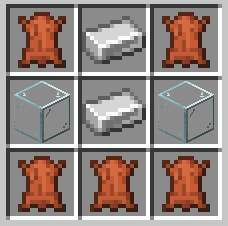
Reinforced Mask (Tier 2)
Spoiler

Advanced Mask (Tier 3)
Spoiler

Air Tank
Spoiler
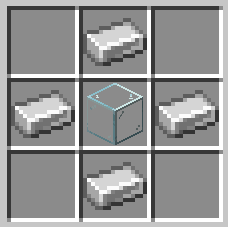
⚠️ Known Incompatibilities:
- Some shaders may cause visual glitches
👤 Credits:
BananaMan
Available Versions
How to Install Rising Toxicity on Your Server
Order Server
Order a Minecraft Java server with at least 3 GB RAM (4 GB recommended).
Set neoforge Loader
In the panel under "Egg", select the neoforge loader and matching Minecraft version (1.21.1).
Install Mod
Open the mod browser in the dashboard and search for "Rising Toxicity". Click "Install" – done! Alternatively, upload the .jar via SFTP to the /mods folder.
Compatibility
Mod Loaders
Minecraft Versions
1.21.1
Server-side
✓ RequiredRecommended RAM
4 GB(min. 3 GB)Frequently Asked Questions
Rising Toxicity server crashes on startup – what to do?
Most common cause: wrong neoforge version or insufficient RAM. Check the server log (latest.log) for "OutOfMemoryError" or "Mixin" errors. With Mado Hosting: ensure at least 3 GB RAM is allocated and the loader matches the mod version (1.21.1). You can switch loaders with one click in the panel.
Is Rising Toxicity compatible with neoforge?
Rising Toxicity officially supports neoforge for Minecraft 1.21.1. The Mado dashboard automatically detects incompatible loader combinations.
Server lagging with Rising Toxicity – how to optimize performance?
Recommended RAM: 4 GB (per 8 players). Use /spark profiler to check if Rising Toxicity consumes the most tick time. Common fixes: reduce server view-distance to 8-10, install "performant" or "starlight" as supplementary mods on Forge. With Mado Hosting, your server runs on NVMe SSDs with dedicated CPU cores for minimal latency.
Similar Mods




Rent Modded Server
Install Rising Toxicity with just one click on your server.