
Ritual thingy
A mod for creating data-driven summoning rituals
Screenshots
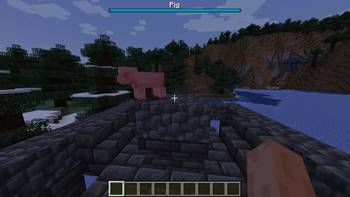
About this Mod
Ritual thingy
A mod allowing mod, modpack or datapack creators to add data-driven summoning rituals.
Features
Multiblocks
Multiblocks are currently supported via Patchouli, with other multiblock system being developed.
Add multiblocks via Patchouli json files, or using the Patchouli API.
Blocks added to the ritual-thingy:altar block tag are checked for multiblocks when right-clicked.
Item conditions
The mod supports item conditions in the player's main hand. Other item conditions can be added with the API.
Mob waves
The mod supports adding multiple waves, each with multiple groups of mobs with customizable NBT. Each wave may have a custom name, boss bar color and two modes of boss bar operation (By entity number and total entity health.
Item actions
The mod supports giving items to the inventory, droppping them inside the ritual block, or dropping them above the ritual block. Other item actions can be added with the API.
Other features include customizable delay boss bars, custom start and end messages and custom start and end sounds.
Format
Ritual files should be in data/YOUR_NAMESPACE/rituals/RITUAL_NAME.json
Keys marked with * are mandatory (But can be omitted if the parent tag is)
{
  "soundEvent": "block.beacon.activate", //Sound played at the start
  "maxUses": 1, //Maximum ritual uses per player. Set to 0 to disable
  "altar"*: {
    "patchouli": true, //Must be set to true
    "id"*: "ritual-thingy:test_altar", //Identifier of the patchouli altar
    "itemCondition": { //Don't include to disable item condition
      "predicate": "ritual-thingy:mainhand", //Identifier of the predicate (Defaults to "ritual-thingy:mainhand")
      "ingredient"*: { // Ingredient: Uses the same format as recipes
        "item": "minecraft:stick"
      },
      "decrement":1 //Remove this many items from the stack if the correct item is used
    },
    "dimensionCondition":{
      "dimensions":[
        "minecraft:overworld"
      ], //List of allowed dimensions
      "allowed":true //True means the list if the allowed dimension, false means it is the disallowed
    }
  },
  "stack": { //Item reward, see [Item Stack](https://origins.readthedocs.io/en/latest/types/data_types/item_stack/)
    "item"*: "minecraft:diamond_sword"
    "count" : 1
  },
  "startMessage": "Ritual starting", //Message sent at the start
  "completeMessage": "Ritual ending", //Message sent at the end
  "completeAction": "ritual-thingy:drop_offset", //Identifier of the item action (Defaults to "ritual-thingy:none")
  "trial": { //Omit to have the ritual completed instantly
    "waveTickDelay": 80, //Delay between trial waves, in ticks
    "beginningCountdown": 80, //Countdown to the trial, in ticks
    "delayBossBarColor": "blue", //Boss bar color for the delay and countdown
    "waves"* : [ //Waves of entities
      {
        "bossBarText": "Pig", //Boss bar text for the wave
        "bossBarColor": "blue", //Boss bar color for the wave
        "isBoss": true, //If boss bar should display health instead of amount of entities
        "spawnRange": 4, //Mob spawn range from the clicked block
        "startSound": "entity.wither.shoot", //Sound played at start of wave
        "endSound": "entity.experience_orb.pickup", //Sound played at end of wave
        "groups": [ //Individual groups of entities
          {//This group contains one pig with no extra data
            "count": 1,
            "entityType"*: "minecraft:pig"
          }
        ]
      },
      {
        "bossBarText": "Cows",
        "bossBarColor": "blue",
        "spawnRange": 4,
        "startSound": "entity.wither.shoot",
        "endSound": "entity.experience_orb.pickup",//Use the ending sound of the last wave as the ending sound of the ritual itself
        "groups": [
          {
            "count": 8,
            "entityType"*: "minecraft:cow",
            "tag": "{}" //Additional entity data (Name, armor, effects, variant...)
          }
        ]
      }
    ]
  }
}
Dependency
To use the API or other parts of the mod as a developer, add this to your build.gradle
repositories {
  maven {
  	url = 'https://maven.riftrealms.de/releases'
  }
  repositories {
        maven { url 'https://maven.blamejared.com' }
    }
}
dependencies {
    //Add the version to your gradle.properties or replace ${project.ritual_thingy_version} with the mod version
    modApi "eu.ansquare.ritualthingy:ritual-thingy:${project.ritual_thingy_version}"
}
API
The Ritual API allows modders to add their own item actions, conditions and events that prevent a ritual from starting. They are registered in the common initializer with the following formats:
Conditions
ItemConditionPredicate YOUR_CONDITION = RitualApi.registerItemCondition(new Identifier("YOUR_MOD_ID", "YOUR_CONDITION_ID"), (ingredient, player, pos) -> {
        ItemStack stack = //Get the item stack
        return new Pair<>(ingredient.test(stack), stack);//Test the stack with the ingredient and return it for possible decrementing
    });
The default conditions are
- ritual-thingy:mainhand checks the item in the player's main hand
Actions
ItemConditionPredicate YOUR_ACTION = RitualApi.registerItemAction(new Identifier("YOUR_MOD_ID", "YOUR_ACTION_ID"), (stack, player, pos) -> {
        //Execute the action
    });
The default actions are
- ritual-thingy:none to do nothing
- ritual-thingy:give to give the item to the player
- ritual-thingy:drop to drop it at the ritual block's position
- ritual-thingy:drop_offset to drop it one block above the ritual block (on top of it)
Ritual prevention
PreventRitualCallback.EVENT.register((player, world, hand, hitResult) -> {
            return false; //Return false if a ritual is not allowed to happen
        });
Available Versions
How to Install Ritual thingy on Your Server
Order Server
Order a Minecraft Java server with at least 3 GB RAM (4 GB recommended).
Set fabric Loader
In the panel under "Egg", select the fabric loader and matching Minecraft version (1.20.1).
Install Mod
Open the mod browser in the dashboard and search for "Ritual thingy". Click "Install" – done! Alternatively, upload the .jar via SFTP to the /mods folder.
Compatibility
Mod Loaders
Minecraft Versions
1.20.1, 1.19.2
Server-side
✓ RequiredRecommended RAM
4 GB(min. 3 GB)Frequently Asked Questions
Ritual thingy server crashes on startup – what to do?
Most common cause: wrong fabric version or insufficient RAM. Check the server log (latest.log) for "OutOfMemoryError" or "Mixin" errors. With Mado Hosting: ensure at least 3 GB RAM is allocated and the loader matches the mod version (1.20.1). You can switch loaders with one click in the panel.
Is Ritual thingy compatible with fabric and quilt?
Ritual thingy officially supports fabric, quilt for Minecraft 1.20.1, 1.19.2. The Mado dashboard automatically detects incompatible loader combinations.
Server lagging with Ritual thingy – how to optimize performance?
Recommended RAM: 4 GB (per 8 players). Use /spark profiler to check if Ritual thingy consumes the most tick time. Common fixes: reduce server view-distance to 8-10, install "performant" or "starlight" as supplementary mods on Forge. With Mado Hosting, your server runs on NVMe SSDs with dedicated CPU cores for minimal latency.
Similar Mods



Rent Modded Server
Install Ritual thingy with just one click on your server.