
RoadMap
А lightweight and high-performance client-side mod for Fabric, designed for convenient navigation in the world of Minecraft. It adds a functional minimap and an information panel to the player's screen.
Screenshots
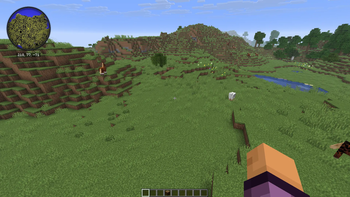
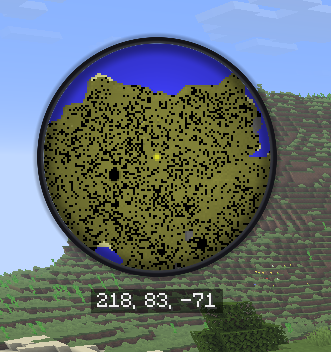
About this Mod
🧭 RoadMap — Smooth & Clean Direction HUD
RoadMap is a lightweight, performance-focused utility mod for Fabric that adds a clean, customizable directional HUD to your screen. Whether you are exploring massive open worlds, navigating tight cave systems, or coordinating with team members in multiplayer, RoadMap ensures you always know exactly where you are heading.
✨ Features
- Real-time Direction Tracking: A precise and responsive compass overlay that updates instantly as you look around or move.
- Modern Typography: Uses high-legibility, smooth fonts that scale perfectly across all monitor resolutions without pixelation.
- Fully Customizable: Don't like where it is? Want it smaller? You can tweak everything to match your personal HUD style.
- Zero Performance Impact: Built with optimization at its core. It hooks directly into the rendering loop without dropping a single frame.
⚙️ Configuration
RoadMap works perfectly out of the box, but it creates a config file upon the first launch so you can tailor it to your needs. You can easily adjust:
- Visibility: Toggle the entire HUD overlay on or off.
- UI Scaling: Change the text size so it doesn't clutter your screen.
- Screen Alignment: Place the overlay anywhere (Top Center, Top Left, Bottom Right, etc.).
- Update Frequency: Customize how often the heading recalculates for ultimate smoothness.
🚀 Installation
- Make sure you have the latest version of Fabric Loader installed.
- Put the downloaded
.jarfile into your Minecraftmodsfolder. - Launch the game! The configuration file will be automatically generated in your
configdirectory.
🛡️ Compatibility
- Fully compatible with standard performance mods (Sodium, Lithium, etc.).
- Designed for client-side use (you don't need it installed on the server to work).
Available Versions
How to Install RoadMap on Your Server
Order Server
Order a Minecraft Java server with at least 3 GB RAM (4 GB recommended).
Set fabric Loader
In the panel under "Egg", select the fabric loader and matching Minecraft version (26.1.2).
Install Mod
Open the mod browser in the dashboard and search for "RoadMap". Click "Install" – done! Alternatively, upload the .jar via SFTP to the /mods folder.
Compatibility
Mod Loaders
Minecraft Versions
26.1.2
Server-side
✗ UnsupportedRecommended RAM
4 GB(min. 3 GB)Frequently Asked Questions
RoadMap server crashes on startup – what to do?
Most common cause: wrong fabric version or insufficient RAM. Check the server log (latest.log) for "OutOfMemoryError" or "Mixin" errors. With Mado Hosting: ensure at least 3 GB RAM is allocated and the loader matches the mod version (26.1.2). You can switch loaders with one click in the panel.
Is RoadMap compatible with fabric?
RoadMap officially supports fabric for Minecraft 26.1.2. The Mado dashboard automatically detects incompatible loader combinations.
Server lagging with RoadMap – how to optimize performance?
Recommended RAM: 4 GB (per 8 players). Use /spark profiler to check if RoadMap consumes the most tick time. Common fixes: reduce server view-distance to 8-10, install "performant" or "starlight" as supplementary mods on Forge. With Mado Hosting, your server runs on NVMe SSDs with dedicated CPU cores for minimal latency.
Rent Modded Server
Install RoadMap with just one click on your server.