RogueCraft
A Rogue-like mod for Minecraft which adds a fully playable Rogue-like dungeon dimension!
Screenshots
About this Mod
Welcome to RogueCraft, a Rogue-like mod for Minecraft adds a fully playable Rogue-like dungeon dimension! The mod is designed with modpack authors in mind as this mod aims to be fully customizable with what I call "dungeon packs" that are datapacks combined with the mod's config in a specific way. which adds a fully playable Rogue-like dungeon dimension!
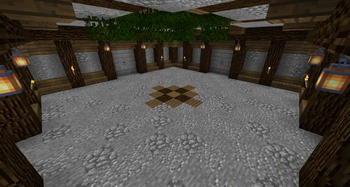
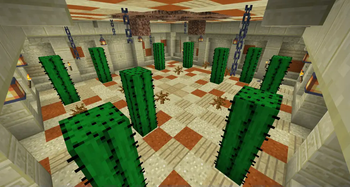
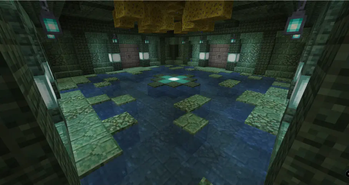
As it's a rogue-like explaining everything would just ruin part of the fun so I'll only share what I think is necessary but do feel free to check out the gallery of images to get some idea of what's in store. (Images will also be updated as time goes on)
You start your adventure by creating the Dungeon Run Portal which is created by putting chiseled stone bricks in the shape of a Nether portal and then ignited with the "Mysterious Shard" item.
Join the Discord Server! https://discord.gg/QagkwvSWtC
Dungeon Pack Guide:
Dungeon packs are made through a combination of config files and a datapack with structures.
(Example Pack)
Let's start with some basic rules of the dungeons. Roguecraft's dungeons are divided in to grids of rooms 19 x 19 big with the edge blocks been shared between any neighboring rooms. Rougecraft's Keystones use Minecraft functions to generate rooms so anything that you can do through a function should be possible to generate, check out the Example Pack for an idea of how it works.
In the center of each grid at Y:118 once a room has been generated there is a block called "room_active" which is how the mod indicates if a room is active or not, it turns in to a "room_deactive" block once the dungeon ends/stops.
Rooms can be larger than 1 grid if desired but in that case make sure to follow the grid format "ex: 19x38" and to manually put a "room_active" block in the center of the extended grid.
Now on to how to design a Dungeon Pack. Here is an example Dungeon Pack I threw together where you can see how they're designed.
The template provided has the namespace "testpack" and the basic rooms and boss rooms are named this "level_1_room" & "level_1_boss_room" (excluding room number and direction) so what you enter under "Dungeon Pack" is: "testpack:level_1_room" for the regular rooms & "testpack:level_1_boss_room" for the boss rooms. The Keystone generates 4 different rooms per direction (North, South, West & East) meaning you'll have to make sure your room generates correctly in these different directions by adjusting the placement in the function for that direction. The name for a function when creating it should then be something like this: "testpack" for the namespace "level_1_room" for the room set's name which should be the same for all of them and then after that you HAVE to add "
(This image shows the Grid Layout and where/how the "room_active" & "room_deactive" blocks are placed)
Supported Versions:
1.7.10: N/A: None
1.12.2: N/A: None
1.14.4: N/A: None
1.15.2: N/A: None
1.16.5: N/A: None
1.17.1: N/A: None
1.18.2: LTS: "Long Term Support"
1.19.2: LTS: "Long Term Support"
1.19.4: STS: "Short Term Support"
1.20.1: LTS: "Long Term Support"
Do note that this is the plan but things may change overtime!
FAQ:
1. coming soon...
Developers:
Textures:
mc_jojo3 & other
Made by: mc_jojo3
Available Versions
How to Install RogueCraft on Your Server
Order Server
Order a Minecraft Java server with at least 3 GB RAM (4 GB recommended).
Set forge Loader
In the panel under "Egg", select the forge loader and matching Minecraft version (1.20.1).
Install Mod
Open the mod browser in the dashboard and search for "RogueCraft". Click "Install" – done! Alternatively, upload the .jar via SFTP to the /mods folder.
Compatibility
Mod Loaders
Minecraft Versions
1.20.1, 1.19.4, 1.19.2 (+1 more)
Server-side
✓ RequiredRecommended RAM
4 GB(min. 3 GB)Frequently Asked Questions
RogueCraft server crashes on startup – what to do?
Most common cause: wrong forge version or insufficient RAM. Check the server log (latest.log) for "OutOfMemoryError" or "Mixin" errors. With Mado Hosting: ensure at least 3 GB RAM is allocated and the loader matches the mod version (1.20.1). You can switch loaders with one click in the panel.
Is RogueCraft compatible with forge and neoforge?
RogueCraft officially supports forge, neoforge for Minecraft 1.20.1, 1.19.4, 1.19.2. The Mado dashboard automatically detects incompatible loader combinations.
Server lagging with RogueCraft – how to optimize performance?
Recommended RAM: 4 GB (per 8 players). Use /spark profiler to check if RogueCraft consumes the most tick time. Common fixes: reduce server view-distance to 8-10, install "performant" or "starlight" as supplementary mods on Forge. With Mado Hosting, your server runs on NVMe SSDs with dedicated CPU cores for minimal latency.
Similar Mods




Rent Modded Server
Install RogueCraft with just one click on your server.