
RoseBackport
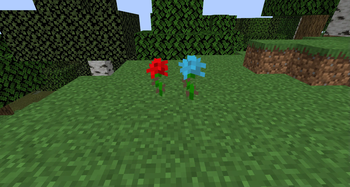
Adds rare classic red and blue roses to specific biomes in your world!
Screenshots
About this Mod
English version:
Classic Roses Mod
This mod brings back the nostalgic red rose and the legendary blue rose into your Minecraft world!
Both flowers naturally generate as rare finds in specific biomes — collect them, decorate, and relive classic vibes!
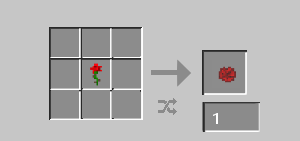
The red rose can be found in Plains, Sunflower Plains, Forest, Flower Forest, and Meadow biomes.
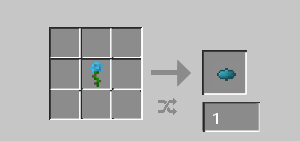
The blue rose is even rarer, appearing only in Flower Forest, Meadow, and occasionally in Swamp biomes.
If you have any questions, join my Discord or follow for updates so you don’t miss anything!
Also check out my other mods! 🌹✨
Enjoy the return of classic flowers!
Русская версия:
Classic Roses Mod
Этот мод возвращает в мир Minecraft ту самую классическую красную розу и легендарную голубую розу!
Оба цветка генерируются в мире очень редко в определённых биомах — собирайте их, украшайте и наслаждайтесь атмосферой старых версий!
Красная роза встречается в биомах: равнины, равнины подсолнухов, лес, цветущий лес и луг.
Голубая роза ещё реже — она появляется только в цветущем лесу, на лугах и иногда на болотах.
Если возникли вопросы — заходите в мой Discord или подпишитесь на обновления, чтобы ничего не пропустить!
Также посмотрите другие мои моды! 🌹✨
Наслаждайтесь возвращением классических цветов!
Available Versions
How to Install RoseBackport on Your Server
Order Server
Order a Minecraft Java server with at least 3 GB RAM (4 GB recommended).
Set forge Loader
In the panel under "Egg", select the forge loader and matching Minecraft version (1.21.5).
Install Mod
Open the mod browser in the dashboard and search for "RoseBackport". Click "Install" – done! Alternatively, upload the .jar via SFTP to the /mods folder.
Compatibility
Mod Loaders
Minecraft Versions
1.21.5, 1.21.4, 1.21.1 (+6 more)
Server-side
✓ RequiredRecommended RAM
4 GB(min. 3 GB)Frequently Asked Questions
RoseBackport server crashes on startup – what to do?
Most common cause: wrong forge version or insufficient RAM. Check the server log (latest.log) for "OutOfMemoryError" or "Mixin" errors. With Mado Hosting: ensure at least 3 GB RAM is allocated and the loader matches the mod version (1.21.5). You can switch loaders with one click in the panel.
Is RoseBackport compatible with forge and neoforge?
RoseBackport officially supports forge, neoforge for Minecraft 1.21.5, 1.21.4, 1.21.1. The Mado dashboard automatically detects incompatible loader combinations.
Server lagging with RoseBackport – how to optimize performance?
Recommended RAM: 4 GB (per 8 players). Use /spark profiler to check if RoseBackport consumes the most tick time. Common fixes: reduce server view-distance to 8-10, install "performant" or "starlight" as supplementary mods on Forge. With Mado Hosting, your server runs on NVMe SSDs with dedicated CPU cores for minimal latency.
Similar Mods




Rent Modded Server
Install RoseBackport with just one click on your server.
Details
- License
- Creative Commons Attribution Non Commercial No Derivatives 4.0 International
- Server-side
- Required