
Rosen
A mod that adds more noteblock instruments!
Screenshots
About this Mod
Rosen is a lightweight mod that aims to expand on the noteblock system by adding more instruments, while trying to keep the sound design on the same level as the vanilla Minecraft.
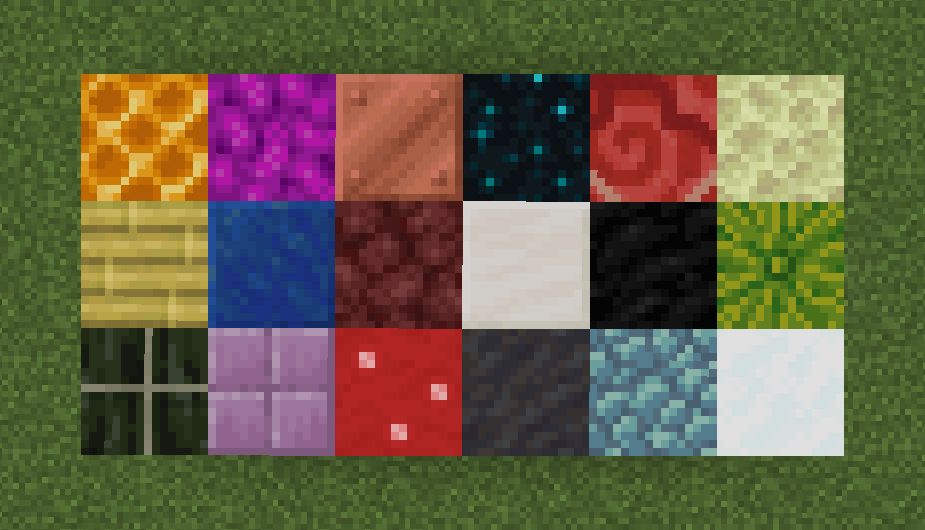
Currently Rosen adds 18 new carefully crafted instruments such as Saxophone, Organ, Sitar, Music Box, Timpani and more! Rosen also features a Quality of Life addition that allows to play already existing instruments with the other blocks of a similar type.
| № | Instrument | Blocks |
|---|---|---|
| 1 | Accordion | Honey Block, Honeycomb, Bee Nest |
| 2 | Beach | All full coral blocks (including dead) |
| 3 | Carillon | All copper blocks |
| 4 | Choir | Sculk, Sculk Catalyst |
| 5 | Dholak | All terracotta blocks (including glazed), Decorated Pot |
| 6 | Kick | End Stone, End Stone Bricks |
| 7 | Log Drum | Bamboo Block, Stripped Bamboo Block, Bamboo Planks, Bamboo Mosaic |
| 8 | Music Box | Lapis Block |
| 9 | Organ | Netherrack, all Nether bricks |
| 10 | Piano | All full quartz blocks |
| 11 | Power Guitar | Coal Block |
| 12 | Saxophone | Melon |
| 13 | Sitar | Dried Kelp Block |
| 14 | Synth | Purpur Block, Purpur Pillar |
| 15 | Synth Bass | Shroomlight, all mushroom blocks, all wart blocks |
| 16 | Timpani | Mud, Muddy Mangrove Roots, Packed Mud, Mud Bricks |
| 17 | Vibraphone | All prismarine blocks, Sea Lantern |
| 18 | Violin | Snow Block, Powder Snow |
How to add custom instruments (1.21.1+ only)
In your datapack, add a new json file named after your instrument to data.rosen.noteblock_instrument that follows this format:
{
 "name": "<instrument_name>",
 "sound_event": "<sound>"
}
Next, add a new file data/<namespace>/tags/block/<instrument_name>_noteblocks.json for the respective block tag that defines blocks to be used for your instrument that follows regular tag format:
{
  "values": [
    "<block>",
    "<other_block>",
    "<another_block>",
    ...
  ]
}
Voilà!
Available Versions
How to Install Rosen on Your Server
Order Server
Order a Minecraft Java server with at least 3 GB RAM (4 GB recommended).
Set fabric Loader
In the panel under "Egg", select the fabric loader and matching Minecraft version (1.21.1).
Install Mod
Open the mod browser in the dashboard and search for "Rosen". Click "Install" – done! Alternatively, upload the .jar via SFTP to the /mods folder.
Compatibility
Mod Loaders
Minecraft Versions
1.21.1, 1.20.6, 1.20.5 (+4 more)
Server-side
✓ RequiredRecommended RAM
4 GB(min. 3 GB)Frequently Asked Questions
Rosen server crashes on startup – what to do?
Most common cause: wrong fabric version or insufficient RAM. Check the server log (latest.log) for "OutOfMemoryError" or "Mixin" errors. With Mado Hosting: ensure at least 3 GB RAM is allocated and the loader matches the mod version (1.21.1). You can switch loaders with one click in the panel.
Is Rosen compatible with fabric and forge and neoforge?
Rosen officially supports fabric, forge, neoforge for Minecraft 1.21.1, 1.20.6, 1.20.5. Note: Forge and Fabric mods are NOT cross-compatible – pick one loader and stick with it. The Mado dashboard automatically detects incompatible loader combinations.
Server lagging with Rosen – how to optimize performance?
Recommended RAM: 4 GB (per 8 players). Use /spark profiler to check if Rosen consumes the most tick time. Common fixes: reduce server view-distance to 8-10, install "performant" or "starlight" as supplementary mods on Forge. With Mado Hosting, your server runs on NVMe SSDs with dedicated CPU cores for minimal latency.
Similar Mods






Rent Modded Server
Install Rosen with just one click on your server.