
Mekanism Addon: Rotten Flesh To Bio Fuel
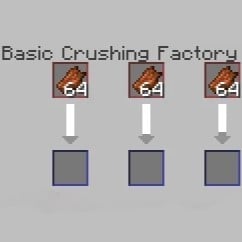
This mod brings back the Mekanism feature of crushing rotten flesh to biofuel.
Screenshots
About this Mod
Rotten Flesh to Biofuel (Mekanism Addon)
Something wrong with the mod? Give me a message in Discord!
Description:
The "Rotten Flesh to Biofuel" mod is an addon for Mekanism in Minecraft 1.20.1 that allows players to convert rotten flesh into biofuel. This mod is perfect for players who are tired of accumulating useless rotten flesh from fighting zombies and want to turn it into something more valuable.
Features:
- Biofuel Production: Using Mekanism's machines, you can now process rotten flesh into biofuel, providing a renewable energy source for your advanced machinery.
- Balanced Recipes: The mod adds balanced recipes that integrate smoothly with the existing Mekanism mechanics, ensuring that converting rotten flesh to biofuel remains a fair but rewarding process.
- Compatibility: Fully compatible with other Mekanism features and compatible mods, ensuring a seamless experience in your modded Minecraft world.
How to Use:
- Gather Rotten Flesh: Collect rotten flesh by defeating zombies or by other means.
- Process in a Crusher: Use the Mekanism Crusher to convert the rotten flesh into 2 biofuel.
- Use Biofuel: Utilize the biofuel in your machinery for a variety of energy-related tasks within the Mekanism mod.
Installation:
- Ensure you have Minecraft 1.20.1 installed with Forge and Mekanism.
- Download and place the "rftb
-<MOD_Version.jar" file into your Minecraft "mods" folder. - Launch Minecraft and enjoy the new functionality!
Notes:
This mod is intended to provide a useful application for the often-overlooked rotten flesh item in Minecraft, giving players a new way to manage resources and maintain energy efficiency within their worlds. Make sure to explore other features of Mekanism to fully optimize your energy systems!
Available Versions
How to Install Mekanism Addon: Rotten Flesh To Bio Fuel on Your Server
Order Server
Order a Minecraft Java server with at least 4 GB RAM (6 GB recommended).
Set forge Loader
In the panel under "Egg", select the forge loader and matching Minecraft version (1.20.1).
Install Mod
Open the mod browser in the dashboard and search for "Mekanism Addon: Rotten Flesh To Bio Fuel". Click "Install" – done! Alternatively, upload the .jar via SFTP to the /mods folder.
Compatibility
Mod Loaders
Minecraft Versions
1.20.1, 1.19.2, 1.18.2 (+2 more)
Server-side
~ OptionalRecommended RAM
6 GB(min. 4 GB)Frequently Asked Questions
Mekanism Addon: Rotten Flesh To Bio Fuel server crashes on startup – what to do?
Most common cause: wrong forge version or insufficient RAM. Check the server log (latest.log) for "OutOfMemoryError" or "Mixin" errors. With Mado Hosting: ensure at least 4 GB RAM is allocated and the loader matches the mod version (1.20.1). You can switch loaders with one click in the panel.
Is Mekanism Addon: Rotten Flesh To Bio Fuel compatible with forge?
Mekanism Addon: Rotten Flesh To Bio Fuel officially supports forge for Minecraft 1.20.1, 1.19.2, 1.18.2. The Mado dashboard automatically detects incompatible loader combinations.
Server lagging with Mekanism Addon: Rotten Flesh To Bio Fuel – how to optimize performance?
Recommended RAM: 6 GB (per 5 players). Use /spark profiler to check if Mekanism Addon: Rotten Flesh To Bio Fuel consumes the most tick time. Common fixes: reduce server view-distance to 8-10, install "performant" or "starlight" as supplementary mods on Forge. With Mado Hosting, your server runs on NVMe SSDs with dedicated CPU cores for minimal latency.
Similar Mods





Rent Modded Server
Install Mekanism Addon: Rotten Flesh To Bio Fuel with just one click on your server.