
Rotting Food
A fully customizable mod that adds a rotting mechanic to all foods in Minecraft. Compatible with your favorite food mods!
Screenshots


About this Mod
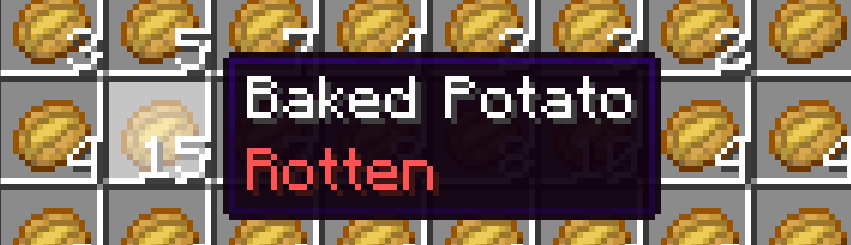
This fully customizable mod adds a rotting mechanic to all foods in the game, even to ones added by other mods. No more chest filled with food. No more food farms!

Configuration Guide
This mod was made to be extremely customizable, which means you can freely change what stages the food will go through as it rots, as well as which food will rot and which won't.
This is the default config:
{
"modDataComponentsEnabled": true,
"showInTooltip": true,
"randomiseFoodState": false,
"preventFoodFarms": true,
"maxRandomState": 2,
"exclude": [
    "minecraft:golden_apple",
    "minecraft:enchanted_golden_apple",
    "minecraft:golden_carrot"
],
"foodStates": [
    {
    "tooltip": "Fresh",
    "color": 5635925,
    "duration": 1,
    "nurtition": "x",
    "saturation": "x",
    "eatSeconds": "x",
    "effects": []
    },
    {
    "tooltip": "Edible",
    "color": 16777045,
    "duration": 3,
    "nurtition": "x/2",
    "saturation": "x/2",
    "eatSeconds": "x",
    "effects": []
    },
    {
    "tooltip": "Rotten",
    "color": 16733525,
    "duration": -1,
    "nurtition": "0",
    "saturation": "0",
    "eatSeconds": "x*2",
    "effects": [
        {
        "probability": 1.0,
        "id": "minecraft:nausea",
        "duration": 200,
        "amplifier": 1,
        "ambient": true,
        "showParticles": false,
        "showIcon": false
        }
    ]
    }
]
}
Here are a things you should know before tampering with the config:
- All Food Stages must be in order. The highest one comes first.
- Values for nutrition, saturation, eatSeconds are essentially equations, where x is the original value of the given item. They can be anything, ranging from "(x / 2) + 1" to a plain number like "2". Mark that x value is not affected by the previous stage as it is the original value.
- Duration is measured in world days(Which means even if you do /time set [insert some crazy number] all your food won't immediately rot)
- Color is an rgb integer.
- Effects allow you to add your own effects to a certain stage(The food will still keep it's original effects).
- When "modDataComponentsEnabled" is set to false the mod will actively remove the rotting functionality from every item it can tick. Essentialy all the food in players inventory will reset and become normal food that doesn't rot.
- randomiseFoodState randomises the food items state when you get it, within the range of maxRandomState. maxRandomState of 2 means you would get either 1 - Fresh or 2 - Edible.
Why was this mod made?
Truthfully i just wanted to make my friends to suffer. And i thought maybe someone might have a simillar desire or might add this to his hardcore world...
As always, any mistakes are my own.


Available Versions
How to Install Rotting Food on Your Server
Order Server
Order a Minecraft Java server with at least 3 GB RAM (4 GB recommended).
Set fabric Loader
In the panel under "Egg", select the fabric loader and matching Minecraft version (1.21.10).
Install Mod
Open the mod browser in the dashboard and search for "Rotting Food". Click "Install" – done! Alternatively, upload the .jar via SFTP to the /mods folder.
Compatibility
Mod Loaders
Minecraft Versions
1.21.10, 1.21.9, 1.21.8 (+8 more)
Server-side
✓ RequiredRecommended RAM
4 GB(min. 3 GB)Frequently Asked Questions
Rotting Food server crashes on startup – what to do?
Most common cause: wrong fabric version or insufficient RAM. Check the server log (latest.log) for "OutOfMemoryError" or "Mixin" errors. With Mado Hosting: ensure at least 3 GB RAM is allocated and the loader matches the mod version (1.21.10). You can switch loaders with one click in the panel.
Is Rotting Food compatible with fabric?
Rotting Food officially supports fabric for Minecraft 1.21.10, 1.21.9, 1.21.8. The Mado dashboard automatically detects incompatible loader combinations.
Server lagging with Rotting Food – how to optimize performance?
Recommended RAM: 4 GB (per 8 players). Use /spark profiler to check if Rotting Food consumes the most tick time. Common fixes: reduce server view-distance to 8-10, install "performant" or "starlight" as supplementary mods on Forge. With Mado Hosting, your server runs on NVMe SSDs with dedicated CPU cores for minimal latency.
Similar Mods





Rent Modded Server
Install Rotting Food with just one click on your server.