
RpEssentials
Nickname players, configurable Jobs, Schedule system (for opening/closing), chat formatting, last connection tracker and much more! Read the description to learn more about it
Screenshots
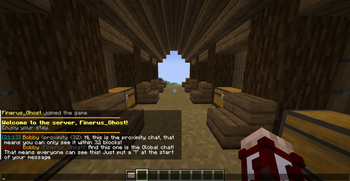
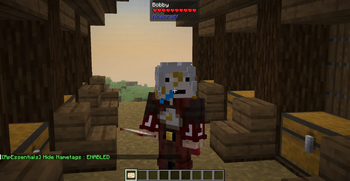
About this Mod
Rp Essentials
Rp Essentials is a comprehensive server-side utility mod built for immersive Roleplay servers running Minecraft 1.21.1 on NeoForge. It provides a complete suite of RP tools: proximity-based name obfuscation, a profession and license system, a warn system, connection tracking, private messaging, schedule automation, staff moderation tools, advanced chat formatting, world border warnings, named zones, Death RP, and deep LuckPerms integration. All configurable in real-time without restarts.
Current version: 4.1.10: See CHANGELOG for the full history.
Requirements
| Dependency | Version | Side | Required |
|---|---|---|---|
| Minecraft | 1.21.1 | Both | ✅ |
| NeoForge | 21.1.219+ | Both | ✅ |
| LuckPerms | Any | Server | ⬜ Optional |
| ImmersiveMessages | neoforge-1.21.1:1.0.18 | Client | ⬜ Optional |
| TxniLib | neoforge-1.21.1:1.0.24 | Client | ⬜ Optional |
ImmersiveMessages and TxniLib are only required on the client if you use
zoneMessageMode = IMMERSIVE. The server runs fine without them.
Installation
- Download the latest
rpessentials-X.X.X.jarfrom the releases page. - Place the JAR in your server's
mods/folder. - (Optional) Install LuckPerms for prefix/suffix and group-based staff permissions.
- Start the server: all config files are generated automatically under
config/rpessentials/. - Edit the relevant config files (see 'Configuration' below).
- Reload in-game with
/rpessentials config reloador restart the server.
Features
Proximity Obfuscation
Prevents metagaming by hiding player identities based on distance:
- Player names in the TabList and above heads are replaced with
?????beyond a configurable range (default: 8 blocks). - Tab list player head hidden for obfuscated players: The skin icon next to an obfuscated player's name in the tab list is hidden, preventing skin-based identification. Non-obfuscated players, staff, whitelisted players, and always-visible players are unaffected.
- Sneak Stealth Mode: Crouching players are only detectable at 2 blocks (configurable).
- Nametag Hiding: Optionally hide all player nametags above heads server-wide.
- Whitelist: Players who always see all names clearly.
- Blacklist: Players who are always hidden regardless of distance (stealth staff, NPCs).
- Always Visible List: Players who are never obfuscated to anyone.
- Spectator Blur: Players in spectator mode are automatically hidden from the TabList.
- LuckPerms rank prefixes are always hidden during obfuscation to prevent rank-based metagaming.
- Staff with
opsSeeAllsee both nickname and real name simultaneously:Nickname (RealName).
Nickname System
Persistent RP nicknames fully integrated across all mod systems:
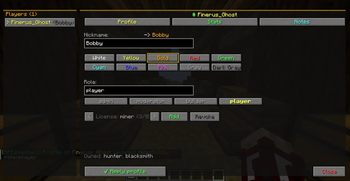
- Set custom nicknames with full
§and&color code support. - Nicknames appear in the TabList, above heads, in chat, and in private messages.
- Stored persistently in
world/data/rpessentials/nicknames.json. /whoisallows staff to reverse-lookup any nickname to its real MC username and UUID.
Nametag System
Realistic nametag behavior integrated with the nickname system:
- Block occlusion: Nametags are hidden when a block is between the viewer and the target. Implemented by switching
Font.DisplayModefromSEE_THROUGHtoNORMAL, activating the GPU depth test, same technique as the Realistic Nametag mod. No raycast, no performance overhead. - Server nickname on nametag: The nametag displays the nickname set on the server (via
/rpessentials nick), with the LuckPerms prefix and full color code support. Never uses a locally cached nickname. - Global hide toggle: All nametags can be hidden server-wide via
hideNametags = trueinrpessentials-core.tomlor/rpessentials config set hideNametags true/false.
Profession & License System
A complete job restriction system for RP servers:
- Define unlimited professions with custom names and color codes.
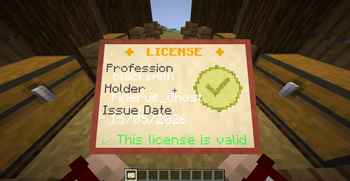
- Physical license items are given to players, carrying profession metadata and issuance date.
- RP Licenses: Decorative-only licenses for events, with a printed expiration date and no actual permissions.
- Restriction types: crafting, block breaking, item usage, equipment (armor/weapons), and attacks.
- Global restrictions apply to all players by default, with per-profession overrides for licensed players.
- Wildcard pattern support:
minecraft:*_pickaxeblocks an entire item category. - Restriction messages shown via action bar with anti-spam cooldown.
- Tooltips display required professions on restricted items (client-side packet sync).
- License Audit Log: Every
GIVE,REVOKE, andGIVE_RPaction is permanently logged toworld/data/rpessentials/license-audit.json. - Temp License Registry: RP licenses are tracked in
world/data/rpessentials/licenses-temp.json. - Revoked license items are automatically removed from the player's inventory.
- Whitelisted players are exempt from all profession restrictions (configurable).
- Granting or revoking a license automatically adds or removes the corresponding vanilla scoreboard tag (tag name = profession ID).
Warn System
Full staff warning system for moderation:
- Issue permanent or temporary warns to any online player.
- The warned player receives an immediate in-chat notification with the reason and duration.
- On every login, players are notified of their active warn count and invited to run
/mywarn. /mywarnlets any player view their own active warns with reason, issuer, date, and remaining time.- Configurable staff broadcast on every warn add and warn remove.
- Automatic purge of expired temp-warns on player login (configurable).
- Warn IDs are auto-incremental integers, recalculated after every deletion to avoid gaps.
- Data stored in
world/data/rpessentials/warns.json.
Last Connection Tracking
Automatic recording of player connection history:
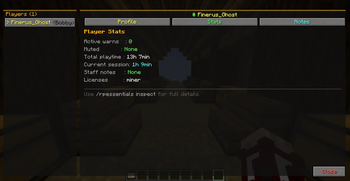
- Records last login and last logout for every player.
- Data stored in
world/data/rpessentials/lastconnection.json: human-readableUUID (McUsername)key format. - Staff can look up any player's last connection time, even for offline players.
- List view shows the N most recent connections sorted by date.
Private Messaging
Custom /msg system fully replacing vanilla messaging:
/msg <player> <message>,/tell,/w,/whisper: send private messages with Rp Essentials formatting./r <message>: reply to the last person who messaged you.- Messages formatted with nicknames, LuckPerms prefixes/suffixes, and color codes.
- Clickable "Click to reply" button in received messages.
- Console-to-player messaging supported.
Advanced Chat
Full chat formatting system:
- Customizable player name format with LuckPerms prefix/suffix support (
$prefix $name $suffix). - Full message template with timestamp and color support (
$time | $name: $msg). - Global chat message color configuration (16 Minecraft colors available).
- Timestamp system with customizable Java
SimpleDateFormat. - Real-time Markdown support:
**text**→ Bold*text*→ Italic__text__→ Underline~~text~~→ Strikethrough
/colorsdisplays all available colors and formatting codes with a visual preview.- Full integration with the nickname system, nicknames appear in chat automatically.
Join / Leave Messages
- Fully customizable join and leave messages with
{player}and{nickname}placeholders. - Full color code support.
- Can be disabled entirely.
Welcome Message
- Configurable multi-line welcome message sent to players on login.
- Optional sound effect with configurable volume and pitch.
{player}and{nickname}variable support.- Integrates with the schedule system to display server status.
Server Schedule
Automated server opening and closing management with per-day support:
- Each day of the week (
MONDAYthroughSUNDAY) has its ownenabled,open, andclosefields. - Disabled days are treated as fully closed.
- Automated warnings at 45, 30, 10, and 1 minute before closing.
- Smart kick system that only affects non-staff players.
- Staff receives notifications when the server opens or closes.
- The kick message displays the next open day and its hours (placeholders:
{day},{open},{close}). /rpessentials scheduleand/scheduledisplay the full week at a glance with the current day highlighted.- Aliases:
/scheduleand/horaires.
Death Hours
An optional schedule layer that activates Death RP during configured time slots, independently of the global Death RP toggle. Supports cross-midnight ranges. Disabled by default.
HRP Hours
An optional schedule layer for out-of-roleplay (HRP) period management:
- Two tiers: tolerated (noted but not punished) and allowed (fully free).
- Broadcast message sent once per slot start to all connected players.
- Configurable display mode:
CHAT,ACTION_BAR,TITLE,IMMERSIVE. - Disabled by default, entirely ignored when
enableHrpHours = false.
Death RP
Permanent death system for RP servers:
- Global toggle enabling or disabling the system in real-time.
- Per-player overrides to enable, disable, or reset to the global state.
- On RP death: a broadcast is sent to all connected players with the deceased's nickname and real name.
- A configurable sound is played to all players on RP death.
- Optional automatic whitelist removal on RP death (
whitelistRemove). - All messages and sounds are fully configurable for both global and per-player toggles.
World Border & Named Zones
- Distance-based warning triggered by proximity to spawn (independent of the vanilla world border).
- Configurable message with
{distance}and{player}placeholders. - Named Zones: Define circular zones with center coordinates, radius, and custom entry/exit messages.
- Configurable display mode for zone messages:
IMMERSIVE,CHAT,ACTION_BAR.
Staff Moderation Tools
Silent staff commands with full logging:
- Silent gamemode, teleport, and effect commands: invisible to other players.
- All actions logged to console and broadcast to other online staff (configurable).
- Target notification disabled by default (stealth mode).
Teleportation Platforms
- Define named platforms across dimensions with custom coordinates.
- Staff can teleport themselves or other players to any platform.
/setplatformcommand to create or update a platform without editing the config file.
Roles
- Assign predefined roles to players via
/rpessentials setrole. - Automatically removes all existing role tags, adds the new tag, and sets the corresponding LuckPerms group.
- Roles configurable in
rpessentials-core.tomlunder[Roles]. Format:roleId;lpGroup. - Full tab-completion of available roles.
- Requires OP level 3.
Auto-Unwhitelist
Automatic removal of inactive players from the whitelist:
- Configurable inactivity threshold (days).
- Runs once per day at midnight.
- Requires
enableLastConnection = true. - Staff members online at the time receive a clickable cancel button to immediately re-whitelist the player.
- Optional extra commands executed per removed player. Placeholders:
{player},{uuid}. - Disabled by default.
Staff Permission System
Multi-layered staff detection for maximum reliability:
- Scoreboard tags (
admin,modo,staff,builder: configurable). - Minimum OP level bypass (configurable from 0 to 4).
- LuckPerms group integration (configurable).
- Results cached for better performance (30-second cache).
- Automatic cache invalidation on logout.
Fully Configurable Messages
Every player-facing string in the mod is exposed as a configurable value via oneria-messages.toml:
- Full English translation of all messages out of the box.
§and&color code support in all values.- Reloadable at runtime with
/rpessentials config reload(no restart required). - Organized into clear sections:
[System],[Private Messaging],[Warn System],[Last Connection],[Death RP],[Whois],[Player List],[Help],[Profession Restrictions].
Commands
Permissions:
OP 2= OP level ≥ 2;Staff= staff role detected by the mod's permission system;Everyone= all players.
Configuration
| Command | Permission | Description |
|---|---|---|
/rpessentials config reload |
OP 2 | Reload all configs and clear caches. |
/rpessentials config status |
OP 2 | Display current status of all mod systems. |
/rpessentials config set <option> <value> |
OP 2 | Modify any config option in real-time. |
Nicknames
| Command | Permission | Description |
|---|---|---|
/rpessentials nick <player> <nickname> |
OP 2 | Set a nickname (supports color codes). |
/rpessentials nick <player> |
OP 2 | Reset a player's nickname. |
/rpessentials nick list |
OP 2 | List all active nicknames. |
/whois <nickname> |
OP 2 | Find the MC username and UUID behind a nickname. |
Licenses
| Command | Permission | Description |
|---|---|---|
/rpessentials license give <player> <profession> |
OP 2 | Grant a functional license. |
/rpessentials license giverp <player> <profession> <days> |
OP 2 | Grant a decorative RP-only license with an expiration date. |
/rpessentials license revoke <player> <profession> |
OP 2 | Revoke a license. |
/rpessentials license list [player] |
OP 2 | List all licenses, or those of a specific player. |
/rpessentials license check <player> <profession> |
OP 2 | Check if a player holds a specific license. |
Warns
| Command | Permission | Description |
|---|---|---|
/rpessentials warn add <player> <reason> |
Staff | Issue a permanent warn. |
/rpessentials warn temp <player> <minutes> <reason> |
Staff | Issue a temporary warn. |
/rpessentials warn remove <player> <warnId> |
Staff | Remove a specific warn. |
/rpessentials warn list [player] |
Staff | List all warns, or all warns for a player. |
/rpessentials warn info <player> <warnId> |
Staff | Show full details of a warn. |
/rpessentials warn clear <player> |
Staff | Remove all warns for a player. |
/rpessentials warn purge |
Staff | Purge all expired temp-warns. |
/mywarn |
Everyone | View your own active warns. |
Last Connection
| Command | Permission | Description |
|---|---|---|
/rpessentials lastconnection <player> |
Staff | Show last login/logout for a player. |
/rpessentials lastconnection list [count] |
Staff | List the N most recent connections (default: 20). |
Death RP
| Command | Permission | Description |
|---|---|---|
/rpessentials deathrp enable <true|false> |
Staff | Toggle Death RP globally. |
/rpessentials deathrp player <player> enable <true|false> |
Staff | Set a per-player override. |
/rpessentials deathrp player <player> reset |
Staff | Remove a player's individual override. |
/rpessentials deathrp status |
Staff | Display system state and all active overrides. |
Roles
| Command | Permission | Description |
|---|---|---|
/rpessentials setrole <player> <role> |
OP 3 | Assign a role to a player (sets tags + LuckPerms group). |
Staff
| Command | Permission | Description |
|---|---|---|
/rpessentials staff gamemode <mode> [player] |
Staff | Silent gamemode change. |
/rpessentials staff tp <player> |
Staff | Silent teleport. |
/rpessentials staff effect <player> <effect> <duration> <amplifier> |
Staff | Silent effect application. |
/rpessentials staff platform [player] [id] |
Staff | Teleport to a named platform. |
/setplatform <id> <dimension> <x> <y> <z> |
OP 2 | Create or update a platform entry. |
Whitelist / Blacklist
| Command | Permission | Description |
|---|---|---|
/rpessentials whitelist add/remove/list |
OP 2 | Manage the blur bypass whitelist. |
/rpessentials blacklist add/remove/list |
OP 2 | Manage the always-hidden blacklist. |
/rpessentials alwaysvisible add/remove/list |
OP 2 | Manage the never-obfuscated list. |
Messaging
| Command | Permission | Description |
|---|---|---|
/msg <player> <message> |
Everyone | Send a private message. |
/tell, /w, /whisper |
Everyone | Aliases for /msg. |
/r <message> |
Everyone | Reply to the last person who messaged you. |
Public
| Command | Permission | Description |
|---|---|---|
/rpessentials schedule / /schedule / /horaires |
Everyone | View server schedule and status. |
/rpessentials help |
Everyone | Display available commands (staff section shown to staff only). |
/colors |
Everyone | Display all color codes and formatting options. |
/list |
Everyone | Custom player list showing nicknames and real usernames. |
/mywarn |
Everyone | View your own active warns. |
Configuration
The mod uses 6 config files under config/rpessentials/, generated automatically on first launch. All files are fully documented with inline comments.
| File | Contents |
|---|---|
rpessentials-core.toml |
Obfuscation, permissions, world border & zones, Death RP, roles |
rpessentials-chat.toml |
Chat formatting, markdown, timestamps, join/leave messages |
rpessentials-schedule.toml |
Per-day schedule, death hours, HRP hours, welcome message, auto-unwhitelist |
rpessentials-moderation.toml |
Silent commands, platforms, last connection, warn system |
rpessentials-professions.toml |
Profession definitions and all restriction lists |
rpessentials-messages.toml |
All customizable player-facing message strings |
rpessentials-core.toml
[Obfuscation Settings]
| Option | Default | Description |
|---|---|---|
enableBlur |
true |
Master switch for the obfuscation system. |
proximityDistance |
8 |
Detection range in blocks (normal). |
obfuscatedNameLength |
5 |
Number of ? characters in the obfuscated name. |
obfuscatePrefix |
true |
Hide LuckPerms rank prefix when obfuscating. |
opsSeeAll |
true |
Staff always see real names. |
hideNametags |
false |
Hide all player nametags above heads. |
showNametagPrefixSuffix |
true |
Show LuckPerms prefix/suffix in nametags. |
enableSneakStealth |
true |
Crouching reduces detection range. |
sneakProximityDistance |
2 |
Detection range for crouching players (blocks). |
blurSpectators |
true |
Hide spectator-mode players from the TabList. |
whitelist |
[] |
Players who always see all names clearly. |
blacklist |
[] |
Players who are always hidden. |
alwaysVisibleList |
[] |
Players who are never obfuscated to anyone. |
whitelistExemptProfessions |
false |
Whitelist players bypass profession restrictions. |
[Permissions System]
| Option | Default | Description |
|---|---|---|
staffTags |
["admin","moderateur","modo","staff","builder"] |
Scoreboard tags/groups considered staff. |
opLevelBypass |
2 |
Minimum OP level to bypass restrictions (0 = disabled). |
useLuckPermsGroups |
true |
Use LuckPerms groups for staff detection. |
luckPermsStaffGroups |
["admin","moderateur","staff"] |
LuckPerms groups treated as staff. |
[World Border Warning]
| Option | Default | Description |
|---|---|---|
enableWorldBorderWarning |
true |
Enable distance-based warnings. |
worldBorderDistance |
2000 |
Warning trigger distance from spawn (blocks). |
worldBorderMessage |
"..." |
Warning message. Variables: {distance}, {player}. |
worldBorderCheckInterval |
40 |
Check frequency in ticks (40 = 2 seconds). |
namedZones |
[] |
Named zones with entry/exit messages. Format: name;centerX;centerZ;radius;enterMsg;exitMsg. |
zoneMessageMode |
"ACTION_BAR" |
Display mode for zone messages: IMMERSIVE, CHAT, ACTION_BAR. |
[DeathRP]
| Option | Default | Description |
|---|---|---|
globalEnabled |
false |
Global state of the Death RP system. |
whitelistRemove |
false |
Automatically remove the player from the whitelist on RP death. |
deathMessage |
"..." |
Message broadcast to all players on RP death. Variables: {player}, {realname}. |
deathSound |
"minecraft:entity.wither.death" |
Sound played on RP death. Use none to disable. |
deathSoundVolume |
1.0 |
RP death sound volume. |
deathSoundPitch |
1.0 |
RP death sound pitch. |
[Roles]
| Option | Default | Description |
|---|---|---|
roles |
["admin;admin","modo;modo","builder;builder","joueur;joueur"] |
Role definitions. Format: roleId;lpGroup. |
rpessentials-chat.toml
[Chat Settings]
| Option | Default | Description |
|---|---|---|
enableChatFormat |
true |
Enable the chat formatting system. |
playerNameFormat |
"$prefix$name$suffix" |
Player name format in chat. |
chatMessageFormat |
"$time | $name: $msg" |
Full message template. |
chatMessageColor |
"white" |
Global chat message color. |
enableTimestamp |
false |
Show timestamps in chat. |
timestampFormat |
"HH:mm" |
Java SimpleDateFormat pattern for timestamps. |
enableMarkdown |
true |
Enable Markdown support in chat. |
[Join / Leave Messages]
| Option | Default | Description |
|---|---|---|
enableJoinMessage |
true |
Enable the join message. |
joinMessage |
"..." |
Join message. Variables: {player}, {nickname}. |
enableLeaveMessage |
true |
Enable the leave message. |
leaveMessage |
"..." |
Leave message. Variables: {player}, {nickname}. |
rpessentials-schedule.toml
[Schedule System | Per Day]
Each day of the week (MONDAY through SUNDAY) has its own fields:
| Option | Default | Description |
|---|---|---|
<day>.enabled |
varies | Whether the server is open this day. |
<day>.open |
"18:00" |
Opening time (format HH:MM). |
<day>.close |
"23:00" |
Closing time (format HH:MM). |
[Messages]
| Option | Description |
|---|---|
closingWarningMessage |
Warning message before closing. Variable: {time}. |
kickMessage |
Kick message. Variables: {day}, {open}, {close}. |
serverOpenMessage |
Broadcast message on server open. |
serverCloseMessage |
Broadcast message on server close. |
[Welcome Message]
| Option | Default | Description |
|---|---|---|
enableWelcomeMessage |
true |
Enable the welcome message. |
welcomeMessage |
["..."] |
Multi-line welcome message with color code support. |
welcomeSound |
"" |
Sound played on login (resource location string). |
welcomeSoundVolume |
1.0 |
Welcome sound volume. |
welcomeSoundPitch |
1.0 |
Welcome sound pitch. |
[Death Hours]
| Option | Default | Description |
|---|---|---|
enableDeathHours |
false |
Enable automatic Death RP activation by time slot. |
deathHoursSlots |
[] |
Time slots for Death RP activation. Format: HH:MM-HH:MM. |
[HRP Hours]
| Option | Default | Description |
|---|---|---|
enableHrpHours |
false |
Enable the HRP hours system. |
hrpBroadcastMode |
"CHAT" |
Display mode: CHAT, ACTION_BAR, TITLE, IMMERSIVE. |
[Auto-Unwhitelist]
| Option | Default | Description |
|---|---|---|
autoUnwhitelistEnabled |
false |
Enable automatic removal of inactive players from the whitelist. |
autoUnwhitelistDays |
30 |
Days of inactivity before removal. |
autoUnwhitelistExtraCommands |
[] |
Extra commands run on removal. Variables: {player}, {uuid}. |
rpessentials-moderation.toml
[Silent Commands]
| Option | Default | Description |
|---|---|---|
enableSilentCommands |
true |
Enable silent staff commands. |
logToStaff |
true |
Broadcast silent command usage to other staff. |
logToConsole |
true |
Log silent commands to the server console. |
notifyTarget |
false |
Notify the target of the action (disables stealth). |
[Teleportation Platforms]
| Option | Default | Description |
|---|---|---|
enablePlatforms |
true |
Enable the platform teleport system. |
platforms |
[...] |
Platform list (id;DisplayName;dimension;x;y;z). |
[Last Connection]
| Option | Default | Description |
|---|---|---|
enableLastConnection |
true |
Enable login/logout time tracking. |
trackLogout |
true |
Also record disconnection times. |
dateFormat |
"dd/MM/yyyy HH:mm:ss" |
Java SimpleDateFormat for stored dates. |
[Warn System]
| Option | Default | Description |
|---|---|---|
enableWarnSystem |
true |
Enable the warn system. |
notifyOnJoin |
true |
Notify players of active warns on login. |
joinMessage |
"..." |
Login notification message. Variable: {count}. |
maxTempDays |
30 |
Max duration for temp warns in days (0 = unlimited). |
autoPurgeExpired |
true |
Auto-purge expired warns on player login. |
addedBroadcastFormat |
"..." |
Staff broadcast on warn add. Variables: {id}, {staff}, {player}, {reason}, {expiry}. |
removedBroadcastFormat |
"..." |
Staff broadcast on warn remove. Variables: {id}, {staff}. |
rpessentials-professions.toml
| Option | Description |
|---|---|
professions |
Profession definitions (id;DisplayName;§ColorCode). |
globalBlockedCrafts |
Items blocked from crafting for all players. |
globalUnbreakableBlocks |
Blocks that cannot be broken by anyone. |
globalBlockedItems |
Items that cannot be used or interacted with. |
globalBlockedEquipment |
Armor/weapons that cannot be equipped. |
professionAllowedCrafts |
Per-profession craft overrides (profession;item1,item2). |
professionAllowedBlocks |
Per-profession block breaking overrides. |
professionAllowedItems |
Per-profession item usage overrides. |
professionAllowedEquipment |
Per-profession equipment overrides. |
craftBlockedMessage |
Message shown when a craft is blocked. |
blockBreakBlockedMessage |
Message shown when block breaking is blocked. |
itemUseBlockedMessage |
Message shown when item use is blocked. |
equipmentBlockedMessage |
Message shown when equipping is blocked. |
rpessentials-messages.toml
All player-facing strings are configurable in this file. It is generated automatically on first start and organized into sections:
| Section | Contents |
|---|---|
[System] |
System messages, config error strings |
[Private Messaging] |
Private message prompts and notifications |
[Warn System] |
All warn notifications, labels, and duration formats |
[Last Connection] |
Last connection display strings |
[Death RP] |
Death RP toggle and status messages |
[Whois] |
/whois result messages |
[Player List] |
Player list header |
[Help] |
All help menu entries |
[Profession Restrictions] |
Restriction feedback messages |
Data Storage
All persistent data is stored in the world folder. Files are human-readable JSON and can be edited manually. Keys use the UUID (McUsername) format for readability.
| File | Contents |
|---|---|
world/data/rpessentials/nicknames.json |
Player nicknames |
world/data/rpessentials/licenses.json |
Player licenses |
world/data/rpessentials/license-audit.json |
License audit log |
world/data/rpessentials/licenses-temp.json |
Temporary (RP) license registry |
world/data/rpessentials/warns.json |
Player warns |
world/data/rpessentials/lastconnection.json |
Player connection history |
All saves are asynchronous. All loads are synchronous at server startup.
LuckPerms Integration
LuckPerms is optional. The mod works fully without it, with graceful fallback:
- Without LuckPerms: staff detection falls back to scoreboard tags and OP levels. Prefix/suffix display is disabled.
- With LuckPerms: full integration with prefixes, suffixes, groups, and permission nodes.
- All LuckPerms-dependent features are silently skipped when the mod is absent.
Performance
- Permission checks: 30-second cache (~90% overhead reduction).
- Profession restriction checks: ~0.1ms per check (cached) (most of the verification is now event-based so almost no impact).
- License database queries: ~0.5ms (with caching).
- Network sync: ~1KB packet per player on login.
- Cache cleanup runs every 20 seconds to prevent memory leaks.
- Nametag block occlusion: zero raycast overhead, handled entirely by GPU depth test.
- Estimated total overhead: <1% CPU usage on active servers.
Technical Information
| Field | Value |
|---|---|
| Mod ID | rpessentials |
| Group ID | net.rp.rpessentials |
| Version | 4.1.10 |
| MC Version | 1.21.1 |
| NeoForge | 21.1.219+ |
| Java | 21 |
Available Versions
How to Install RpEssentials on Your Server
Order Server
Order a Minecraft Java server with at least 3 GB RAM (4 GB recommended).
Set neoforge Loader
In the panel under "Egg", select the neoforge loader and matching Minecraft version (1.21.1).
Install Mod
Open the mod browser in the dashboard and search for "RpEssentials". Click "Install" – done! Alternatively, upload the .jar via SFTP to the /mods folder.
Compatibility
Mod Loaders
Minecraft Versions
1.21.1
Server-side
✓ RequiredRecommended RAM
4 GB(min. 3 GB)Frequently Asked Questions
RpEssentials server crashes on startup – what to do?
Most common cause: wrong neoforge version or insufficient RAM. Check the server log (latest.log) for "OutOfMemoryError" or "Mixin" errors. With Mado Hosting: ensure at least 3 GB RAM is allocated and the loader matches the mod version (1.21.1). You can switch loaders with one click in the panel.
Is RpEssentials compatible with neoforge?
RpEssentials officially supports neoforge for Minecraft 1.21.1. The Mado dashboard automatically detects incompatible loader combinations.
Server lagging with RpEssentials – how to optimize performance?
Recommended RAM: 4 GB (per 8 players). Use /spark profiler to check if RpEssentials consumes the most tick time. Common fixes: reduce server view-distance to 8-10, install "performant" or "starlight" as supplementary mods on Forge. With Mado Hosting, your server runs on NVMe SSDs with dedicated CPU cores for minimal latency.
Similar Mods






Rent Modded Server
Install RpEssentials with just one click on your server.