
RPG Armor Upgrades
Turns the classic replace and forget system of Minecraft armor to a system of upgrades up through exponential levels of power increase.
Screenshots
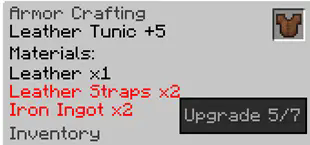
About this Mod

Hunter Armor Upgrades
This mod takes the classic Minecraft armor system and turns it into a system of upgrading.
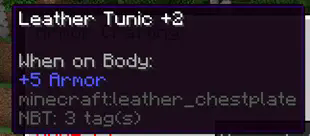
This mod was heavily inspired by Monster Hunter's armor system whereas you can get armor and upgrade it up to 7 times to increase it's power level.
Disabled Armor?
This mod disables vanilla armor recipes except for leather - this mod is intended for difficult situations and interesting progression and all leather is the start.
Some materials for upgrading is only obtained through dungeon crawling or fighting bosses.
How do I start?
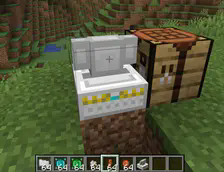
The first thing you'll need is an Armor Crafter. It's a fairly expensive upgrade but it opens the doors to exponential power upgrading.
Once you make that, you can put any piece of armor into the slot within the table and begin upgrading.
It supports every type of armor from every mod however it'll only use generic recipes for non-vanilla mods.
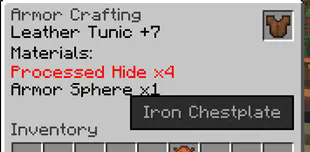
The table will instruct you on the materials you'll need, and once you supply them you'll be able to upgrade the armor to the next level.
One you reach level 7 you'll push into the next tier. Leather -> Iron -> Diamond.
Can I use this in a modpack?
Of course.


Available Versions
How to Install RPG Armor Upgrades on Your Server
Order Server
Order a Minecraft Java server with at least 3 GB RAM (4 GB recommended).
Set forge Loader
In the panel under "Egg", select the forge loader and matching Minecraft version (1.16.5).
Install Mod
Open the mod browser in the dashboard and search for "RPG Armor Upgrades". Click "Install" – done! Alternatively, upload the .jar via SFTP to the /mods folder.
Compatibility
Mod Loaders
Minecraft Versions
1.16.5
Server-side
✓ RequiredRecommended RAM
4 GB(min. 3 GB)Frequently Asked Questions
RPG Armor Upgrades server crashes on startup – what to do?
Most common cause: wrong forge version or insufficient RAM. Check the server log (latest.log) for "OutOfMemoryError" or "Mixin" errors. With Mado Hosting: ensure at least 3 GB RAM is allocated and the loader matches the mod version (1.16.5). You can switch loaders with one click in the panel.
Is RPG Armor Upgrades compatible with forge?
RPG Armor Upgrades officially supports forge for Minecraft 1.16.5. The Mado dashboard automatically detects incompatible loader combinations.
Server lagging with RPG Armor Upgrades – how to optimize performance?
Recommended RAM: 4 GB (per 8 players). Use /spark profiler to check if RPG Armor Upgrades consumes the most tick time. Common fixes: reduce server view-distance to 8-10, install "performant" or "starlight" as supplementary mods on Forge. With Mado Hosting, your server runs on NVMe SSDs with dedicated CPU cores for minimal latency.
Similar Mods




Rent Modded Server
Install RPG Armor Upgrades with just one click on your server.