
RPG Locator Bar
Makes the locator bar separate from the XP bar and High up like popular RPG's!
Screenshots
About this Mod
RPG Locator Bar
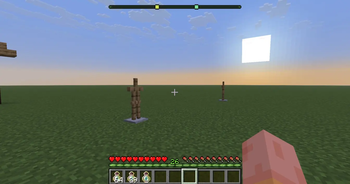
This mod separates the Locator Bar from the XP Bar, moving it higher on the screen similar to popular RPG-style HUDs. The XP bar and locator bar no longer fight for the same space, and their behavior can be fully customized through in-game settings.

Features
Separates the locator bar from the XP bar
Adjustable vertical positioning for the locator bar
Optional XP bar visibility while the locator is active
RPG-style HUD behavior without replacing vanilla mechanics
Configuration Options

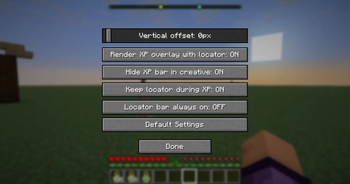
All settings are available in-game and can be changed at any time, either through the Mod Menu (Fabric requires Mod Menu for this feature) or via a configurable keybind.
Locator Bar Vertical Offset
Adjusts how high the locator bar appears on the screen.
default = 0
Can be raised all the way to the top of the screen to as low down as the XP bar.
Render XP Overlay with Locator
Controls whether the XP bar is visible while the locator bar is active.
On (default): XP bar remains visible when the locator bar is shown

Off: XP bar is hidden while the locator bar is on screen
Hide XP Bar in Creative
Controls XP bar visibility in Creative mode.
On (default): XP bar is hidden in Creative mode, matching vanilla behavior

Off: XP bar is visible in Creative mode
Keep Locator During XP Gain
Controls whether the locator bar stays visible while gaining experience.
On (default): Locator bar remains visible while XP is gained

Off: Locator bar is hidden while gaining XP
Locator Bar Always On
Controls whether the locator bar is situational or always visible.
Off (default): Locator bar only appears when something can be located

On: Locator bar is always visible, even with no active targets
Default Settings Button
Instantly resets all settings back to their default values
Available Versions
How to Install RPG Locator Bar on Your Server
Order Server
Order a Minecraft Java server with at least 3 GB RAM (4 GB recommended).
Set fabric Loader
In the panel under "Egg", select the fabric loader and matching Minecraft version (1.21.11).
Install Mod
Open the mod browser in the dashboard and search for "RPG Locator Bar". Click "Install" – done! Alternatively, upload the .jar via SFTP to the /mods folder.
Compatibility
Mod Loaders
Minecraft Versions
1.21.11
Server-side
✗ UnsupportedRecommended RAM
4 GB(min. 3 GB)Frequently Asked Questions
RPG Locator Bar server crashes on startup – what to do?
Most common cause: wrong fabric version or insufficient RAM. Check the server log (latest.log) for "OutOfMemoryError" or "Mixin" errors. With Mado Hosting: ensure at least 3 GB RAM is allocated and the loader matches the mod version (1.21.11). You can switch loaders with one click in the panel.
Is RPG Locator Bar compatible with fabric and neoforge?
RPG Locator Bar officially supports fabric, neoforge for Minecraft 1.21.11. The Mado dashboard automatically detects incompatible loader combinations.
Server lagging with RPG Locator Bar – how to optimize performance?
Recommended RAM: 4 GB (per 8 players). Use /spark profiler to check if RPG Locator Bar consumes the most tick time. Common fixes: reduce server view-distance to 8-10, install "performant" or "starlight" as supplementary mods on Forge. With Mado Hosting, your server runs on NVMe SSDs with dedicated CPU cores for minimal latency.
Similar Mods




Rent Modded Server
Install RPG Locator Bar with just one click on your server.