
RPG Lore
A data-driven lore book mod for Minecraft Forge 1.20.1. Define custom books via simple JSON files and have them drop from mobs based on configurable conditions.
Screenshots
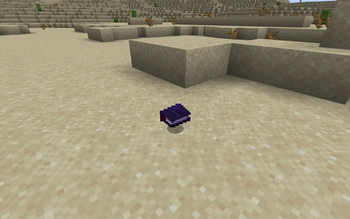
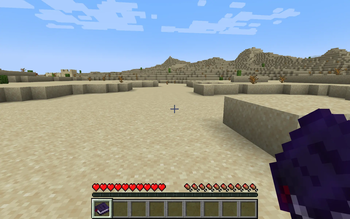
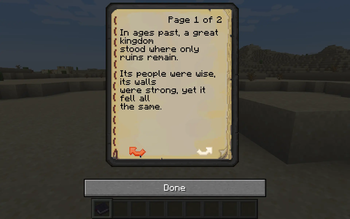
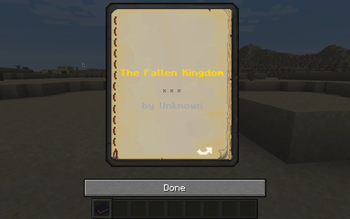
About this Mod

RPG Lore
A data-driven lore book mod for Minecraft Forge 1.20.1. Define custom books via simple JSON files and have them drop from mobs based on configurable conditions.
Features
- JSON-defined lore books -- add, edit, or remove books without recompiling. Each
.jsonfile in the config folder becomes a lore book. - Conditional mob drops -- control which mobs drop which books based on entity type, biome, dimension, time of day, weather, Y-level, and more.
- Auto-generated title page -- every lore book opens with a stylized title page showing the book's title (scaled up, bold, colored) and author (bold, colored), both centered on the page.
- Custom book GUI -- lore books use a unique book texture distinct from vanilla written books.
- Tooltip styling -- bold colored title, bold colored author, italic description, and generation label with automatic formatting.
- Configurable appearance -- per-book title color, author color, description text, and description color via hex codes in the JSON.
- Enchantment glint -- all lore books shimmer with an enchantment glint to stand out in inventories.
- In-game commands -- give books to players, reload configs, and list loaded books without restarting.
- Per-player copy limits -- optionally restrict how many times a player can receive a specific book.
- Looting scaling -- optionally increase drop chance with the Looting enchantment.
Requirements
- Minecraft 1.20.1
- Forge 47.3.0+
- Java 17
Getting Started
- Install the mod in your
mods/folder. - Start the server (or singleplayer world) once. The mod creates:
config/rpg_lore/server.toml-- server settingsconfig/rpg_lore/client.toml-- client settingsconfig/rpg_lore/books/-- lore book definitions folder with an example book and a_README.txt
- Add your own
.jsonfiles toconfig/rpg_lore/books/. - Use
/rpglore reloadin-game to hot-reload book definitions.
Book Definition Format
Each .json file in config/rpg_lore/books/ defines one lore book. The filename (minus .json) becomes the book's internal ID, prefixed with rpg_lore:.
Fields
| Field | Type | Required | Default | Description |
|---|---|---|---|---|
title |
string | Yes | -- | Book title displayed in-game |
author |
string | No | "Unknown" |
Author name |
generation |
int | No | 0 |
0 = Original, 1 = Copy, 2 = Copy of Copy, 3 = Tattered |
weight |
number | No | 1.0 |
Selection weight when multiple books match a drop |
pages |
array | Yes | -- | Page content (JSON text components or plain strings) |
Appearance Fields (all optional)
| Field | Type | Default | Description |
|---|---|---|---|
title_color |
string | "FFFF55" (yellow) |
Hex color for the title |
author_color |
string | "AAAAAA" (gray) |
Hex color for the author |
description |
string | (none) | Brief description shown in the tooltip |
description_color |
string | "55FFFF" (aqua) |
Hex color for the description |
hide_generation |
bool | false |
Suppress the generation label in the tooltip |
Drop Conditions (all optional)
Nested inside a "drop_conditions" object. Omitted fields match everything.
| Field | Type | Default | Description |
|---|---|---|---|
require_player_kill |
bool | true |
Must the mob be killed by a player? |
base_chance |
number | (global) | Override drop chance (0.0--1.0) for this book |
max_copies_per_player |
int | -1 |
Max times a player can receive this book (-1 = unlimited) |
mob_types |
array | (any) | Entity type IDs, e.g. ["minecraft:zombie"] |
mob_tags |
array | (any) | Entity type tags, e.g. ["minecraft:undead"] |
biomes |
array | (any) | Biome IDs, e.g. ["minecraft:plains"] |
biome_tags |
array | (any) | Biome tags, e.g. ["minecraft:is_overworld"] |
dimensions |
array | (any) | Dimension IDs, e.g. ["minecraft:overworld"] |
min_y / max_y |
int | (any) | Y-coordinate range for the kill location |
time |
string | "ANY" |
"ANY", "DAY_ONLY", or "NIGHT_ONLY" |
weather |
string | "ANY" |
"ANY", "CLEAR_ONLY", "RAIN_ONLY", or "THUNDER_ONLY" |
Example
{
  "title": "The Ancient Battle",
  "author": "Unknown Chronicler",
  "generation": 0,
  "weight": 5,
  "title_color": "FFD700",
  "description": "A faded account of a great battle fought long ago.",
  "drop_conditions": {
    "mob_types": ["minecraft:zombie", "minecraft:skeleton"],
    "biome_tags": ["minecraft:is_overworld"],
    "time": "NIGHT_ONLY"
  },
  "pages": [
    "Long ago, in these very fields...",
    "The battle raged for three days..."
  ]
}
Pages can be plain strings (auto-wrapped) or full JSON text components for advanced formatting:
"pages": [
  "{\"text\":\"Chapter 1\\n\\nIt began with a whisper...\",\"color\":\"dark_red\",\"bold\":true}"
]
Commands
All commands require permission level 2 (operator).
| Command | Description |
|---|---|
/rpglore reload |
Reload all book definitions from disk |
/rpglore give <players> <book_id> |
Give a specific book to player(s) |
/rpglore list |
List all loaded book definitions |
Server Configuration
config/rpg_lore/server.toml
| Setting | Default | Description |
|---|---|---|
globalDropChance |
0.05 |
Base drop chance (0.0--1.0) |
onlyHostileMobs |
true |
Only hostile mobs drop books |
maxBooksPerKill |
1 |
Max different books per kill |
enablePerBookWeights |
true |
Use per-book weight for selection |
lootScaling |
false |
Looting enchantment increases drop chance |
allowNonPlayerKills |
false |
Allow non-player kills to trigger drops |
Client Configuration
config/rpg_lore/client.toml
| Setting | Default | Description |
|---|---|---|
showLoreIdInTooltip |
false |
Show internal lore_id in tooltip (for pack authors) |
showEnchantmentGlint |
true |
Show enchantment glint on lore books |
License
MIT
Available Versions
How to Install RPG Lore on Your Server
Order Server
Order a Minecraft Java server with at least 3 GB RAM (4 GB recommended).
Set forge Loader
In the panel under "Egg", select the forge loader and matching Minecraft version (1.21.1).
Install Mod
Open the mod browser in the dashboard and search for "RPG Lore". Click "Install" – done! Alternatively, upload the .jar via SFTP to the /mods folder.
Compatibility
Mod Loaders
Minecraft Versions
1.21.1, 1.20.1
Server-side
✓ RequiredRecommended RAM
4 GB(min. 3 GB)Frequently Asked Questions
RPG Lore server crashes on startup – what to do?
Most common cause: wrong forge version or insufficient RAM. Check the server log (latest.log) for "OutOfMemoryError" or "Mixin" errors. With Mado Hosting: ensure at least 3 GB RAM is allocated and the loader matches the mod version (1.21.1). You can switch loaders with one click in the panel.
Is RPG Lore compatible with forge and neoforge?
RPG Lore officially supports forge, neoforge for Minecraft 1.21.1, 1.20.1. The Mado dashboard automatically detects incompatible loader combinations.
Server lagging with RPG Lore – how to optimize performance?
Recommended RAM: 4 GB (per 8 players). Use /spark profiler to check if RPG Lore consumes the most tick time. Common fixes: reduce server view-distance to 8-10, install "performant" or "starlight" as supplementary mods on Forge. With Mado Hosting, your server runs on NVMe SSDs with dedicated CPU cores for minimal latency.
Similar Mods




Rent Modded Server
Install RPG Lore with just one click on your server.