
RRC - Combat Update
A re-imagining of the old Combat Test Snapshots (CTS), with returning features/changes and entirely new ones!
Screenshots


About this Mod
This datapack/mod aims to add key features from the original Combat Test Snapshots (CTS) along with some of our own features, such as those from other datapacks we have made like Power Crossbows.
All Changes from VANILLA:
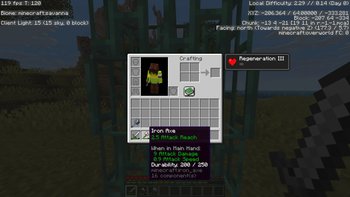
- Weapons now have individual Attack Reach values
- Swords and any other non-specified items have 3 Attack Reach
- Axes have 2.5 Attack Reach
- Tridents have 4 Attack Reach
- Shield delay removed
- Shield Blocking angle reduced to 90 degrees (from 180)
- Swords can now block again, negating 50% of incoming damage
- Crossbows can be enchanted with Power
- Stews can be eaten multiple times (5x for Mushroom & Beet, 4x for Rabbit Stew. Suspicious Stew remains 1x use)
- Potions can be stacked (Must be held to update the max stack component first)
This pack MAY HAVE CONFLICTING EFFECTS WITH:
- POWERful Crossbows (https://modrinth.com/datapack/stronger-crossbows)
- Multiple Use Stews (?)
This pack has full tested support for:
- Mo-Combat (https://modrinth.com/datapack/mo-combat)
Available Versions
How to Install RRC - Combat Update on Your Server
Order Server
Order a Minecraft Java server with at least 3 GB RAM (4 GB recommended).
Set datapack Loader
In the panel under "Egg", select the datapack loader and matching Minecraft version (1.21.11).
Install Mod
Open the mod browser in the dashboard and search for "RRC - Combat Update". Click "Install" – done! Alternatively, upload the .jar via SFTP to the /mods folder.
Compatibility
Mod Loaders
Minecraft Versions
1.21.11, 1.21.9, 1.21.8
Server-side
✓ RequiredRecommended RAM
4 GB(min. 3 GB)Frequently Asked Questions
RRC - Combat Update server crashes on startup – what to do?
Most common cause: wrong datapack version or insufficient RAM. Check the server log (latest.log) for "OutOfMemoryError" or "Mixin" errors. With Mado Hosting: ensure at least 3 GB RAM is allocated and the loader matches the mod version (1.21.11). You can switch loaders with one click in the panel.
Is RRC - Combat Update compatible with datapack and fabric and forge and neoforge and quilt?
RRC - Combat Update officially supports datapack, fabric, forge, neoforge, quilt for Minecraft 1.21.11, 1.21.9, 1.21.8. Note: Forge and Fabric mods are NOT cross-compatible – pick one loader and stick with it. The Mado dashboard automatically detects incompatible loader combinations.
Server lagging with RRC - Combat Update – how to optimize performance?
Recommended RAM: 4 GB (per 8 players). Use /spark profiler to check if RRC - Combat Update consumes the most tick time. Common fixes: reduce server view-distance to 8-10, install "performant" or "starlight" as supplementary mods on Forge. With Mado Hosting, your server runs on NVMe SSDs with dedicated CPU cores for minimal latency.
Rent Modded Server
Install RRC - Combat Update with just one click on your server.