
RTStrucures Framework
A library focused on RTS structures mechanics
Screenshots
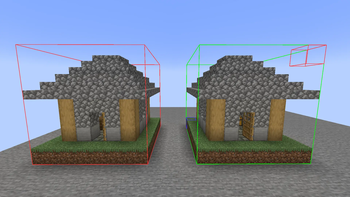

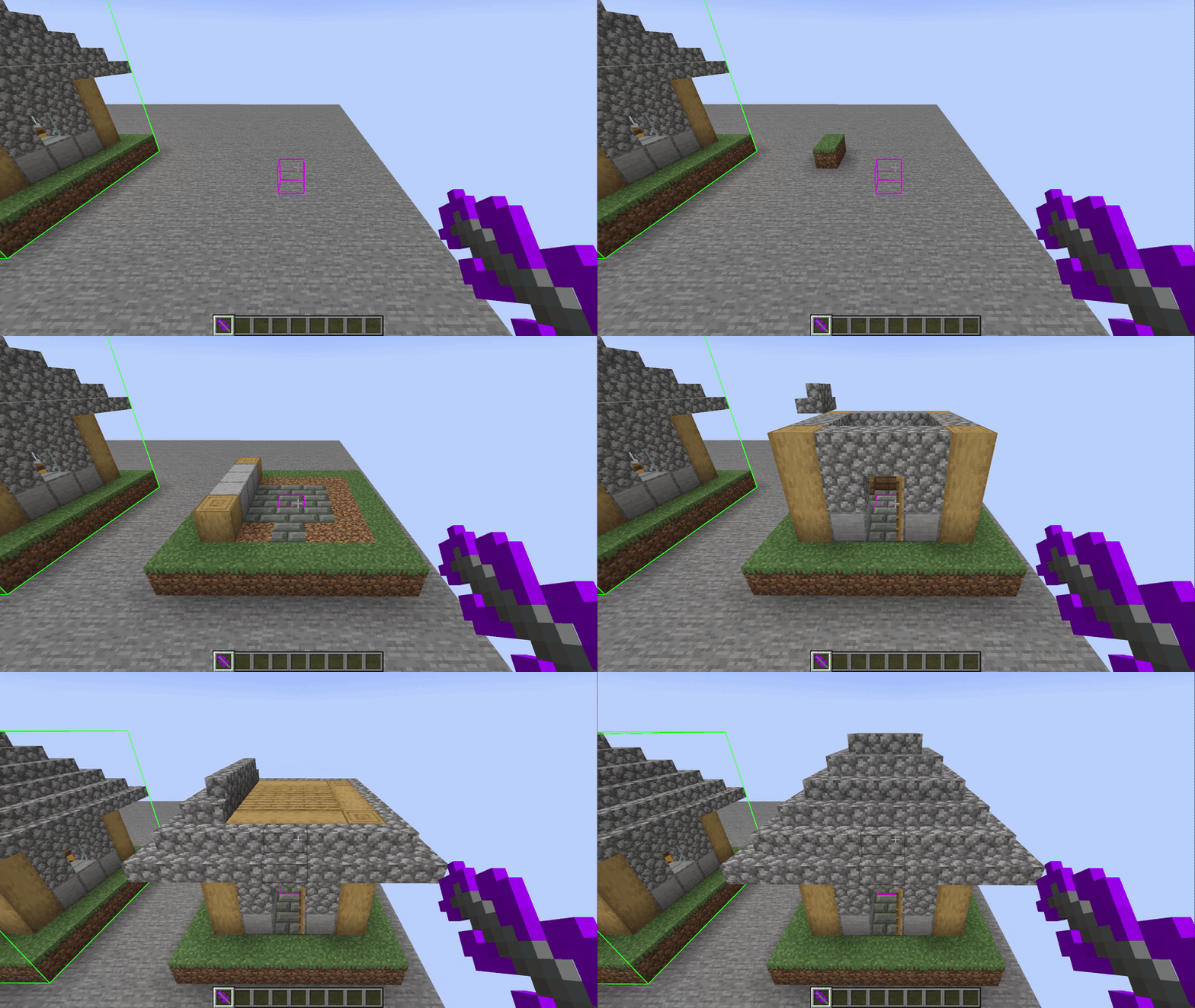
About this Mod
This mod provides functional for RTS multiblock structures. It also can be used as a structure copy/paste
In-game functions
- Save structures
- Paste structures
To save structure you need structure tool - use /give or operator tab;
Right click - position 1;
Left click - position 2;
Shift + right click - anchor position
CTRL + mouse click - expand area (can be changed in keybinds)
Shift + left click - placement anchor
/rtstrucutres save
/rtstrucutres load
/rtstrucutres execute
/rtstrucutres execload
/rtstrucutres toggle_boxes <true/false> - always displays tool selection area
Mod-Developer functions
Installation Guide
repositories {
    maven {
        url = "https://api.modrinth.com/maven"
    }
}

dependencies {
    implementation "maven.modrinth:rtstrucures-framework:0.1.4"
}
Mod Guide
Here is the example of /execload command
ServerLevel level = ctx.getSource().getLevel();
String filename = "house";

Path worldDir = level.getServer().getWorldPath(LevelResource.ROOT);
StructureTemplate template = StructureCache.get(worldDir, filename);

BlockPos anchorPos = StructureToolState.placeAnchor; // Place position
PlacementAnchor anchorMode = PlacementAnchor.CUSTOM; // Recommended to use custom anchor
StructureInstance instance = new StructureInstance(level, template, anchorPos, anchorMode);

StructureManager.add(instance);
instance.build(BuildType.FAST, 2.0f); // Execute in the world; Layer-by layer building
StructureInstance class provides more methods for structure management;
Basic Usage
Saving Structure
StructureTemplate template = StructureCapture.capture(level, pos1, pos2, customAnchor);
Path path = worldDir.resolve("generated/rtstructures/house.rtstructure");

StructureSerializer.save(template, path);
Loading Structure
Path path = worldDir.resolve("generated/rtstructures/house.rtstructure");

StructureTemplate template = StructureDeserializer.load(path);
Register Structure
StructureManager.add(instance);
Start Building
instance.build(BuildType.FAST,10);
BuildType= construction logicspeed= blocks per tick
Validation System
Check Damage
boolean damaged = instance.isDamaged();
Completion Percent
float percent = instance.getCompletionPercent();
Damage Percent
float percent = instance.getDamagePercent();
Full Validation Result
ValidationResult result = instance.validate();
Build Modes
WARNING! If structure won't be able to finish constructing, it will infinitly tick. Be aware of it (max steps amount will be added in next version)
FAST
Instant layered building
- fast
- unrestricted
- replaces blocks
Best for:
- debugging
- cinematic building
- RTS instant construction
FAST_SAFE
Layered building without replacing existing blocks
- preserves world
- safer placement
- slower completion
Best for:
- survival gameplay
- protected worlds
CONNECT
Builds only connected blocks
- realistic propagation
- support-dependent
- may stall if disconnected
Best for:
- RTS simulation
- organic building systems
SEPARATED
Growth-style construction from anchor
- spreading build effect
- directional expansion
- organic appearance
Best for:
- alien structures
- plant-like construction
- visual effects
SEPARATED_DIAGONAL
Just like SEPARATED but corner blocks are used as anchor too
DEMOLISH
Demolished structure from top to bottom
Advanced Usage (0.1.4+)
Registering Structure
Mod provides DefferedRegistered structure
public final class StructuresInit {
    private StructuresInit() {}

    public static final DeferredRegister<StructureType> STRUCTURES =
            DeferredRegister.create(RTSRegistries.STRUCTURES, RTStructureFramework.MOD_ID);

    public static final Supplier<StructureType> SIMPLE_HOUSE = STRUCTURES.register("simple_house", SimpleHouseStructure::new);
    public static final Supplier<StructureType> AIRFIELD = STRUCTURES.register("airfield", AirfieldStructure::new);
    public static final Supplier<StructureType> CRYSTAL = STRUCTURES.register("crystal", CrystalStructure::new);
    public static final Supplier<StructureType> PROTECTED_STRUCTURE = STRUCTURES.register("protected_structure", ProtectedStructure::new);

    public static void register(IEventBus bus) {
        STRUCTURES.register(bus);
    }
}
Structure class
public class SimpleHouseStructure extends StructureType {

    public SimpleHouseStructure() {
        super("simple_house", StructureProperties.create()
                // Structure file
                .modPath("basic/simple_house", RTStructureFramework.MOD_ID) // In your resources/data/mod_id/...

                // Default placement
                .defaultAnchor(PlacementAnchor.CENTER)

                // Default build behavior
                .defaultBuildType(BuildType.FAST)
                .defaultBuildSpeed(2f)

                // Validation
                .damagedThreshold(0.15f)
                .destroyedThreshold(0.5f)
        );
    }
}
Library provides some methods for management
    public void onCompleted(StructureInstance instance) {}

    public void onDamaged(StructureInstance instance) {}

    public void onDestroyed(StructureInstance instance) {}

    public void onDemolished(StructureInstance instance) {}
Example usage:
public class AirfieldStructure extends StructureType {
    private int productionTick;

    public AirfieldStructure() {
        super("airfield", StructureProperties.create()
                .modPath("basic/airfield", RTStructureFramework.MOD_ID)
                .defaultAnchor(PlacementAnchor.CENTER)
                .defaultBuildType(BuildType.FAST)

                .defaultBuildSpeed(3f)
                .damagedThreshold(0.2f)
                .destroyedThreshold(0.6f)
        );
    }

    @Override
    public void onCompleted(StructureInstance instance) {
        System.out.println("[RTS] Airfield completed");
    }

    @Override
    public void onTick(StructureInstance instance) {
        if (!instance.isCompleted()) return;

        productionTick++;
        if (productionTick >= 100) {
            productionTick = 0;

            System.out.println("[RTS] Kirov reporting...");
            // Do your stuff. E.g spawn unit
        }
    }

    @Override
    public void onDestroyed(StructureInstance instance) {
        System.out.println("[RTS] Airfield destroyed!");
    }
}
Spawning structure
    StructureInstance instance = StructuresInit.AIRFIELD.get().create(level, anchorPos);
    StructureManager.add(instance);

    instance.build();
Warning!
StructureManager.add(instance); Actually creates your structure;
instance.build(); Just constructs your structure;
If you need to remove your structure use instance.destroy(); (Warning! could call stackoverflow in case of spam. Never put it in tick();)
Example of usage:
public class CrystalStructure extends StructureType {

    public CrystalStructure() {
        super("crystal", StructureProperties.create()
                .modPath("crystal", RTStructureFramework.MOD_ID)
                .defaultBuildType(BuildType.FAST)
                .defaultBuildSpeed(1f)
                .defaultAnchor(PlacementAnchor.CUSTOM)

                .damagedThreshold(0.05f)
                .destroyedThreshold(0.8f)
        );
    }

    @Override
    public void onTick(StructureInstance instance) {
        if (instance.isDamaged()) {
            if (!instance.isBuilding()) {
                instance.build(BuildType.FAST, 0.5f);
            }
        }
    }

    @Override
    public void onDestroyed(StructureInstance instance) {
        if (instance.getDamagePercent() >= 0.95f) {
            instance.destroy();
        }
    }

    @Override
    public void onCompleted(StructureInstance instance) {
        System.out.println(instance.debugInfo());
    }
}
This description will be scratched to a normal mod description. For documentation view github wiki
Available Versions
How to Install RTStrucures Framework on Your Server
Order Server
Order a Minecraft Java server with at least 3 GB RAM (4 GB recommended).
Set neoforge Loader
In the panel under "Egg", select the neoforge loader and matching Minecraft version (1.21.1).
Install Mod
Open the mod browser in the dashboard and search for "RTStrucures Framework". Click "Install" – done! Alternatively, upload the .jar via SFTP to the /mods folder.
Compatibility
Mod Loaders
Minecraft Versions
1.21.1
Server-side
✓ RequiredRecommended RAM
4 GB(min. 3 GB)Frequently Asked Questions
RTStrucures Framework server crashes on startup – what to do?
Most common cause: wrong neoforge version or insufficient RAM. Check the server log (latest.log) for "OutOfMemoryError" or "Mixin" errors. With Mado Hosting: ensure at least 3 GB RAM is allocated and the loader matches the mod version (1.21.1). You can switch loaders with one click in the panel.
Is RTStrucures Framework compatible with neoforge?
RTStrucures Framework officially supports neoforge for Minecraft 1.21.1. The Mado dashboard automatically detects incompatible loader combinations.
Server lagging with RTStrucures Framework – how to optimize performance?
Recommended RAM: 4 GB (per 8 players). Use /spark profiler to check if RTStrucures Framework consumes the most tick time. Common fixes: reduce server view-distance to 8-10, install "performant" or "starlight" as supplementary mods on Forge. With Mado Hosting, your server runs on NVMe SSDs with dedicated CPU cores for minimal latency.
Similar Mods



Rent Modded Server
Install RTStrucures Framework with just one click on your server.