
tutorialmod
Ruby Mod adds rubies to Minecraft as a new gem, enabling crafting of powerful ruby tools, weapons, and armor with special effects. Discover ruby ores, build with ruby blocks, and explore new crafting recipes for a vibrant, enhanced gameplay experience.
Screenshots
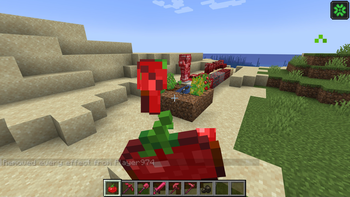
About this Mod
Mod Name: tutoralmod or ruby mod
Description:
Step into a world of vibrant red gemstones with the Ruby Renaissance mod, a comprehensive addition to Minecraft that expands your gameplay with the dazzling allure of rubies. This mod is designed to enrich your Minecraft experience by introducing a variety of new elements centered around the ruby gemstone, offering players a range of exciting new tools, armor, blocks, and crops.
Key Features:
Ruby Ore and Mining:
- Discover the elusive Ruby Ore, which generates deep underground between levels 10 and 30. With its rich red color, Ruby Ore is a rare sight that requires an iron pickaxe or better to mine.
- raw Ruby or ruby Ore can be smelted in a furnace to create Rubies.
Ruby Tools and Armor:
- Ruby Tools: Enhance your mining and combat efficiency with a full set of Ruby Tools, including Ruby Pickaxe, Shovel, Axe, and Hoe. Each tool boasts higher durability and efficiency compared to netherite tools, making them a valuable addition to your arsenal.
- Ruby Armor: Equip yourself with Ruby Armor, featuring a complete set of Helmet, Chestplate, Leggings, and Boots. Ruby Armor provides superior protection and a stylish red appearance, offering better durability and enchantability compared to standard netherite armor.
Crafting Recipes:
- Raw Ruby Armor and Tools: In addition to refined rubies, players can craft a unique set of Ruby Armor and Tools. These items offer a different effect for players who want help in fights.
- Custom Recipes: The mod introduces a variety of new crafting recipes, including Ruby-based enhancements for existing tools and armor, as well as decorative and functional items.
Ruby Blocks and Decorative Items:
- Ruby Block: Crafted from nine rubies, the Ruby Block serves as both a decorative element and a valuable storage solution. Use it to showcase your collection or to craft more advanced items.
- Ruby Slabs and Stairs: Add a touch of elegance to your builds with Ruby Slabs and Stairs, perfect for creating stunning architectural features.
Custom Crops:
- tomato crops: Cultivate tomato crop, a new type of crop that produces tomatos. These berries can be used to gain special effects like luck and many more.
Unique Features:
- Ruby Enchantments: Apply exclusive enchantments to your Ruby Tools and Armor. These enchantments offer unique benefits and effects, adding a new layer of strategy to your gameplay.
this is coming please wait for - Ruby Villagers: Encounter Ruby Villagers in the world, who offer special trades and quests related to rubies. Complete their challenges to earn rare items and rewards.
Installation and Compatibility:
The Ruby mod is designed to integrate seamlessly with Minecraft’s existing mechanics. It requires 1.20.1 version of Minecraft and is compatible with other mods that do not conflict with its core features. Installation is straightforward through popular mod loader Fabric, and detailed instructions are provided in the mod’s documentation.
Conclusion:
Ruby mod is more than just a gem-themed expansion—it's an immersive experience that transforms the way you interact with Minecraft. Whether you're mining for precious rubies, crafting exquisite armor, or enhancing your world with new blocks and crops, this mod offers a wealth of content to explore. Embrace the brilliance of rubies and elevate your Minecraft adventures with the Ruby mod!
Available Versions
How to Install tutorialmod on Your Server
Order Server
Order a Minecraft Java server with at least 3 GB RAM (4 GB recommended).
Set fabric Loader
In the panel under "Egg", select the fabric loader and matching Minecraft version (1.20.1).
Install Mod
Open the mod browser in the dashboard and search for "tutorialmod". Click "Install" – done! Alternatively, upload the .jar via SFTP to the /mods folder.
Compatibility
Mod Loaders
Minecraft Versions
1.20.1
Server-side
✓ RequiredRecommended RAM
4 GB(min. 3 GB)Frequently Asked Questions
tutorialmod server crashes on startup – what to do?
Most common cause: wrong fabric version or insufficient RAM. Check the server log (latest.log) for "OutOfMemoryError" or "Mixin" errors. With Mado Hosting: ensure at least 3 GB RAM is allocated and the loader matches the mod version (1.20.1). You can switch loaders with one click in the panel.
Is tutorialmod compatible with fabric?
tutorialmod officially supports fabric for Minecraft 1.20.1. The Mado dashboard automatically detects incompatible loader combinations.
Server lagging with tutorialmod – how to optimize performance?
Recommended RAM: 4 GB (per 8 players). Use /spark profiler to check if tutorialmod consumes the most tick time. Common fixes: reduce server view-distance to 8-10, install "performant" or "starlight" as supplementary mods on Forge. With Mado Hosting, your server runs on NVMe SSDs with dedicated CPU cores for minimal latency.
Similar Mods



![[TaCZ] Timeless and Classics Zero](https://cdn.modrinth.com/data/SzzJttH8/fd27766d2bb8390d284696b1dbd358f87e081439_96.webp)


Rent Modded Server
Install tutorialmod with just one click on your server.