
Ruined Portals Only
Restrict lighting of portals to within a ruined portal structure's bounding box. Makes exploration a must and controls Nether travel. Configurable for Overworld and Nether. Now supports modded structures and biomes!
Screenshots
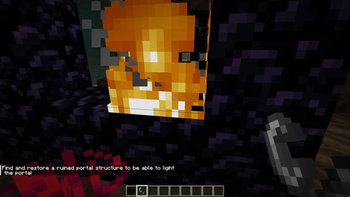
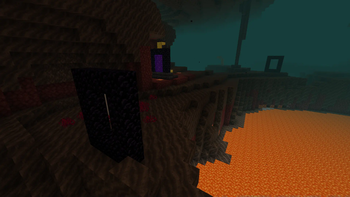
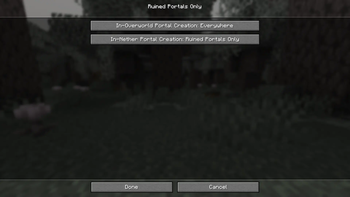
About this Mod

Description
Ruined Portals Only, by default, prevents the lighting of a portal unless the portal is within a ruined portal structure's bounding box. The goal is to promote exploration, give ruined portals more of a purpose, and make setting up Nether fast travel networks more challenging. This mod does not affect any already lit portals upon being installed.
Return portals generated upon travelling through a portal may generate in a restricted area, but will remain lit until being destroyed, at which point they cannot be re-lit.
Features:
- 3 In-Overworld portal creation options: Allow creation everywhere, allow creation only at ruined portals, and allow creation only at custom locations defined in
ruinedportalsonly.json(preset to ruined portals, desert pyramid, jungle pyramid, ocean monument, ancient city, stronghold) - 3 In-Nether portal creation options: Allow creation everywhere, allow creation only at ruined portals, and allow creation only at custom locations defined in
ruinedportalsonly.json(preset to ruined portals, nether wastes, crimson forest, bastion remnant) - Helpful message to player if attempting to light a portal in a restricted area
- In-game documentation is available via Treatise if installed
- In-game configuration is available via Mod Menu if installed
Config:
Overworld portals options: "EVERYWHERE", "RUINED_PORTALS_ONLY", "CUSTOM"
When "CUSTOM" is selected, values will be read from customOverworldBiomesOption and customOverworldStructuresOption. This allows adding modded structures or biomes.
Nether portals options: "EVERYWHERE", "RUINED_PORTALS_ONLY", "CUSTOM"
When "CUSTOM" is selected, values will be read from customNetherBiomesOption and customNetherStructuresOption. This allows adding modded structures or biomes.
Default .minecraft/config/ruinedportalsonly.json:
{
  "overworldPortalsOption": "RUINED_PORTALS_ONLY",
  "netherPortalsOption": "RUINED_PORTALS_ONLY",
  "customOverworldBiomesOption": [],
  "customOverworldStructuresOption": [
    "minecraft:ruined_portal",
    "minecraft:ruined_portal_desert",
    "minecraft:ruined_portal_jungle",
    "minecraft:ruined_portal_mountain",
    "minecraft:ruined_portal_ocean",
    "minecraft:ruined_portal_swamp",
    "minecraft:desert_pyramid",
    "minecraft:jungle_pyramid",
    "minecraft:ancient_city",
    "minecraft:ocean_monument",
    "minecraft:stronghold"
  ],
  "customNetherBiomesOption": [
    "minecraft:nether_wastes",
    "minecraft:crimson_forest"
  ],
  "customNetherStructuresOption": [
    "minecraft:ruined_portal_nether",
    "minecraft:bastion_remnant"
  ]
}
Lore:
Portals can only be lit in certain locations due to the presence of powerful energy there.
Return portals can be generated anywhere, but are unstable and cannot be rebuilt.
Regarding the preset "CUSTOM" settings:
Why allow creating portals in areas where piglins spawn? In Minecraft: Legends, the piglins invade the Overworld. We imagine that the nether wastes, crimson forests, and bastion remnants contain high amounts of energy (the nether wastes being barren due to being irradiated by this energy), and that the piglins could still create portals and invade, but are too scattered and directionless to stage an invasion. Also, piglins know that they will now zombify if entering the Overworld and never convert back.
Why allow creating portals in certain Overworld structures? We imagine that these structures were built at locations infused with energy, and still have enough of that energy present to support portal creation.
Support
If you have a bug report, feature request, or any other type of issue, please post on our GitHub issues page. This is an issues page for all of our mods, so be sure to include the mod's name and version in your post. We appreciate all feedback!
If you'd like to support development, you can leave a tip at our BuyMeACoffee. Only if it's within your means- otherwise, using, sharing, and enjoying the mod is support enough. Thank you!
Available Versions
How to Install Ruined Portals Only on Your Server
Order Server
Order a Minecraft Java server with at least 3 GB RAM (4 GB recommended).
Set fabric Loader
In the panel under "Egg", select the fabric loader and matching Minecraft version (1.21.11).
Install Mod
Open the mod browser in the dashboard and search for "Ruined Portals Only". Click "Install" – done! Alternatively, upload the .jar via SFTP to the /mods folder.
Compatibility
Mod Loaders
Minecraft Versions
1.21.11, 1.21.10, 1.21.8 (+7 more)
Server-side
✓ RequiredRecommended RAM
4 GB(min. 3 GB)Frequently Asked Questions
Ruined Portals Only server crashes on startup – what to do?
Most common cause: wrong fabric version or insufficient RAM. Check the server log (latest.log) for "OutOfMemoryError" or "Mixin" errors. With Mado Hosting: ensure at least 3 GB RAM is allocated and the loader matches the mod version (1.21.11). You can switch loaders with one click in the panel.
Is Ruined Portals Only compatible with fabric?
Ruined Portals Only officially supports fabric for Minecraft 1.21.11, 1.21.10, 1.21.8. The Mado dashboard automatically detects incompatible loader combinations.
Server lagging with Ruined Portals Only – how to optimize performance?
Recommended RAM: 4 GB (per 8 players). Use /spark profiler to check if Ruined Portals Only consumes the most tick time. Common fixes: reduce server view-distance to 8-10, install "performant" or "starlight" as supplementary mods on Forge. With Mado Hosting, your server runs on NVMe SSDs with dedicated CPU cores for minimal latency.
Similar Mods




Rent Modded Server
Install Ruined Portals Only with just one click on your server.